What does this symbol on my air-conditioner remote mean?
Find it by its shape. 1. Pick what you see on the remote or the indoor unit’s display. 2. Match the drawing. Each of the 21 symbols here — modes, fan and swing settings, timers, and status letters on the unit — is backed by at least two makers’ own manuals.
Tap a shape — the symbols that use it appear here.
Snowflake, sun or drop — 4 symbols
 Cool mode (snowflake)A six-armed snowflake, usually beside or instead of the word COOL.…
 Heat mode (sun)A sun: a circle with short rays around it, beside or instead of…
 Dry mode (water drop)A single water drop, sometimes with the word DRY. Samsung prints…
 8 °C / 10 °C frost-guard heating8 °C, 10 °C or 46 °F on the remote, a button labelled MIN. HEAT or…
A fan or bars — 4 symbols
 Fan only modeA fan with three or four curved blades around a hub, as a mode…
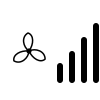 Fan speedA small fan next to bars or wedges that grow from one to three or…
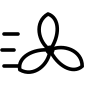 Turbo / PowerfulA fan or arrow with speed lines, a figure running, or just the…
 Quiet / SilenceUsually the word QUIET or SILENCE; some remotes use a fan with a…
Arrows or a flap — 3 symbols
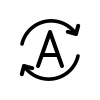
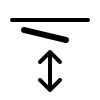
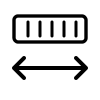
Moon, clock, bulb or speaker — 4 symbols
 Sleep mode (moon)A crescent moon, sometimes with a sleeping face or small stars.Quiet / SilenceUsually the word QUIET or SILENCE; some remotes use a fan with a…
 On/off timer (clock)A clock face, often with the word ON or OFF beside or under it; a…
 Display light on/offA light bulb, a lamp with rays, or the word LED, LIGHT or DISPLAY.
Leaf, person or particles — 3 symbols


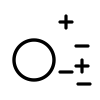
Padlock or power button — 2 symbols


Letters or digits on the unit — 4 symbols
 Clean-filter reminderLetters such as CF on the indoor unit’s display (Samsung), or a…
 Defrost indicator (dF or blinking lamp)The letters dF on the indoor display (Samsung), or the green…
 Self-clean (CL)CL on the indoor display (Gree), Samsung’s own auto-clean…8 °C / 10 °C frost-guard heating8 °C, 10 °C or 46 °F on the remote, a button labelled MIN. HEAT or…
Remote symbols by brand
The same snowflake or fan can carry a different name on each make — Daikin’s POWERFUL is Samsung’s Fast and LG’s Jet. These pages list only what that maker’s own manual or support page shows, with the maker’s wording for each button next to the drawing:
How a brand gets a page: at least 6 buttons or icons confirmed from that maker’s own website, at most 4 brands. Not yet published: Panasonic (its own CS-Z operating instructions on panasonic.com confirm enough symbols, but this page shows at most four brands and Panasonic drew the fewest Google suggestions of the five that qualified; checked 2026-10-12); Fujitsu (the fujitsugeneral.com operating manual this site cites returned “not found”; the site now redirects to generalww.com, where no replacement remote manual was found; checked 2026-10-12); Toshiba (the only Toshiba manual found on its own site is for a window unit and confirms 2 symbols; checked 2026-10-12); Hisense (every Hisense remote manual found was a third-party copy, none on Hisense’s own site; checked 2026-10-12).
A code on the display instead?
A code such as U4, CH05, E6 or F.022 is a fault message, not a remote symbol, and it means different things on different makes. Each maker has its own page, from its own manual or support site, with what the code means, what the maker lets you check and when to call the installer:
Air conditioners
Heat pumps
Look up a code by maker, or type it in.
Before you trust any chart, including this one
No single published standard defines air-conditioner remote icons. Each maker draws its own — Midea and Airwell draw a snowflake, a sun and a water drop for the modes, Samsung prints the words Cool, Heat and Dry on the remote, and Samsung and Gree show letter codes such as dF and CL on the indoor unit — so every meaning on this page is taken from manufacturers’ manuals.
- The three you will use most: the snowflake cools, the sun heats (heat pumps only), the water drop dries the air with gentle cooling. Dry is not a humidity setpoint: no remote cited here lets you choose a target humidity.
- Same word, opposite meaning. Midea calls the up-and-down flap the “horizontal louver”, Fujitsu the “vertical airflow direction louver”. Follow the arrow in the drawing, not the word.
- ECO is not one thing. Midea sets 24 °C, Mitsubishi Electric adds 2 °C and swings the flap, Daikin caps the power draw. The eco page lists each.
- Letters on the unit are often status, not faults. dF (defrost), CF (clean filter) and CL (self-clean) are normal messages; a blinking lamp in heat mode is usually defrost.
What this page cannot do
- It cannot identify your model or say exactly what a button does on it — temperatures, times and which modes allow a setting differ between models of the same make. It tells you what a drawing means on the makes cited (Airwell, Daikin, Fujitsu General, Gree, Midea, Mitsubishi Electric, Panasonic, Samsung, Toshiba); your unit’s manual is the authority.
- This page does not decode unit error codes (such as E1, H6 or U4): they differ by make and model. The maker-by-maker error-code pages above do, from each maker’s own documents.
- It gives no buying advice and makes no energy-saving claims of its own: where a page mentions saving energy, it is quoting the maker’s manual.
- Symbols only one maker describes — for example Samsung’s Wind-Free, Gree’s X-FAN and Mitsubishi Electric’s i-see sensor — are left out until a second maker’s manual confirms them.
Sources
Every document below is a maker’s own manual or web manual, fetched and read on the date shown. Each symbol page lists what its sources show.
- Midea: Midea — Remote controller owner’s manual, RG51A(2)/E and RG51B(2)/E (PDF) Checked 2026-09-26.
- Airwell: Airwell — RC08W remote control manual (PDF) Checked 2026-09-26.
- Samsung: Samsung — Wind-Free 2.0 air conditioner user manual, AR**TSFA*** (PDF on Samsung HVAC’s document store) Checked 2026-09-26.
- Daikin: Daikin web operation manual — COOL · DRY · FAN operation Checked 2026-09-26.
- Daikin: Daikin web operation manual — POWERFUL operation Checked 2026-09-26.
- Daikin: Daikin web operation manual — ECONO / OUTDOOR UNIT QUIET operation Checked 2026-09-26.
- Daikin: Daikin web operation manual — Adjusting the airflow direction Checked 2026-09-26.
- Daikin: Daikin web operation manual — Adjusting the airflow rate Checked 2026-09-26.
- Daikin: Daikin web operation manual — FLASH STREAMER AIR CLEANING operation Checked 2026-09-26.
- Daikin: Daikin web operation manual — MOLD PROOF operation Checked 2026-09-26.
- Mitsubishi Electric: Mitsubishi Electric — MSZ-LN indoor unit service manual OBH766 revised edition B (PDF, UK library) Checked 2026-09-26.
- Panasonic: Panasonic — Operating instructions, CS-Z*AKUAW air conditioner (North America, PDF) Checked 2026-09-26.
- Fujitsu General: Fujitsu General — Operating manual, wall-mounted 18/24RLB and 30/36RLXB (US, PDF) Checked 2026-09-26.
- Gree: Gree Comfort — Vireo GEN3 indoor unit owner’s manual (PDF) Checked 2026-09-26.
- Toshiba: Toshiba — RAC-WK1513ESCWRU window air conditioner user manual (PDF) Checked 2026-09-26.