LG fridge-freezer symbols
The 7 symbols that LG’s own fridge-freezer manuals explain, with LG’s name for each, what it does on an LG, the manual’s own words and the document it comes from. The drawing is ours; tap a symbol for its full page.
The LG manual checked here is for a bottom-freezer model with a water and ice dispenser; its LED display shows the temperature settings, dispenser options, water filter, door alarm and lock status. LG says some functions may not be available, depending on the model, and other LG ranges may have different panels, so compare with your own manual.
Makes differ, check your fridge’s manual: the same drawing can mean different things on different brands, and only your model’s manual says exactly what a button does, what temperature it sets and when it switches itself off.
A code on the display instead of a symbol? LG fridge freezer error codes

Super freeze / fast freeze (snowflakes)
LG calls it: Express Freezing
24 hours, then off by itself; press the button again to stop it sooner. LG also uses it to make more ice.
“This function increases both ice making and freezing capabilities. … the graphic will illuminate in the display and will continue for 24 hours. The function will automatically shut off after 24 hours.”
Source: LG — Owner’s manual, bottom-freezer refrigerator, P/No MFL62184515 (PDF) Checked 2026-10-13.
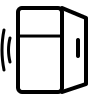
Door-open alarm (open door or bell)
LG calls it: Door Alarm
It starts after 60 seconds and repeats every 30 seconds; the ALARM button can turn it off altogether.
“The Door Alarm function sounds if a refrigerator door or freezer drawer remains open. If a refrigerator door or freezer drawer is left open for more than 60 seconds, a warning alarm sounds in 30 second intervals. … When you press the ALARM button, the display will change to OFF and the Alarm function will deactivate.”
Source: LG — Owner’s manual, bottom-freezer refrigerator, P/No MFL62184515 (PDF) Checked 2026-10-13.

Water filter change light
LG calls it: Change Filter
About every six months; hold FILTER for 3 seconds after the change to clear the light.
“When the water filter indicator turns on, you have to change the water filter. After changing the water filter, press and hold the FILTER button for three seconds to turn the indicator light off. You need to change the water filter approximately every six months.”
Source: LG — Owner’s manual, bottom-freezer refrigerator, P/No MFL62184515 (PDF) Checked 2026-10-13.

Ice maker off (ice cubes, crossed or unlit)
LG calls it: Icemaker switch OFF (O)
On this LG it is a switch marked O and I on the icemaker, not a panel button. Turn it off if the water is off for hours or the bin is out.
“To turn off the automatic icemaker, set the icemaker switch to OFF (O). To turn on the automatic icemaker, set the switch to ON (I). … When the water supply will be shut off for several … hours. When the ice bin is removed for more than one or two … minutes. When the refrigerator will not be used for several days.”
Source: LG — Owner’s manual, bottom-freezer refrigerator, P/No MFL62184515 (PDF) Checked 2026-10-13.

Humidity control on the vegetable drawer
LG calls it: Humidity Controlled Crisper
HIGH for leafy vegetables, LOW for fruit.
“You can control the amount of humidity in the moisture-sealed crispers by adjusting the control to any setting between HIGH and LOW. HIGH … keeps moist air in the crisper for best storage of fresh, leafy vegetables. LOW … lets moist air out of the crisper for best storage of fruit.”
Source: LG — Owner’s manual, bottom-freezer refrigerator, P/No MFL62184515 (PDF) Checked 2026-10-13.

Showroom / demo mode (lights on, not cooling)
LG calls it: Display Mode (For Store Use Only)
If the panel says OFF and nothing is cold, this is the likely cause; the same button sequence turns it off.
“The Display Mode disables all cooling in the refrigerator and freezer sections to conserve energy while on display in a retail store. When activated, OFF will display on the control panel. To deactivate: Press the EXPRESS FREEZING button 3 times In the state of pressing the Refrigerator button after the door opens.”
Source: LG — Owner’s manual, bottom-freezer refrigerator, P/No MFL62184515 (PDF) Checked 2026-10-13.

Child lock or button lock (key or padlock)
LG calls it: Control Lock
Hold Lock for 3 seconds; the Lock icon shows while it is on.
“The Control Lock function disables every other button on the display. … press and hold the Lock button for three seconds or more. The Lock icon will display and the Lock function is now enabled.”
Source: LG — Owner’s manual, bottom-freezer refrigerator, P/No MFL62184515 (PDF) Checked 2026-10-13.
Not in the LG manuals checked
The LG documents below do not show these symbols from this site, so they are left off this page: One star (*), Two stars (**), Three stars (***), Four stars (one large star and three small), No stars, Chill compartment, Super cool / fast cool, No frost / auto defrost, Holiday / vacation mode, Eco mode on a fridge-freezer, Sabbath mode, Temperature alarm and Temperature zones and the “OK” indicator. That does not mean no LG fridge has one, only that the manuals read here do not. If yours shows a symbol not listed, find it by its shape.
Other brands
Sources
A symbol is listed here only when one of these LG documents, from LG’s own website, shows it. Each was fetched and read on the date shown; the words in quotation marks are LG’s, everything else is ours.
- LG: LG — Owner’s manual, bottom-freezer refrigerator, P/No MFL62184515 (PDF) Checked 2026-10-13.