EPH Controls CP4D thermostat pack (RFRPD and RF1B): what its lights, symbols and messages mean
On an EPH CP4D thermostat (the RFRPD in the pack) MAN means manual mode, a permanent override that ignores the program; OVERRIDE means a temporary change that lasts until the next switching time; BOOST TO means a boost for 30 minutes to 3 hours. The flame means heating is on, the snowflake is frost protection, the padlock is the keypad lock and the battery means the batteries are almost empty. On the RF1B receiver by the boiler, a double-flashing RF light means it has lost the thermostat. All of it is from EPH’s own CP4D guides, linked from the CP4D page on ephcontrols.com.
The symbols and words are on the screen of the RFRPD wireless thermostat; the lights are on the RF1B receiver wired in by the boiler. EPH sells them together as the CP4D pack and says they come already paired. This page reads only the CP4D guides; EPH’s other CP4 models (CP4, CP4B, CP4M, CP4i and others) have their own guides on ephcontrols.com that were not read for it.
MAN: manual mode (permanent override)
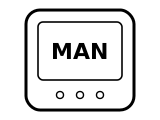
Manual mode is on: EPH calls it a permanent override. The thermostat holds the one temperature you set and ignores the program until you go back to AUTO.
Applies to: CP4D (RFRPD thermostat). What you see: words.
What EPH Controls says to do
- To cancel permanent override, press AUTO; EPH says the thermostat then returns to the automatic mode.
- While MAN is on, turn the dial to change the temperature it holds and press it, or wait 5 seconds.
Source:
- EPH Controls: CP4D Installation and Operation Guide, Programmable RF Thermostat & Receiver (2025-07-18) — CP4D: RFRPD room thermostat and RF1B receiver. www.ephcontrols.com Checked 2026-10-17.
- EPH Controls: CP4D Easy User Guide (2026-05-08) — CP4D: RFRPD room thermostat and RF1B receiver. www.ephcontrols.com Checked 2026-10-17.
OVERRIDE: temporary change until the next switching time
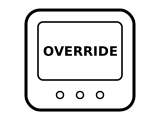
Someone turned the dial while the thermostat was in AUTO. EPH says it then works to that temperature until the next switching time in the program, and goes back to the program by itself.
Applies to: CP4D (RFRPD thermostat). What you see: words.
What EPH Controls says to do
- To cancel it early, press AUTO.
Source:
- EPH Controls: CP4D Installation and Operation Guide, Programmable RF Thermostat & Receiver (2025-07-18) — CP4D: RFRPD room thermostat and RF1B receiver. www.ephcontrols.com Checked 2026-10-17.
- EPH Controls: CP4D Easy User Guide (2026-05-08) — CP4D: RFRPD room thermostat and RF1B receiver. www.ephcontrols.com Checked 2026-10-17.
BOOST TO: a timed boost is on
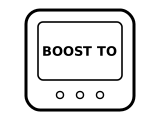
A boost is running to a temperature you chose, and the time shown is when it ends. EPH says a boost can be 30 minutes, 1, 2 or 3 hours, in every mode except holiday mode.
Applies to: CP4D (RFRPD thermostat). What you see: words.
What EPH Controls says to do
- Press BOOST to turn the boost off.
- To start one: press BOOST once for 30 minutes, twice for 1 hour, three times for 2 hours or four times for 3 hours, confirm, then set the boost temperature with the dial.
Source:
- EPH Controls: CP4D Installation and Operation Guide, Programmable RF Thermostat & Receiver (2025-07-18) — CP4D: RFRPD room thermostat and RF1B receiver. www.ephcontrols.com Checked 2026-10-17.
Flame: heating on
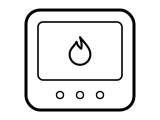
The heating is on. EPH labels the flame “Heating on symbol” on its LCD diagram. In AUTO the thermostat turns the heating on whenever the room is below the setpoint for the current period; EPH notes there is no OFF time, only higher and lower temperatures, so a P6 overnight setting of 15 °C will bring the heating on at night if the room drops below it.
Applies to: CP4D (RFRPD thermostat). What you see: a symbol.
What to do
EPH Controls gives no step for this on the page cited; the meaning above is all it says.
A similar symbol on other thermostats, where it can mean something else: Honeywell: “Heat On” or the flame blinking; ecobee: Flame icon orange, or an orange line around the edge; ecobee: Flame icon white (not heating); ecobee: Flame icon with an exclamation mark; Heatmiser: Flame: calling for heat (flashing: optimum start).
Source:
- EPH Controls: CP4D Installation and Operation Guide, Programmable RF Thermostat & Receiver (2025-07-18) — CP4D: RFRPD room thermostat and RF1B receiver. www.ephcontrols.com Checked 2026-10-17.
- EPH Controls: CP4D Easy User Guide (2026-05-08) — CP4D: RFRPD room thermostat and RF1B receiver. www.ephcontrols.com Checked 2026-10-17.
Snowflake: frost protection active
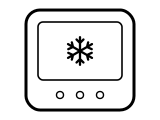
Frost protection is active: EPH says the thermostat switches the boiler on when the temperature drops below the frost setpoint, 5 °C by factory default (5 to 15 °C). It only works in OFF mode and holiday mode.
Applies to: CP4D (RFRPD thermostat). What you see: a symbol.
What EPH Controls says to do
- Frost protection is setting P05 in the installer menu: hold PROG and the dial together for 5 seconds, turn the dial until P05 & Fr shows, press it, then confirm ON and pick 5 to 15 °C, or turn anticlockwise to switch it OFF. Press AUTO to get back to the home screen.
A similar symbol on other thermostats, where it can mean something else: Honeywell: “Cool On” or the snowflake blinking; ecobee: Snowflake icon blue, or a blue ring around the edge; ecobee: Snowflake icon white (not cooling); Danfoss: Snowflake in a shield: frost protection active; Heatmiser: House with a snowflake: frost protection.
Source:
- EPH Controls: CP4D Installation and Operation Guide, Programmable RF Thermostat & Receiver (2025-07-18) — CP4D: RFRPD room thermostat and RF1B receiver. www.ephcontrols.com Checked 2026-10-17.
- EPH Controls: CP4D Easy User Guide (2026-05-08) — CP4D: RFRPD room thermostat and RF1B receiver. www.ephcontrols.com Checked 2026-10-17.
Battery: batteries almost empty
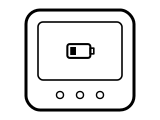
The batteries are almost empty. EPH says they must now be replaced or the unit will shut down; the same warning shows in the EMBER app.
Applies to: CP4D (RFRPD thermostat). What you see: a symbol.
What EPH Controls says to do
- Replace the 2 AA batteries, behind the flap at the front below the buttons. EPH recommends Duracell or Energiser and says low-quality batteries can stop the wireless link, reset the thermostat or make it show the wrong information.
A similar symbol on other thermostats, where it can mean something else: Honeywell: BATT with code 405: low battery; Honeywell: Only BATT on the screen, code 407: critically low battery; tado: Low battery symbol; tado: Depleted battery symbol; Danfoss: Battery: batteries low.
Source:
- EPH Controls: CP4D Installation and Operation Guide, Programmable RF Thermostat & Receiver (2025-07-18) — CP4D: RFRPD room thermostat and RF1B receiver. www.ephcontrols.com Checked 2026-10-17.
- EPH Controls: CP4D Easy User Guide (2026-05-08) — CP4D: RFRPD room thermostat and RF1B receiver. www.ephcontrols.com Checked 2026-10-17.
Padlock: keypad locked
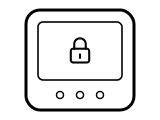
The keypad is locked, so turning or pressing will not change the settings.
Applies to: CP4D (RFRPD thermostat). What you see: a symbol.
What EPH Controls says to do
- Press and hold the dial for 10 seconds; EPH says the padlock disappears and the keypad is unlocked. Holding it 10 seconds again locks it.
A similar symbol on other thermostats, where it can mean something else: Sensi: Padlock icon; Heatmiser: Padlock: keypad locked.
Source:
- EPH Controls: CP4D Installation and Operation Guide, Programmable RF Thermostat & Receiver (2025-07-18) — CP4D: RFRPD room thermostat and RF1B receiver. www.ephcontrols.com Checked 2026-10-17.
- EPH Controls: CP4D Easy User Guide (2026-05-08) — CP4D: RFRPD room thermostat and RF1B receiver. www.ephcontrols.com Checked 2026-10-17.
nOE, then ---, then r01: pairing with the receiver
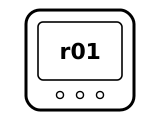
The thermostat is pairing with the RF1B receiver. EPH says it shows nOE followed by ---, and r01 once the wireless connection has been made.
Applies to: CP4D (RFRPD thermostat with the RF1B receiver). What you see: words.
What EPH Controls says to do
- A CP4D pack comes already paired, EPH says, so you only do this when pairing again: hold the receiver’s Connect button for 3 seconds until the RF light flashes, then press the connect button on the side of the thermostat.
- When r01 shows, press the dial to finish.
Source:
- EPH Controls: CP4D Easy User Guide (2026-05-08) — CP4D: RFRPD room thermostat and RF1B receiver. www.ephcontrols.com Checked 2026-10-17.
- EPH Controls: CP4D Installation and Operation Guide, Programmable RF Thermostat & Receiver (2025-07-18) — CP4D: RFRPD room thermostat and RF1B receiver. www.ephcontrols.com Checked 2026-10-17.
Receiver RF light double-flashing: thermostat disconnected
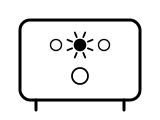
The receiver has lost the thermostat. EPH says the white RF light stays on while the thermostat is connected and double-flashes when it is disconnected. Two other blinks are normal: the RF light blinks now and then while the two are talking, and once a second while it is in pairing mode.
Applies to: CP4D (RF1B receiver). What you see: a light.
What EPH Controls says to do
- Check the thermostat pairing, as EPH says (see nOE and r01 above).
Source:
- EPH Controls: CP4D Installation and Operation Guide, Programmable RF Thermostat & Receiver (2025-07-18) — CP4D: RFRPD room thermostat and RF1B receiver. www.ephcontrols.com Checked 2026-10-17.
Receiver System light red or green: system off or on
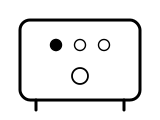
Red means the system is OFF; green means it is ON. EPH’s receiver light table gives just those two.
Applies to: CP4D (RF1B receiver). What you see: a light.
What EPH Controls says to do
- The receiver’s Manual button switches the system on and off, EPH says.
Source:
- EPH Controls: CP4D Installation and Operation Guide, Programmable RF Thermostat & Receiver (2025-07-18) — CP4D: RFRPD room thermostat and RF1B receiver. www.ephcontrols.com Checked 2026-10-17.
Receiver OpenTherm light blinking: OpenTherm communication error
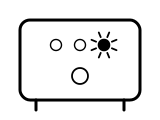
There is an OpenTherm communication error between the receiver and the boiler. EPH says the white OpenTherm light is steady when OpenTherm is connected and blinks on an error.
Applies to: CP4D (RF1B receiver on an OpenTherm boiler). What you see: a light.
What to do
EPH Controls gives no step for this on the page cited; the meaning above is all it says.
EPH Controls ties this to the boiler or heating system. What the symbols on a boiler’s own panel mean is on the boiler symbols page.
Source:
- EPH Controls: CP4D Installation and Operation Guide, Programmable RF Thermostat & Receiver (2025-07-18) — CP4D: RFRPD room thermostat and RF1B receiver. www.ephcontrols.com Checked 2026-10-17.
Sources
EPH Controls’s own help pages only, read on the date shown. Nothing here comes from third-party “codes explained” sites or forums.
- EPH Controls: CP4D Installation and Operation Guide, Programmable RF Thermostat & Receiver (2025-07-18) — CP4D: RFRPD room thermostat and RF1B receiver. www.ephcontrols.com Checked 2026-10-17.
- EPH Controls: CP4D Easy User Guide (2026-05-08) — CP4D: RFRPD room thermostat and RF1B receiver. www.ephcontrols.com Checked 2026-10-17.