Danfoss TP5001 programmable room thermostat: what its codes, symbols and messages mean
On a Danfoss TP5001 the three wavy lines mean the heating is active, the snowflake inside a shield means frost protection is active, the clock means it is running its schedule, the suitcase means Away mode, and the battery means the batteries are low. The screen can also show seven error messages: E1 (sensor failure), E3 (RF pairing failed), E4 (RF signal lost), E6 (clock failure), EE (memory failure), and Lo or Hi when the room is below 0 °C or above 50 °C. All of it is from the TP5001 User Guide (03/2023) that Danfoss links from its own TP5001 product page.
Everything here is on the round LCD screen of the TP5001; Danfoss’s guide describes no lights. The guide covers three versions: the TP5001, the battery TP5001B and the wireless TP5001RF. The RF status symbol and the E3 and E4 messages are for the TP5001RF only, and the low-battery symbol for the TP5001B and TP5001RF only. Danfoss’s UK room-thermostat pages list no TP5000 today, so the older TP5000 is not covered here; check its own guide before reading a TP5000 screen from this page.
Three wavy lines: heating active
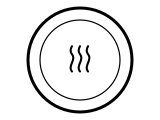
The heating is active. Danfoss’s LCD overview lists the three wavy lines as “Heating active”; its symbol list has no flame.
Applies to: TP5001, TP5001B and TP5001RF. What you see: a symbol.
What to do
Danfoss gives no step for this on the page cited; the meaning above is all it says.
Source:
- Danfoss: TP5001 Programmable Room Thermostat User Guide (BC306936081288EN-010201, 03/2023) — TP5001, TP5001B and TP5001RF. assets.danfoss.com Checked 2026-10-17.
Snowflake in a shield: frost protection active
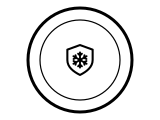
Frost protection is active, which on the TP5001 means the thermostat is switched OFF (standby). Danfoss says that in standby it is set to the frost protection temperature and switches on only if the measured temperature falls below it, 5 °C by default; the frost protect icon and the current temperature are shown.
Applies to: TP5001, TP5001B and TP5001RF. What you see: a symbol.
What Danfoss says to do
- Press the power button to switch the thermostat back on from OFF (standby); Danfoss says the same button switches it between on and standby.
- The frost temperature itself is parameter P06 (5 to 15 °C, 5 °C by default): hold M for 6 seconds to enter the parameter settings, press M to move to P06 and set it with < or >. The guide exits by itself after 20 seconds with no button pressed.
A similar symbol on other thermostats, where it can mean something else: Honeywell: “Cool On” or the snowflake blinking; ecobee: Snowflake icon blue, or a blue ring around the edge; ecobee: Snowflake icon white (not cooling); Heatmiser: House with a snowflake: frost protection; EPH: Snowflake: frost protection active.
Source:
- Danfoss: TP5001 Programmable Room Thermostat User Guide (BC306936081288EN-010201, 03/2023) — TP5001, TP5001B and TP5001RF. assets.danfoss.com Checked 2026-10-17.
Clock: schedule mode
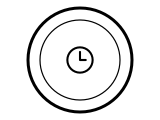
The thermostat is following its timer program. Danfoss lists the clock as “Schedule mode”. With no program of your own it runs Danfoss’s default: Monday to Friday 20 °C from 6:30, 15 °C from 8:30, 20 °C from 16:30 and 15 °C from 22:30; Saturday and Sunday the same temperatures from 7:30, 9:30, 16:30 and 22:30.
Applies to: TP5001, TP5001B and TP5001RF. What you see: a symbol.
What Danfoss says to do
- To change the temperature until the next programmed setting, press < or >: Danfoss says SET is shown and the change is only temporary.
- To change the schedule itself, hold the clock button for 3 seconds and set the start hour, minute and temperature of each of the four events with < or >, accepting each with the clock button.
- If you want no schedule, the installer parameter P01 switches the working mode between 01 Manual, 02 5/2-day timer (the default) and 03 24-hour timer.
Source:
- Danfoss: TP5001 Programmable Room Thermostat User Guide (BC306936081288EN-010201, 03/2023) — TP5001, TP5001B and TP5001RF. assets.danfoss.com Checked 2026-10-17.
Suitcase: Away mode
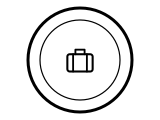
Away mode is on: the thermostat holds the Away temperature instead of following the schedule. Danfoss says pressing M enters Away mode and shows the suitcase.
Applies to: TP5001, TP5001B and TP5001RF. What you see: a symbol.
What Danfoss says to do
- Press M again to leave Away mode; Danfoss says M both enters and exits it.
- The Away temperature is parameter P07, 18 °C by default, set within the low and high limits P05 and P04.
A similar symbol on other thermostats, where it can mean something else: Heatmiser: Suitcase: holiday mode (Slimline V4).
Source:
- Danfoss: TP5001 Programmable Room Thermostat User Guide (BC306936081288EN-010201, 03/2023) — TP5001, TP5001B and TP5001RF. assets.danfoss.com Checked 2026-10-17.
Mast with bars: RF status (TP5001RF only)

This is the wireless (RF) link to the receiver. Danfoss lists it as “RF Status” and says it appears on the TP5001RF only; when that link fails the screen shows E3 or E4 (below) instead.
Applies to: TP5001RF only. What you see: a symbol.
What to do
Danfoss gives no step for this on the page cited; the meaning above is all it says.
Source:
- Danfoss: TP5001 Programmable Room Thermostat User Guide (BC306936081288EN-010201, 03/2023) — TP5001, TP5001B and TP5001RF. assets.danfoss.com Checked 2026-10-17.
Battery: batteries low
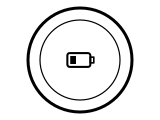
The batteries are low. Danfoss lists it as “Battery low indicator” and says only the battery TP5001B and the wireless TP5001RF show it.
Applies to: TP5001B and TP5001RF only. What you see: a symbol.
What to do
Danfoss gives no step for this on the page cited; the meaning above is all it says.
A similar symbol on other thermostats, where it can mean something else: Honeywell: BATT with code 405: low battery; Honeywell: Only BATT on the screen, code 407: critically low battery; tado: Low battery symbol; tado: Depleted battery symbol; EPH: Battery: batteries almost empty.
Source:
- Danfoss: TP5001 Programmable Room Thermostat User Guide (BC306936081288EN-010201, 03/2023) — TP5001, TP5001B and TP5001RF. assets.danfoss.com Checked 2026-10-17.
SET: changing the temperature
You are changing the set temperature, the temperature the thermostat aims for. Danfoss says SET is shown while you press < or >, and the temperature moves in 0.5 °C steps.
Applies to: TP5001, TP5001B and TP5001RF. What you see: words.
What Danfoss says to do
- Let go of < or > and Danfoss says the screen goes back to the actual temperature.
- In schedule mode the new temperature lasts only until the next programmed setting.
Source:
- Danfoss: TP5001 Programmable Room Thermostat User Guide (BC306936081288EN-010201, 03/2023) — TP5001, TP5001B and TP5001RF. assets.danfoss.com Checked 2026-10-17.
E1: sensor failure
The thermostat’s temperature sensor has failed. Danfoss’s error list gives E1 as “Sensor failure”.
Applies to: TP5001, TP5001B and TP5001RF. What you see: a code.
What to do
Danfoss gives no step for this on the page cited; the meaning above is all it says.
Source:
- Danfoss: TP5001 Programmable Room Thermostat User Guide (BC306936081288EN-010201, 03/2023) — TP5001, TP5001B and TP5001RF. assets.danfoss.com Checked 2026-10-17.
E3 or E4: the wireless link to the receiver
Two different wireless faults. E3 means RF pairing failed: the thermostat could not pair with its receiver. E4 means the RF signal is lost. The guide gives no step for either; the only RF setting in its parameter list is RF pairing, installer parameter P10 (00 off, 01 on).
Applies to: TP5001RF only. What you see: a code.
Codes this covers: E3 E4.
What to do
Danfoss gives no step for this on the page cited; the meaning above is all it says.
Source:
- Danfoss: TP5001 Programmable Room Thermostat User Guide (BC306936081288EN-010201, 03/2023) — TP5001, TP5001B and TP5001RF. assets.danfoss.com Checked 2026-10-17.
E6 or EE: clock or memory failure
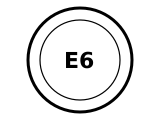
An internal part has failed. Danfoss gives E6 as a “Real Time Clock (RTC)” failure and EE as an “EEPROM failure” (a memory chip). The guide gives no step for either.
Applies to: TP5001, TP5001B and TP5001RF. What you see: a code.
What to do
Danfoss gives no step for this on the page cited; the meaning above is all it says.
Source:
- Danfoss: TP5001 Programmable Room Thermostat User Guide (BC306936081288EN-010201, 03/2023) — TP5001, TP5001B and TP5001RF. assets.danfoss.com Checked 2026-10-17.
Lo or Hi: temperature out of range
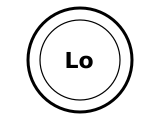
The room is outside what the thermostat measures. Danfoss lists Lo as a measured temperature below 0 °C and Hi as one above 50 °C.
Applies to: TP5001, TP5001B and TP5001RF. What you see: words.
What to do
Danfoss gives no step for this on the page cited; the meaning above is all it says.
Source:
- Danfoss: TP5001 Programmable Room Thermostat User Guide (BC306936081288EN-010201, 03/2023) — TP5001, TP5001B and TP5001RF. assets.danfoss.com Checked 2026-10-17.
Sources
Danfoss’s own help pages only, read on the date shown. Nothing here comes from third-party “codes explained” sites or forums.
- Danfoss: TP5001 Programmable Room Thermostat User Guide (BC306936081288EN-010201, 03/2023) — TP5001, TP5001B and TP5001RF. assets.danfoss.com Checked 2026-10-17.