Drayton Wiser radiator thermostat: what its lights mean
The Wiser Radiator Thermostat by Drayton has three small lights on its front. Red that shows for a second once an hour means the batteries are low; red flashing for five seconds every minute means they are critically low. Blue flashing is recalibration on the valve, and red flashes while you twist and hold the cap are the reset countdown.
The lights are on the front of the thermostat head; Drayton says to fit it with the LED facing forwards. This page covers only the Radiator Thermostat: the Wiser Room Thermostat and hub are in ‘Left out, and why’ on the thermostat hub page.
Solid red for 1 second, once an hour
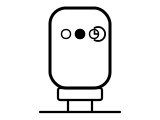
Battery low: replace the batteries soon.
Applies to: Wiser Radiator Thermostat. What you see: a light.
What Drayton Wiser says to do
- Fit 2 × 1.5 V AA (IEC LR6) alkaline batteries; Drayton says rechargeable batteries should not be used.
- After the change the thermostat calibrates itself on the valve. If it does not, twist the cap towards minus for a few seconds until the LED flashes blue and the motor starts.
Source:
- Drayton Wiser: How to Change Batteries in Wiser's Smart Radiator Thermostat — Wiser Radiator Thermostat. wiser.draytoncontrols.co.uk Checked 2026-09-29.
Red flashing for 5 seconds every minute
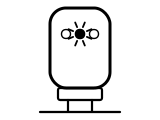
The batteries are critically low: replace them immediately. The Wiser Home app also sends a low-battery alert.
Applies to: Wiser Radiator Thermostat. What you see: a light.
What Drayton Wiser says to do
- Fit 2 × 1.5 V AA (IEC LR6) alkaline batteries; Drayton says rechargeable batteries should not be used.
- You can check battery status at any time in the Wiser Home app, under Devices in the Settings menu.
Source:
- Drayton Wiser: How to Change Batteries in Wiser's Smart Radiator Thermostat — Wiser Radiator Thermostat. wiser.draytoncontrols.co.uk Checked 2026-09-29.
Blue flashing
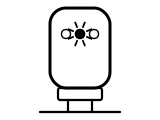
The thermostat is recalibrating on the valve: the motor drives briefly to find its position. It happens after a battery change, or when you twist the cap towards minus for a few seconds.
Applies to: Wiser Radiator Thermostat. What you see: a light.
What to do
Drayton Wiser gives no step for this on the page cited; the meaning above is all it says.
Source:
- Drayton Wiser: How to Change Batteries in Wiser's Smart Radiator Thermostat — Wiser Radiator Thermostat. wiser.draytoncontrols.co.uk Checked 2026-09-29.
Red flashing while you hold the cap at minus
The thermostat has entered reset mode. Keep holding: after eight red flashes (about 20 seconds) the long press is complete.
Applies to: Wiser Radiator Thermostat. What you see: a light.
What Drayton Wiser says to do
- Release the cap after the eighth red flash; all three LEDs then flash once to confirm the factory reset.
Source:
- Drayton Wiser: How to Factory Reset a Wiser Radiator Thermostat — Wiser Radiator Thermostat. wiser.draytoncontrols.co.uk Checked 2026-09-29.
All three lights flash once
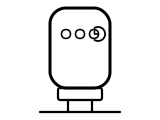
Confirmation that the thermostat is factory resetting. It then reboots, ready to be paired again in the Wiser app.
Applies to: Wiser Radiator Thermostat. What you see: a light.
What to do
Drayton Wiser gives no step for this on the page cited; the meaning above is all it says.
Source:
- Drayton Wiser: How to Factory Reset a Wiser Radiator Thermostat — Wiser Radiator Thermostat. wiser.draytoncontrols.co.uk Checked 2026-09-29.
Sources
Drayton Wiser’s own help pages only, read on the date shown. Nothing here comes from third-party “codes explained” sites or forums.
- Drayton Wiser: How to Change Batteries in Wiser's Smart Radiator Thermostat — Wiser Radiator Thermostat. wiser.draytoncontrols.co.uk Checked 2026-09-29.
- Drayton Wiser: How to Factory Reset a Wiser Radiator Thermostat — Wiser Radiator Thermostat. wiser.draytoncontrols.co.uk Checked 2026-09-29.