Amazon Smart Thermostat: what its lights, symbols and messages mean
On an Amazon Smart Thermostat, SEt with a blinking yellow light means the thermostat and your heating and cooling system did not connect during installation; Amazon says it might need to install updates first, and taking the faceplate off for 30 seconds forces an update. SEt or the temperature on the display when you restore power after wiring means, in Amazon’s words, it is connected successfully. rEs is the reset countdown, a red exclamation mark after a reset means it is ready to be set up again, and the Info icon on the left of the display, lit red, yellow or green, means there is an alert waiting in the Alexa app. All of this is from Amazon’s own help pages for the Amazon Smart Thermostat.
Everything here is on the thermostat’s display, which has three buttons beneath it: Up Temperature, Mode in the middle and Down Temperature. Amazon’s page on what the display lights mean does not list them: it sends you to the Alexa app (Devices › Thermostat › your Smart Thermostat › Device Settings › Thermostat configuration › Thermostat icons), where you tap each icon for a description. What this page cannot tell you: what the Info icon’s red, yellow and green mean one by one, because Amazon’s help page gives a single meaning for all three and puts the detail in the alert inside your Alexa app, which only you can see.
SEt with a blinking yellow light
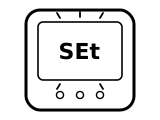
The thermostat and your heating and cooling (HVAC) system did not connect with each other during installation. Amazon says the thermostat might need to install updates first.
Applies to: Amazon Smart Thermostat. What you see: words and a light.
What Amazon says to do
- Allow a little time for the updates to install, then retry the installation.
- To force the software to update: take the thermostat faceplate off and put it back after 30 seconds.
- Close the Alexa app and restart it. If the Thermostat device page has a notification that installation failed, reinstall the thermostat; if that fails, Amazon says to contact Customer Support.
Source:
- Amazon: Amazon Smart Thermostat Installation Isn't Working — Amazon Smart Thermostat. www.amazon.com Checked 2026-10-17.
SEt on the screen after power-up or a factory reset
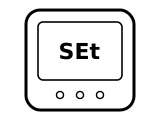
The thermostat has power and is waiting to be set up. Amazon says that if the display shows SEt or the temperature when you turn the power back on after fitting a C-wire adapter, it is connected successfully; SEt also appears at the end of a full factory reset.
Applies to: Amazon Smart Thermostat. What you see: words.
What Amazon says to do
- Set it up in the Alexa app: Devices, then Add Device, then Thermostat, and choose Amazon as the brand.
- After a full factory reset, first remove the old Amazon Smart Thermostat from the Alexa app (Devices › your Thermostat › Settings › Delete/Remove), then set it up again.
Source:
- Amazon: Connect a C-wire Adapter to Your Amazon Smart Thermostat — Amazon Smart Thermostat. www.amazon.com Checked 2026-10-17.
- Amazon: Perform a Full Factory Reset on Your Amazon Smart Thermostat — Amazon Smart Thermostat. www.amazon.com Checked 2026-10-17.
rEs on the screen
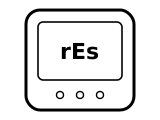
The thermostat is ready to reset. It shows rEs after you hold Up Temperature and Mode (partial reset), or Up Temperature, Down Temperature and Mode (full factory reset), together for 10 seconds.
Applies to: Amazon Smart Thermostat. What you see: words.
What Amazon says to do
- To go ahead, press and hold the middle Mode button: the thermostat resets after a five-second countdown.
- A partial reset (Up Temperature and Mode held for 10 seconds) erases everything except the HVAC configuration. A full factory reset (Up Temperature, Down Temperature and Mode held for 10 seconds) also erases the HVAC configuration and device settings.
Source:
- Amazon: Perform a Partial Reset on Your Amazon Smart Thermostat — Amazon Smart Thermostat. www.amazon.com Checked 2026-10-17.
- Amazon: Perform a Full Factory Reset on Your Amazon Smart Thermostat — Amazon Smart Thermostat. www.amazon.com Checked 2026-10-17.
Red exclamation mark after a reset
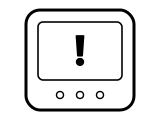
After a partial reset, the red exclamation mark tells you the thermostat is ready to be set up again. Amazon says to wait for it before you start setup.
Applies to: Amazon Smart Thermostat. What you see: a symbol.
What Amazon says to do
- Follow Amazon’s Set Up Your Amazon Smart Thermostat steps in the Alexa app to set it up and reconnect it to Wi-Fi.
Source:
- Amazon: Perform a Partial Reset on Your Amazon Smart Thermostat — Amazon Smart Thermostat. www.amazon.com Checked 2026-10-17.
Info icon in red, yellow or green on the left of the display
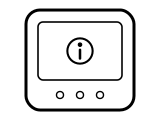
You have an alert or notification about your thermostat. When the Info icon appears in red, yellow or green, Amazon says to go to the Smart Thermostat page in your Alexa app, where the alert itself is shown.
Applies to: Amazon Smart Thermostat. What you see: a symbol.
What to do
Amazon gives no step for this on the page cited; the meaning above is all it says.
Source:
- Amazon: What Do the Display Lights on Your Amazon Smart Thermostat Mean? — Amazon Smart Thermostat. www.amazon.com Checked 2026-10-17.
Display blank or not responding
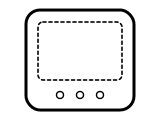
Either the display has dimmed because nobody touched it, or the thermostat is not getting power. Amazon also uses a blank screen as the sign that the power is off before you work on the wiring.
Applies to: Amazon Smart Thermostat. What you see: a blank screen.
What Amazon says to do
Wiring and power. Amazon ties this, on at least some systems, to the wiring, the power supply or the C wire. The steps here are only Amazon’s own, as its page states them; semiatic gives no wiring instructions of its own.
- Amazon says the display might dim when inactive: touch the display face to wake it.
- Amazon suggests raising the display brightness for the thermostat in the Alexa app.
- Amazon says to make sure all the wiring is correct, as in the Alexa app instructions, and firmly connected.
- Amazon says to check the C-wire connection; a C-wire adapter is sold separately if you need one.
- Amazon says to check there is no power outage and that your circuit breaker has power.
- Amazon says to check for a blown fuse (3 and 5 amp) on the furnace board.
Source:
- Amazon: The Amazon Smart Thermostat Display Is Blank — Amazon Smart Thermostat. www.amazon.com Checked 2026-10-17.
- Amazon: Amazon Smart Thermostat Doesn't Switch On Heat — Amazon Smart Thermostat. www.amazon.com Checked 2026-10-17.
Flame icon lit
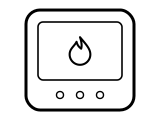
Heat mode is selected. Amazon’s heating check has you press the Mode button until the flame icon illuminates.
Applies to: Amazon Smart Thermostat. What you see: a symbol.
What Amazon says to do
- To check that the heating comes on, Amazon says to press Mode until the flame lights, then press the up arrow until the setting is 1 or 2 degrees above the temperature on the display.
- Amazon then has you check the outdoor unit: if it is running and blowing air, the system is a heat pump; otherwise it is a conventional system. Which one you have decides which wires its page tells you to check.
A similar symbol on other thermostats, where it can mean something else: Honeywell: “Heat On” or the flame blinking; ecobee: Flame icon orange, or an orange line around the edge; ecobee: Flame icon white (not heating); ecobee: Flame icon with an exclamation mark.
Source:
- Amazon: Amazon Smart Thermostat Doesn't Switch On Heat — Amazon Smart Thermostat. www.amazon.com Checked 2026-10-17.
Sources
Amazon’s own help pages only, read on the date shown. Nothing here comes from third-party “codes explained” sites or forums.
- Amazon: What Do the Display Lights on Your Amazon Smart Thermostat Mean? — Amazon Smart Thermostat. www.amazon.com Checked 2026-10-17.
- Amazon: Amazon Smart Thermostat Installation Isn't Working — Amazon Smart Thermostat. www.amazon.com Checked 2026-10-17.
- Amazon: Connect a C-wire Adapter to Your Amazon Smart Thermostat — Amazon Smart Thermostat. www.amazon.com Checked 2026-10-17.
- Amazon: Perform a Partial Reset on Your Amazon Smart Thermostat — Amazon Smart Thermostat. www.amazon.com Checked 2026-10-17.
- Amazon: Perform a Full Factory Reset on Your Amazon Smart Thermostat — Amazon Smart Thermostat. www.amazon.com Checked 2026-10-17.
- Amazon: The Amazon Smart Thermostat Display Is Blank — Amazon Smart Thermostat. www.amazon.com Checked 2026-10-17.
- Amazon: Amazon Smart Thermostat Doesn't Switch On Heat — Amazon Smart Thermostat. www.amazon.com Checked 2026-10-17.