Soundcore Motion Boom Plus lights: what each colour and pattern means
soundcore’s FAQ for the Motion Boom Plus (model A3129) explains its indicator light in answers to separate questions: red is about the battery (solid while charging, flashing when low), solid white is a full charge, and white and blue are also used when you join two speakers, by the Bluetooth button or by PartyCast. The FAQ uses red only for the battery, not for a fault. soundcore says a 5V/3A USB-C wall charger takes it to 100% in 5.5 hours, and that a speaker left unused for a long time may need at least an hour on charge before it turns on.
This page is for the Motion Boom Plus (A3129) only. soundcore’s pages for the Motion Boom (A3118) gave no light meanings when we read them, so its lights are not here.
Solid red while charging
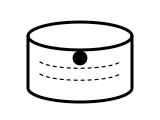
Charging.
Applies to: Motion Boom Plus (A3129), on charge. What you see: red, steady (solid).
soundcore Support’s page gives no step for this light; the meaning above is all it says.
Source:
- soundcore Support: Soundcore Motion Boom Plus A3129 FAQ — Motion Boom Plus (A3129). service.soundcore.com Read in a browser: the FAQ text is drawn in by a script. Checked 2026-10-17.
Solid white while on charge
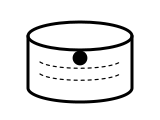
Fully charged.
Applies to: Motion Boom Plus (A3129), on charge. What you see: white, steady (solid).
soundcore Support’s page gives no step for this light; the meaning above is all it says.
Source:
- soundcore Support: Soundcore Motion Boom Plus A3129 FAQ — Motion Boom Plus (A3129). service.soundcore.com Read in a browser: the FAQ text is drawn in by a script. Checked 2026-10-17.
Flashing red
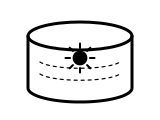
The battery is low.
Applies to: Motion Boom Plus (A3129). What you see: red, flashing or blinking.
soundcore Support’s page gives no step for this light; the meaning above is all it says.
Source:
- soundcore Support: Soundcore Motion Boom Plus A3129 FAQ — Motion Boom Plus (A3129). service.soundcore.com Read in a browser: the FAQ text is drawn in by a script. Checked 2026-10-17.
Flashing white on both speakers
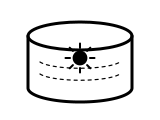
The two speakers are ready to pair with each other. soundcore’s steps: hold the Bluetooth button for 2–3 seconds on both speakers until they flash white.
Applies to: Two Motion Boom Plus (A3129) speakers being paired with each other. What you see: white, flashing or blinking.
What soundcore says to do
- Turn on both speakers and connect either one to your phone or other device by Bluetooth.
- Hold the Bluetooth button for 2–3 seconds on both speakers until they flash white.
- Wait 3–5 seconds for the “ding” that means they are paired.
Source:
- soundcore Support: Soundcore Motion Boom Plus A3129 FAQ — Motion Boom Plus (A3129). service.soundcore.com Read in a browser: the FAQ text is drawn in by a script. Checked 2026-10-17.
Solid blue after pairing two speakers
This is the primary speaker of the pair.
Applies to: Two Motion Boom Plus (A3129) speakers paired with the Bluetooth button. What you see: blue, steady (solid).
soundcore Support’s page gives no step for this light; the meaning above is all it says.
Source:
- soundcore Support: Soundcore Motion Boom Plus A3129 FAQ — Motion Boom Plus (A3129). service.soundcore.com Read in a browser: the FAQ text is drawn in by a script. Checked 2026-10-17.
White on the second speaker after pairing
This is the secondary speaker of the pair (soundcore gives the colour, not whether it is steady).
Applies to: Two Motion Boom Plus (A3129) speakers, paired with the Bluetooth button or by PartyCast. What you see: white, pattern not stated by the maker.
soundcore Support’s page gives no step for this light; the meaning above is all it says.
Source:
- soundcore Support: Soundcore Motion Boom Plus A3129 FAQ — Motion Boom Plus (A3129). service.soundcore.com Read in a browser: the FAQ text is drawn in by a script. Checked 2026-10-17.
Solid white after pressing PartyCast
PartyCast is on. Once the speakers are paired, the primary speaker shows solid white.
Applies to: Motion Boom Plus (A3129) joining other speakers by PartyCast. What you see: white, steady (solid).
What soundcore says to do
- Turn on both speakers and connect one to your device by Bluetooth.
- Press the PartyCast button on both speakers; each shows a solid white light.
- Wait 3–5 seconds for the “ding” that means they are paired.
- If the PartyCast speakers make no sound, double-press the PartyCast button on the Motion Boom Plus.
Source:
- soundcore Support: Soundcore Motion Boom Plus A3129 FAQ — Motion Boom Plus (A3129). service.soundcore.com Read in a browser: the FAQ text is drawn in by a script. Checked 2026-10-17.
Sources
Soundcore Motion Boom Plus’s own support pages only, read on the date shown. Nothing here comes from third-party “lights explained” sites.
- soundcore Support: Soundcore Motion Boom Plus A3129 FAQ — Motion Boom Plus (A3129). service.soundcore.com Read in a browser: the FAQ text is drawn in by a script. Checked 2026-10-17.