Beats Pill lights: what each colour and pattern means
The Beats Pill has one status light, next to the power button, and Apple’s Beats User Guide gives it seven meanings. Apple owns Beats and hosts the guide on support.apple.com. Red appears in one place only: a red flash when you turn the speaker on or off means the battery is below 10 percent. Green means it is charging, and blue means two Pills are joined in Amplify or Stereo mode. Flashing white means three different things, so what you just did tells them apart: at power on or off it means the battery is at 10 percent or more; after you hold the power button it means the speaker is ready to pair; after a reset it means the reset is done. Apple rates the battery at up to 24 hours of play, tested at 50% volume.
This page is for the Beats Pill sold since 2024 (USB-C charging), the speaker Apple’s Beats User Guide covers. The older Beats Pill+ is set up through its own app, and Apple’s Amplify and Stereo article gives it no light meanings, so its lights are not here. The colour of the speaker’s own case is a finish, not a light. What this page cannot tell you: how much charge is left beyond above or below 10 percent, because that is the only battery split the light shows.
Flashes red when you turn it on or off
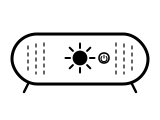
The battery is charged to less than 10 percent.
Applies to: Beats Pill, as you turn it on or off with the power button. What you see: red, flashing or blinking.
What Apple says to do
- Connect the speaker to a power outlet with a USB-C cable and a compatible power adapter.
- While it charges the light turns green; when it is full the light shines white for 10 seconds, then turns off.
Source:
- Apple Support (Beats User Guide): Use your Beats Pill — Beats Pill (the guide covers Beats Pill on iOS 27 and later, and the Beats app on Android). support.apple.com Checked 2026-10-17.
- Apple Support: Set up and use your Beats Pill speaker — Beats Pill. support.apple.com Checked 2026-10-17.
Flashes white when you turn it on or off
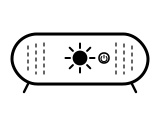
The battery is charged to at least 10 percent. (The guide says “more than 10 percent”; Apple’s setup article says “at least 10 percent”.)
Applies to: Beats Pill, as you turn it on or off with the power button. What you see: white, flashing or blinking.
Apple Support (Beats User Guide)’s page gives no step for this light; the meaning above is all it says.
Source:
- Apple Support (Beats User Guide): Use your Beats Pill — Beats Pill (the guide covers Beats Pill on iOS 27 and later, and the Beats app on Android). support.apple.com Checked 2026-10-17.
- Apple Support: Set up and use your Beats Pill speaker — Beats Pill. support.apple.com Checked 2026-10-17.
Green while plugged in
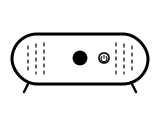
The speaker is charging. Apple says the light “turns green” (guide) and “shines green” (setup article).
Applies to: Beats Pill, connected to power by USB-C. What you see: green, steady (solid).
Apple Support (Beats User Guide)’s page gives no step for this light; the meaning above is all it says.
Source:
- Apple Support (Beats User Guide): Charge Beats — Beats Pill (Charge Beats Pill section). support.apple.com Checked 2026-10-17.
- Apple Support: Set up and use your Beats Pill speaker — Beats Pill. support.apple.com Checked 2026-10-17.
White for 10 seconds, then off, while plugged in
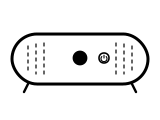
Charging is complete. The light shines white for 10 seconds, then turns off, so a dark light on a plugged-in Pill can mean it is full.
Applies to: Beats Pill, connected to power by USB-C. What you see: white, steady (solid).
Apple Support (Beats User Guide)’s page gives no step for this light; the meaning above is all it says.
Source:
- Apple Support (Beats User Guide): Charge Beats — Beats Pill (Charge Beats Pill section). support.apple.com Checked 2026-10-17.
- Apple Support: Set up and use your Beats Pill speaker — Beats Pill. support.apple.com Checked 2026-10-17.
Flashing or pulsing white after you hold the power button
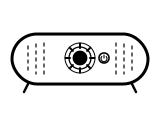
The speaker is in discovery mode, ready to be paired. The guide says the light flashes white after a tone; Apple’s setup article says the light next to the power button pulses.
Applies to: Beats Pill, after turning on or holding the power button. What you see: white, flashing or blinking or pulsing (slow fade).
What Apple says to do
- If the light does not pulse after you turn the speaker on, hold the power button for 3 seconds to enter discovery mode.
- On an iPhone, iPad or Apple Watch go to Settings, then Bluetooth; on a Mac, Apple menu, then System Settings, then Bluetooth; on Android, the Bluetooth settings. Make sure Bluetooth is on.
- Select Beats Pill from the list of Bluetooth devices.
Source:
- Apple Support (Beats User Guide): Pair Beats — Beats Pill speaker. support.apple.com Checked 2026-10-17.
- Apple Support: Set up and use your Beats Pill speaker — Beats Pill. support.apple.com Checked 2026-10-17.
Flashes white with the pairing cue, after a reset
The reset is done and the speaker is ready to be paired. The pairing cue plays briefly as the light flashes.
Applies to: Beats Pill, after holding the center button (10 seconds, keeps settings) or the center and volume down buttons (15 seconds, clears settings). What you see: white, flashing or blinking.
What Apple says to do
- Pair the speaker again to your Apple or Android device.
Source:
- Apple Support (Beats User Guide): Reset Beats — Beats Pill (Reset Beats Pill section). support.apple.com Checked 2026-10-17.
Blue light next to the power button, with two speakers
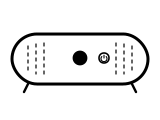
The speakers are joined. Holding the center button on each speaker for five seconds turns both lights blue and puts them in Amplify mode (both play the same audio). Holding the center and volume up buttons on one speaker until its light turns blue makes it the left channel in Stereo mode. Apple says the light turns blue, not whether it is steady.
Applies to: Two Beats Pill speakers joined in Amplify or Stereo mode. What you see: blue, pattern not stated by the maker.
What Apple says to do
- Make sure one Beats Pill is on and connected and the second is on.
- Hold the center button on each speaker for five seconds, until the light next to the power button on each turns blue (Amplify mode).
- For Stereo mode, on the speaker you want as the left channel, hold the center button and the volume up button until its light turns blue.
Source:
- Apple Support: Use Amplify mode and Stereo mode on your Beats Pill and your Beats Pill+ — Beats Pill (the Beats Pill+ steps use its app and name no light). support.apple.com Checked 2026-10-17.
- Apple Support (Beats User Guide): Use your Beats Pill — Beats Pill (the guide covers Beats Pill on iOS 27 and later, and the Beats app on Android). support.apple.com Checked 2026-10-17.
Sources
Beats Pill’s own support pages only, read on the date shown. Nothing here comes from third-party “lights explained” sites.
- Apple Support (Beats User Guide): Use your Beats Pill — Beats Pill (the guide covers Beats Pill on iOS 27 and later, and the Beats app on Android). support.apple.com Checked 2026-10-17.
- Apple Support (Beats User Guide): Charge Beats — Beats Pill (Charge Beats Pill section). support.apple.com Checked 2026-10-17.
- Apple Support (Beats User Guide): Pair Beats — Beats Pill speaker. support.apple.com Checked 2026-10-17.
- Apple Support (Beats User Guide): Reset Beats — Beats Pill (Reset Beats Pill section). support.apple.com Checked 2026-10-17.
- Apple Support: Set up and use your Beats Pill speaker — Beats Pill. support.apple.com Checked 2026-10-17.
- Apple Support: Use Amplify mode and Stereo mode on your Beats Pill and your Beats Pill+ — Beats Pill (the Beats Pill+ steps use its app and name no light). support.apple.com Checked 2026-10-17.