LiftMaster and Chamberlain garage door opener: what each blinking light means
LiftMaster and Chamberlain are both Chamberlain Group brands, and both brands’ support links now land on one shared help site that publishes a single diagnostic table for both, so each code has one page here. Openers with UP and DOWN arrow buttons flash a two-number code: count the UP flashes, then the DOWN flashes, and wait for the pattern to repeat to be sure (4 UP then 2 DOWN is code 4-2). Openers without arrows flash the LED beside the Learn button instead. On either kind, the opener’s own lights flashing 10 times means a safety-sensor problem.
What people ask
What do the flashing UP and DOWN arrows on a LiftMaster mean? They are flashing a diagnostic code, and you read it by counting. Chamberlain Group: “The UP and DOWN arrow lights flash in a repeating pattern. The number of UP flashes and DOWN flashes identifies the diagnostic code.” Its own examples: “1 UP + 1 DOWN = Code 1-1. 1 UP + 5 DOWN = Code 1-5.” Count the UP flashes, then the DOWN flashes, and watch the pattern repeat once to be sure. Code 1-1 is a sensor problem: “One of your safety sensors is likely blocked, misaligned, or unplugged.” Code 1-5 is the motor not turning: “The opener didn't sense the motor spinning right after a command, that doesn't automatically mean the motor itself has failed.” Every code on Chamberlain’s table, 1-1 to 5-5, has its own section further down this page. On this page: Code 1-1: 1 UP flash, 1 DOWN flash · Code 1-5: 1 UP flash, 5 DOWN flashes.
Source: Chamberlain Group Support (LiftMaster and Chamberlain), Garage Door Opener | Diagnostic Codes and UP/DOWN Flashing Lights Checked 2026-10-13.
5 more: code 70, sensor blinking green, wall control blinking, blinks 10 times, blinks twice
What does LiftMaster code 70 mean? Code 70 belongs to a LiftMaster gate operator, not a garage door opener: the openers on this page flash two-number codes on their arrows (1-1 to 5-5), while a gate operator’s main control board shows numbered codes. Chamberlain Group’s gate photo-eye page lists it with three others under one symptom: “The gate is not closing, and the main control board displays the following diagnostic codes: 61, 64, 70, or 73.” It adds: “Either the Close Eye/Interrupt or Eye Only LEDs will be lit.” The fix that page gives is realigning the gate’s photo eyes (LiftMaster LMRRUL or LMTBUL), so a 70 points at the gate’s safety sensors first.
Source: Chamberlain Group Support (LiftMaster and Chamberlain), My Gate is Not Closing - Alignment of Photo Eye Sensors for Gate Operators Checked 2026-10-13.
Why is the green light on my LiftMaster safety sensor blinking? The green light is on the receiving sensor, and it blinks or goes out when the beam from the sending sensor (amber light) does not reach it. Chamberlain Group calls that “a misaligned or obstructed sensor.” First: “Make sure nothing is blocking the sensors.” Then: “Loosen the wing nut on the green LED (receiving sensor). Adjust the sensor until the green LED is glowing steady and tighten the wing nut.” If the green light still blinks, Chamberlain says to repeat the same steps on the amber sending sensor. Until both lights glow steadily the door will not close, and the opener reports it as one of the sensor codes below. On this page: Code 1-1: 1 UP flash, 1 DOWN flash · Learn button LED flashes 4 times · Opener lights flash 10 times.
Source: Chamberlain Group Support (LiftMaster and Chamberlain), Troubleshoot Garage Door Safety Sensors that Are Off or Flicker Checked 2026-10-13.
Why is my LiftMaster wall control blinking? Usually because the opener is in lock mode. Chamberlain Group: “When the garage door opener is in lock mode, the LED light on the door control will constantly flash and the hand held remote controls will not operate your garage door opener.” To leave lock mode, its page says to keep the LOCK button pressed for two seconds, and notes the “lock button may be located under push button cover.” On a Smart Control Panel with a screen, the screen reads Lock Mode instead. A single short blink while the door is travelling is normal and cannot be switched off: “Each time the garage door opener passes through one of the passpoints, the LED or screen will blink to indicate this.” On this page: Opener lights flash 2 times.
Source: Chamberlain Group Support (LiftMaster and Chamberlain), Why the LED or Screen flashes on the door control Checked 2026-10-13.
Why does my LiftMaster blink 10 times? When the opener’s own lights flash 10 times and the door will not close, it is reporting a safety-sensor problem. Chamberlain Group: “If there is a safety reversing sensor issue, the main light(s) flash 10 times.” Its first step: “Start with aligning the safety sensors.” That means clearing anything between the two sensors at the bottom of the door and aiming them at each other until both lights glow steadily, as in the green-light question above. On this page: Opener lights flash 10 times.
Source: Chamberlain Group Support (LiftMaster and Chamberlain), Garage Door Opener Light Blinks but The Door Won’t Close Checked 2026-10-13.
Why does my LiftMaster blink twice? The LOCK feature is on. Chamberlain Group: “If the garage door opener light(s) flash two times, the LOCK button on the door control is ON.” Its door-control page explains when you see it: “The light bulb on the opener will also flash twice when you attempt to activate the door with your remote.” The fix is on the wall door control: “Press the LOCK button to turn this feature off.” Then the remotes work again. On this page: Opener lights flash 2 times.
Sources: Chamberlain Group Support (LiftMaster and Chamberlain), Garage Door Opener Light Blinks but The Door Won’t Close Checked 2026-10-13. · Chamberlain Group Support (LiftMaster and Chamberlain), Why the LED or Screen flashes on the door control Checked 2026-10-13.
The questions are Google’s search suggestions; each answer comes only from the LiftMaster pages named under it.
The arrows and the Learn button are on the motor unit on the ceiling: a yellow round Learn button means a Security+ 2.0 opener, a white one Security+ 3.0. The two safety sensors sit either side of the door, no higher than 6 inches above the floor, usually on the door tracks; one sends an invisible beam, the other shows a green light while it receives it.
Covers Chamberlain openers too: the two brands share one published table, so each code has one section here.
LiftMaster’s safety line: “Never adjust or loosen the door’s springs, cables, pulleys, or brackets yourself, they’re under extreme tension.” Where a spring, cable or balance problem shows up, its page says to stop and contact a local garage door professional.
No repair advice of our own. The steps in each code below are only LiftMaster’s, as its own page states them; semiatic gives no repair instructions of its own. For anything beyond them, LiftMaster’s page and a trained door technician are the authority.
The UP and DOWN arrows
LiftMaster: Code 1-1: 1 UP flash, 1 DOWN flash
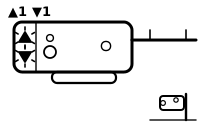
One of the safety sensors is blocked, out of line or unplugged, or its wire is broken. The door starts to close, then reverses.
Applies to: LiftMaster and Chamberlain Security+ 2.0 and Security+ 3.0 openers with UP and DOWN arrows; codes 3-5 and 5-5 only on the wall-mounted jackshaft models 8500W/RJO70, 98022/RJO101 and 98032. What you see: the UP and DOWN arrows, 1 UP flash, then 1 DOWN flash.
What LiftMaster says to do
This is a safety-sensor code. The sensors stop the door closing on a person, a pet or a car. semiatic repeats only LiftMaster’s own alignment and cleaning steps; nothing here tells you to work around the sensors, and LiftMaster’s wiring checks are in its own page.
- LiftMaster says to remove anything blocking the invisible beam between the two sensors.
- LiftMaster says to look at the two sensor lights: if the green light is off or blinking, align the sensors so they point at each other.
LiftMaster’s page then goes on to checking the sensor wires at the opener and further wiring checks if the code will not clear.
Source:
- Chamberlain Group Support (LiftMaster and Chamberlain): Garage Door Opener | Diagnostic Codes and UP/DOWN Flashing Lights — LiftMaster and Chamberlain Security+ 2.0 and Security+ 3.0 openers with UP and DOWN arrows; codes 3-5 and 5-5 only on the wall-mounted jackshaft models 8500W/RJO70, 98022/RJO101 and 98032. support.chamberlaingroup.com Checked 2026-09-29.
LiftMaster: Code 1-2: 1 UP flash, 2 DOWN flashes
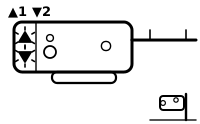
The safety sensor wiring is probably reversed or shorted, so the door will not close.
Applies to: LiftMaster and Chamberlain Security+ 2.0 and Security+ 3.0 openers with UP and DOWN arrows; codes 3-5 and 5-5 only on the wall-mounted jackshaft models 8500W/RJO70, 98022/RJO101 and 98032. What you see: the UP and DOWN arrows, 1 UP flash, then 2 DOWN flashes.
What LiftMaster says to do
This is a safety-sensor code. The sensors stop the door closing on a person, a pet or a car. semiatic repeats only LiftMaster’s own alignment and cleaning steps; nothing here tells you to work around the sensors, and LiftMaster’s wiring checks are in its own page.
LiftMaster’s page gives no step for this code that is repeated here; the meaning above is what it says.
LiftMaster’s steps for this code are all wiring checks: the same wire colours to the same terminals at the sensors and at the opener, and the wire inspected along its run for staples, nails or cuts.
Source:
- Chamberlain Group Support (LiftMaster and Chamberlain): Garage Door Opener | Diagnostic Codes and UP/DOWN Flashing Lights — LiftMaster and Chamberlain Security+ 2.0 and Security+ 3.0 openers with UP and DOWN arrows; codes 3-5 and 5-5 only on the wall-mounted jackshaft models 8500W/RJO70, 98022/RJO101 and 98032. support.chamberlaingroup.com Checked 2026-09-29.
LiftMaster: Code 1-5: 1 UP flash, 5 DOWN flashes
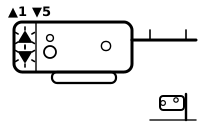
The opener did not sense the motor turning just after a command, so it hums or clicks and the door barely moves or does not move. LiftMaster notes this does not necessarily mean the motor has failed.
Applies to: LiftMaster and Chamberlain Security+ 2.0 and Security+ 3.0 openers with UP and DOWN arrows; codes 3-5 and 5-5 only on the wall-mounted jackshaft models 8500W/RJO70, 98022/RJO101 and 98032. What you see: the UP and DOWN arrows, 1 UP flash, then 5 DOWN flashes.
What LiftMaster says to do
- If the emergency release on a wall-mounted jackshaft opener has been pulled, LiftMaster says to reconnect the door to the opener and try again.
- If it keeps happening, LiftMaster says to contact a local garage door professional: the motor, the travel module or another internal part may need inspecting.
LiftMaster’s page sends a door that moves only 6 to 8 inches, and an opener that hums while the door stays put, to separate troubleshooting articles.
Source:
- Chamberlain Group Support (LiftMaster and Chamberlain): Garage Door Opener | Diagnostic Codes and UP/DOWN Flashing Lights — LiftMaster and Chamberlain Security+ 2.0 and Security+ 3.0 openers with UP and DOWN arrows; codes 3-5 and 5-5 only on the wall-mounted jackshaft models 8500W/RJO70, 98022/RJO101 and 98032. support.chamberlaingroup.com Checked 2026-09-29.
LiftMaster: Code 1-6: 1 UP flash, 6 DOWN flashes
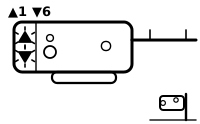
The opener sensed door movement it did not start, usually because the door is out of balance, or because a door on a jackshaft opener was moved by hand with the emergency release disconnected. The door opens fully, then drifts back down or moves on its own.
Applies to: LiftMaster and Chamberlain Security+ 2.0 and Security+ 3.0 openers with UP and DOWN arrows; codes 3-5 and 5-5 only on the wall-mounted jackshaft models 8500W/RJO70, 98022/RJO101 and 98032. What you see: the UP and DOWN arrows, 1 UP flash, then 6 DOWN flashes.
What LiftMaster says to do
- If the door drifts down after opening, LiftMaster says to do a door balance test.
- If the code appeared after the door was moved by hand on a jackshaft opener, LiftMaster says to reconnect the door to the opener and run it again.
- If the door stays out of balance, LiftMaster says to contact a local garage door professional.
Source:
- Chamberlain Group Support (LiftMaster and Chamberlain): Garage Door Opener | Diagnostic Codes and UP/DOWN Flashing Lights — LiftMaster and Chamberlain Security+ 2.0 and Security+ 3.0 openers with UP and DOWN arrows; codes 3-5 and 5-5 only on the wall-mounted jackshaft models 8500W/RJO70, 98022/RJO101 and 98032. support.chamberlaingroup.com Checked 2026-09-29.
LiftMaster: Codes 2-1 to 2-5: 2 UP flashes, 1 to 5 DOWN flashes
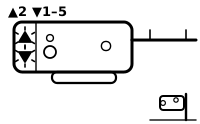
The opener detected a possible fault in an electronic component on its logic board, and does not respond to commands at all. LiftMaster gives all five codes the same meaning.
Applies to: LiftMaster and Chamberlain Security+ 2.0 and Security+ 3.0 openers with UP and DOWN arrows; codes 3-5 and 5-5 only on the wall-mounted jackshaft models 8500W/RJO70, 98022/RJO101 and 98032. What you see: the UP and DOWN arrows, 2 UP flashes, then 1 to 5 DOWN flashes.
What LiftMaster says to do
- LiftMaster says to disconnect the battery backup if there is one, unplug the opener, plug it back in, then reconnect the battery backup.
- If the code comes back, LiftMaster says to contact a garage door professional.
Source:
- Chamberlain Group Support (LiftMaster and Chamberlain): Garage Door Opener | Diagnostic Codes and UP/DOWN Flashing Lights — LiftMaster and Chamberlain Security+ 2.0 and Security+ 3.0 openers with UP and DOWN arrows; codes 3-5 and 5-5 only on the wall-mounted jackshaft models 8500W/RJO70, 98022/RJO101 and 98032. support.chamberlaingroup.com Checked 2026-09-29.
LiftMaster: Code 3-5: 3 UP flashes, 5 DOWN flashes
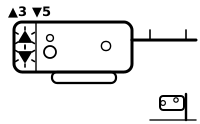
On the wall-mounted jackshaft models, the cable tension monitor sensed slack in a door cable, which LiftMaster treats as a safety hazard. The door reverses to open while it is closing.
Applies to: LiftMaster and Chamberlain Security+ 2.0 and Security+ 3.0 openers with UP and DOWN arrows; codes 3-5 and 5-5 only on the wall-mounted jackshaft models 8500W/RJO70, 98022/RJO101 and 98032. What you see: the UP and DOWN arrows, 3 UP flashes, then 5 DOWN flashes.
What LiftMaster says to do
- LiftMaster says: if a cable looks loose, frayed, damaged or off its drum, stop using the garage door and contact a professional.
- LiftMaster says to check whether the cable tension monitor has come unplugged from the logic board, reconnect it if so, and look over its wiring for damage.
LiftMaster’s page also checks the monitor’s roller position against the installation manual.
LiftMaster warns: do not loosen, adjust or remove garage door cables; they are under high tension and can cause serious injury.
Source:
- Chamberlain Group Support (LiftMaster and Chamberlain): Garage Door Opener | Diagnostic Codes and UP/DOWN Flashing Lights — LiftMaster and Chamberlain Security+ 2.0 and Security+ 3.0 openers with UP and DOWN arrows; codes 3-5 and 5-5 only on the wall-mounted jackshaft models 8500W/RJO70, 98022/RJO101 and 98032. support.chamberlaingroup.com Checked 2026-09-29.
LiftMaster: Code 4-1: 4 UP flashes, 1 DOWN flash
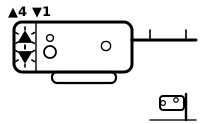
Resistance while closing: the opener sensed an unexpected change in motor speed on the way down, so the door reverses, stops or struggles at any point while closing, not only near the floor.
Applies to: LiftMaster and Chamberlain Security+ 2.0 and Security+ 3.0 openers with UP and DOWN arrows; codes 3-5 and 5-5 only on the wall-mounted jackshaft models 8500W/RJO70, 98022/RJO101 and 98032. What you see: the UP and DOWN arrows, 4 UP flashes, then 1 DOWN flash.
What LiftMaster says to do
- LiftMaster says to inspect the door’s path and tracks and remove bins, tools, broom handles or anything else in or near it.
- LiftMaster says to check the rollers and hinges for obstructions or wear, and lubricate them as the door maker’s maintenance instructions say.
- If the door tries to keep travelling after it reaches the floor, LiftMaster says to reprogram the travel limits.
LiftMaster warns: do not disconnect an open garage door from the opener; a weak or broken spring or an unbalanced door could make it fall unexpectedly.
Source:
- Chamberlain Group Support (LiftMaster and Chamberlain): Garage Door Opener | Diagnostic Codes and UP/DOWN Flashing Lights — LiftMaster and Chamberlain Security+ 2.0 and Security+ 3.0 openers with UP and DOWN arrows; codes 3-5 and 5-5 only on the wall-mounted jackshaft models 8500W/RJO70, 98022/RJO101 and 98032. support.chamberlaingroup.com Checked 2026-09-29.
LiftMaster: Code 4-2: 4 UP flashes, 2 DOWN flashes
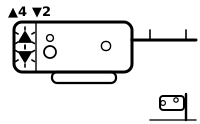
Resistance while opening: the door stops before it is fully open.
Applies to: LiftMaster and Chamberlain Security+ 2.0 and Security+ 3.0 openers with UP and DOWN arrows; codes 3-5 and 5-5 only on the wall-mounted jackshaft models 8500W/RJO70, 98022/RJO101 and 98032. What you see: the UP and DOWN arrows, 4 UP flashes, then 2 DOWN flashes.
What LiftMaster says to do
- LiftMaster says to close the door with the wall control, inspect the path and tracks, remove anything in the way and try the door again.
- If it still does not open fully, LiftMaster says to check the balance of the door.
Source:
- Chamberlain Group Support (LiftMaster and Chamberlain): Garage Door Opener | Diagnostic Codes and UP/DOWN Flashing Lights — LiftMaster and Chamberlain Security+ 2.0 and Security+ 3.0 openers with UP and DOWN arrows; codes 3-5 and 5-5 only on the wall-mounted jackshaft models 8500W/RJO70, 98022/RJO101 and 98032. support.chamberlaingroup.com Checked 2026-09-29.
LiftMaster: Code 4-3: 4 UP flashes, 3 DOWN flashes
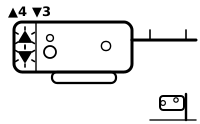
Motor speed lost while closing: the motor slowed unexpectedly, and the door stops and reverses just before it touches the floor.
Applies to: LiftMaster and Chamberlain Security+ 2.0 and Security+ 3.0 openers with UP and DOWN arrows; codes 3-5 and 5-5 only on the wall-mounted jackshaft models 8500W/RJO70, 98022/RJO101 and 98032. What you see: the UP and DOWN arrows, 4 UP flashes, then 3 DOWN flashes.
What LiftMaster says to do
- LiftMaster says to inspect the door’s path and tracks, remove anything in the way, check the rollers and hinges for obstructions or wear, then try the door again.
Source:
- Chamberlain Group Support (LiftMaster and Chamberlain): Garage Door Opener | Diagnostic Codes and UP/DOWN Flashing Lights — LiftMaster and Chamberlain Security+ 2.0 and Security+ 3.0 openers with UP and DOWN arrows; codes 3-5 and 5-5 only on the wall-mounted jackshaft models 8500W/RJO70, 98022/RJO101 and 98032. support.chamberlaingroup.com Checked 2026-09-29.
LiftMaster: Code 4-4: 4 UP flashes, 4 DOWN flashes
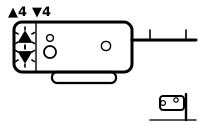
Motor speed lost while opening: the motor slowed unexpectedly and the door stops before it is fully open.
Applies to: LiftMaster and Chamberlain Security+ 2.0 and Security+ 3.0 openers with UP and DOWN arrows; codes 3-5 and 5-5 only on the wall-mounted jackshaft models 8500W/RJO70, 98022/RJO101 and 98032. What you see: the UP and DOWN arrows, 4 UP flashes, then 4 DOWN flashes.
What LiftMaster says to do
- LiftMaster says to inspect the door’s path and tracks, remove anything in the way, check the rollers and hinges, then try again.
- If the code returns, LiftMaster describes a door balance test; if a torsion spring then looks broken, it says to stop troubleshooting and contact a professional.
Source:
- Chamberlain Group Support (LiftMaster and Chamberlain): Garage Door Opener | Diagnostic Codes and UP/DOWN Flashing Lights — LiftMaster and Chamberlain Security+ 2.0 and Security+ 3.0 openers with UP and DOWN arrows; codes 3-5 and 5-5 only on the wall-mounted jackshaft models 8500W/RJO70, 98022/RJO101 and 98032. support.chamberlaingroup.com Checked 2026-09-29.
LiftMaster: Code 4-5: 4 UP flashes, 5 DOWN flashes
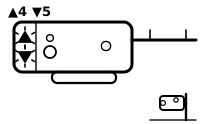
The opener does not recognise the travel module installed in it, usually right after a part was replaced, and the door will not move.
Applies to: LiftMaster and Chamberlain Security+ 2.0 and Security+ 3.0 openers with UP and DOWN arrows; codes 3-5 and 5-5 only on the wall-mounted jackshaft models 8500W/RJO70, 98022/RJO101 and 98032. What you see: the UP and DOWN arrows, 4 UP flashes, then 5 DOWN flashes.
What LiftMaster says to do
- LiftMaster says to find the model number on the label on the opener, look up the correct travel module for that model in the owner’s manual, and fit the correct part if the one installed is wrong.
Source:
- Chamberlain Group Support (LiftMaster and Chamberlain): Garage Door Opener | Diagnostic Codes and UP/DOWN Flashing Lights — LiftMaster and Chamberlain Security+ 2.0 and Security+ 3.0 openers with UP and DOWN arrows; codes 3-5 and 5-5 only on the wall-mounted jackshaft models 8500W/RJO70, 98022/RJO101 and 98032. support.chamberlaingroup.com Checked 2026-09-29.
LiftMaster: Code 5-5: 5 UP flashes, 5 DOWN flashes
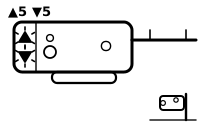
On the wall-mounted jackshaft models, the door ignores the myQ app and schedules (the wall control and remotes still work) because a myQ-compatible light must be installed and paired before the opener will move the door unattended.
Applies to: LiftMaster and Chamberlain Security+ 2.0 and Security+ 3.0 openers with UP and DOWN arrows; codes 3-5 and 5-5 only on the wall-mounted jackshaft models 8500W/RJO70, 98022/RJO101 and 98032. What you see: the UP and DOWN arrows, 5 UP flashes, then 5 DOWN flashes.
What LiftMaster says to do
- LiftMaster says to install and plug in a myQ-compatible light, reprogram it if the opener’s memory was cleared, or turn off schedules in the myQ app.
Source:
- Chamberlain Group Support (LiftMaster and Chamberlain): Garage Door Opener | Diagnostic Codes and UP/DOWN Flashing Lights — LiftMaster and Chamberlain Security+ 2.0 and Security+ 3.0 openers with UP and DOWN arrows; codes 3-5 and 5-5 only on the wall-mounted jackshaft models 8500W/RJO70, 98022/RJO101 and 98032. support.chamberlaingroup.com Checked 2026-09-29.
The LED beside the Learn button
LiftMaster: Learn button LED flashes once
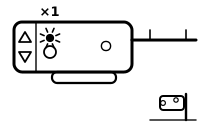
A safety-sensor problem that stops the door closing: a sensor wire is broken or disconnected.
Applies to: LiftMaster and Chamberlain openers without UP and DOWN arrows, which flash the LED beside the Learn button. What you see: the LED beside the Learn button, one flash, repeating.
What LiftMaster says to do
This is a safety-sensor code. The sensors stop the door closing on a person, a pet or a car. semiatic repeats only LiftMaster’s own alignment and cleaning steps; nothing here tells you to work around the sensors, and LiftMaster’s wiring checks are in its own page.
- LiftMaster says to clean the sensor lenses.
- LiftMaster says to realign the sensors until their lights glow steadily, and make sure the door track they are mounted on is secure.
LiftMaster’s page also has you look for a break or short in the sensor wires, behind walls and at the opener.
The same count on another maker’s opener means something else: Genie, Excelerator: green LED blinks once, repeating; Genie, 600/700/800 series: red LED blinks once, pause, repeat; Genie, 600/700/800 series: green LED blinks once, pause, repeat; Linear, Light flashes 1 time.
Source:
- Chamberlain Group Support (LiftMaster and Chamberlain): What Does the Flashing LED Next to the Learn Button Mean — LiftMaster and Chamberlain openers without UP and DOWN arrows, which flash the LED beside the Learn button. support.chamberlaingroup.com Checked 2026-09-29.
LiftMaster: Learn button LED flashes 2 times
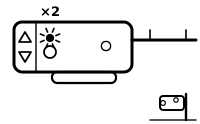
A safety-sensor problem that stops the door closing: a sensor wire is shorted, or the black and white wires are reversed.
Applies to: LiftMaster and Chamberlain openers without UP and DOWN arrows, which flash the LED beside the Learn button. What you see: the LED beside the Learn button, 2 flashes, repeating.
What LiftMaster says to do
This is a safety-sensor code. The sensors stop the door closing on a person, a pet or a car. semiatic repeats only LiftMaster’s own alignment and cleaning steps; nothing here tells you to work around the sensors, and LiftMaster’s wiring checks are in its own page.
- LiftMaster says to clean the sensor lenses.
- LiftMaster says to realign the sensors until their lights glow steadily, and make sure the door track they are mounted on is secure.
LiftMaster’s page also covers finding the short and putting the wires on the right terminals at the opener.
The same count on another maker’s opener means something else: Genie, Excelerator: green LED blinks 2 times, repeating; Genie, 600/700/800 series: green LED blinks 2 times, pause, repeat; Linear, Light flashes 2 times.
Source:
- Chamberlain Group Support (LiftMaster and Chamberlain): What Does the Flashing LED Next to the Learn Button Mean — LiftMaster and Chamberlain openers without UP and DOWN arrows, which flash the LED beside the Learn button. support.chamberlaingroup.com Checked 2026-09-29.
LiftMaster: Learn button LED flashes 3 times
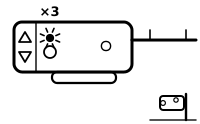
A door control fault: the light or screen on the wall-mounted door control is not lit.
Applies to: LiftMaster and Chamberlain openers without UP and DOWN arrows, which flash the LED beside the Learn button. What you see: the LED beside the Learn button, 3 flashes, repeating.
What LiftMaster says to do
- LiftMaster says to check the door control’s wires for staples or shorts.
LiftMaster’s page then describes a wire test at the door control and at the opener’s terminals, and says it does not apply to Security+ 2.0 openers.
The same count on another maker’s opener means something else: Genie, Excelerator: green LED blinks 3 times, repeating; Genie, 600/700/800 series: green LED blinks 3 times, pause, repeat; Linear, Light flashes 3 times.
Source:
- Chamberlain Group Support (LiftMaster and Chamberlain): What Does the Flashing LED Next to the Learn Button Mean — LiftMaster and Chamberlain openers without UP and DOWN arrows, which flash the LED beside the Learn button. support.chamberlaingroup.com Checked 2026-09-29.
LiftMaster: Learn button LED flashes 4 times
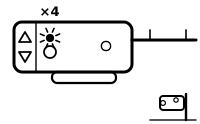
The sensors are out of line: the sending sensor works but the receiving sensor’s light is dim or flashing.
Applies to: LiftMaster and Chamberlain openers without UP and DOWN arrows, which flash the LED beside the Learn button. What you see: the LED beside the Learn button, 4 flashes, repeating.
What LiftMaster says to do
This is a safety-sensor code. The sensors stop the door closing on a person, a pet or a car. semiatic repeats only LiftMaster’s own alignment and cleaning steps; nothing here tells you to work around the sensors, and LiftMaster’s wiring checks are in its own page.
- LiftMaster says to clean the sensor lenses.
- LiftMaster says to realign the sensors until their lights glow steadily, and make sure the door track they are mounted on is secure.
The same count on another maker’s opener means something else: Genie, Excelerator: green LED blinks 4 times, repeating; Genie, 600/700/800 series: green LED blinks 4 times, pause, repeat; Linear, Light flashes 4 times.
Source:
- Chamberlain Group Support (LiftMaster and Chamberlain): What Does the Flashing LED Next to the Learn Button Mean — LiftMaster and Chamberlain openers without UP and DOWN arrows, which flash the LED beside the Learn button. support.chamberlaingroup.com Checked 2026-09-29.
LiftMaster: Learn button LED flashes 5 times
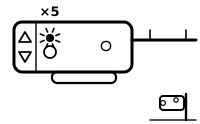
The opener sensed no motor rotation in the first second of a run, which LiftMaster says is usually a mechanical obstruction.
Applies to: LiftMaster and Chamberlain openers without UP and DOWN arrows, which flash the LED beside the Learn button. What you see: the LED beside the Learn button, 5 flashes, repeating.
What LiftMaster says to do
- If the opener otherwise works normally, LiftMaster says to unplug it for 5 seconds to reset it.
If it hums and then stops, LiftMaster’s page goes through the door’s balance and springs, manual locks, the trolley position and parts inside the opener.
The same count on another maker’s opener means something else: Genie, Excelerator: green LED blinks 5 times, repeating; Genie, 600/700/800 series: green LED blinks 5 times, pause, repeat; Linear, Light flashes 5 times.
Source:
- Chamberlain Group Support (LiftMaster and Chamberlain): What Does the Flashing LED Next to the Learn Button Mean — LiftMaster and Chamberlain openers without UP and DOWN arrows, which flash the LED beside the Learn button. support.chamberlaingroup.com Checked 2026-09-29.
LiftMaster: Learn button LED flashes 6 times
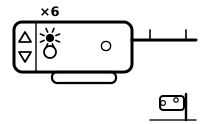
A motor circuit fault. LiftMaster says the motor itself rarely fails and points to replacing the receiver logic board.
Applies to: LiftMaster and Chamberlain openers without UP and DOWN arrows, which flash the LED beside the Learn button. What you see: the LED beside the Learn button, 6 flashes, repeating.
What LiftMaster says to do
LiftMaster’s page gives no step for this code that is repeated here; the meaning above is what it says.
The same count on another maker’s opener means something else: Genie, Excelerator: green LED blinks 6 times, repeating; Linear, Light flashes 6 times.
Source:
- Chamberlain Group Support (LiftMaster and Chamberlain): What Does the Flashing LED Next to the Learn Button Mean — LiftMaster and Chamberlain openers without UP and DOWN arrows, which flash the LED beside the Learn button. support.chamberlaingroup.com Checked 2026-09-29.
The opener’s own light bulbs
LiftMaster: Opener lights flash 10 times
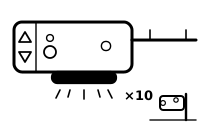
The opener’s own lights flash 10 times and the door will not close: the safety reversing sensors have a problem.
Applies to: LiftMaster and Chamberlain openers with safety reversing sensors and a door control with a LOCK button. What you see: the opener’s own lights, 10 flashes, repeating.
What LiftMaster says to do
This is a safety-sensor code. The sensors stop the door closing on a person, a pet or a car. semiatic repeats only LiftMaster’s own alignment and cleaning steps; nothing here tells you to work around the sensors, and LiftMaster’s wiring checks are in its own page.
- LiftMaster says the sensors sit either side of the door, no higher than 6 inches above the floor, usually on the door tracks; remove anything between them.
- LiftMaster says to loosen the wing nut on each sensor, align it so the lenses point at each other, and tighten the wing nut once its light glows steadily; then try the door, and realign both again if it still will not close.
LiftMaster’s page notes that strong sunlight can interfere with the sensors’ infrared beam, and that the cause may otherwise be the sensors or their wiring.
Source:
- Chamberlain Group Support (LiftMaster and Chamberlain): Garage Door Opener Light Blinks but The Door Won’t Close — LiftMaster and Chamberlain openers with safety reversing sensors and a door control with a LOCK button. support.chamberlaingroup.com Checked 2026-09-29.
LiftMaster: Opener lights flash 2 times
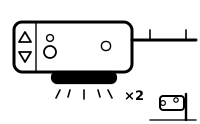
The LOCK feature on the wall door control is on, so the door does not respond as normal.
Applies to: LiftMaster and Chamberlain openers with safety reversing sensors and a door control with a LOCK button. What you see: the opener’s own lights, 2 flashes, repeating.
What LiftMaster says to do
- LiftMaster says to press the LOCK button on the door control to turn the feature off, then try the remote control again.
The same count on another maker’s opener means something else: Genie, Excelerator: green LED blinks 2 times, repeating; Genie, 600/700/800 series: green LED blinks 2 times, pause, repeat; Linear, Light flashes 2 times.
Source:
- Chamberlain Group Support (LiftMaster and Chamberlain): Garage Door Opener Light Blinks but The Door Won’t Close — LiftMaster and Chamberlain openers with safety reversing sensors and a door control with a LOCK button. support.chamberlaingroup.com Checked 2026-09-29.
Sources
LiftMaster’s own help pages only, read on the date shown. Nothing here comes from forums or third-party “codes explained” sites.
- Chamberlain Group Support (LiftMaster and Chamberlain): Garage Door Opener | Diagnostic Codes and UP/DOWN Flashing Lights — LiftMaster and Chamberlain Security+ 2.0 and Security+ 3.0 openers with UP and DOWN arrows; codes 3-5 and 5-5 only on the wall-mounted jackshaft models 8500W/RJO70, 98022/RJO101 and 98032. support.chamberlaingroup.com Checked 2026-09-29.
- Chamberlain Group Support (LiftMaster and Chamberlain): What Does the Flashing LED Next to the Learn Button Mean — LiftMaster and Chamberlain openers without UP and DOWN arrows, which flash the LED beside the Learn button. support.chamberlaingroup.com Checked 2026-09-29.
- Chamberlain Group Support (LiftMaster and Chamberlain): Garage Door Opener Light Blinks but The Door Won’t Close — LiftMaster and Chamberlain openers with safety reversing sensors and a door control with a LOCK button. support.chamberlaingroup.com Checked 2026-09-29.
- Chamberlain Group Support (LiftMaster and Chamberlain): My Gate is Not Closing - Alignment of Photo Eye Sensors for Gate Operators — LiftMaster gate operators with LMRRUL (retro-reflective) or LMTBUL (through-beam) photo eyes; not garage door openers. support.chamberlaingroup.com Checked 2026-10-13.
- Chamberlain Group Support (LiftMaster and Chamberlain): Troubleshoot Garage Door Safety Sensors that Are Off or Flicker — LiftMaster and Chamberlain safety reversing sensors: amber LED on the sending sensor, green LED on the receiving sensor. support.chamberlaingroup.com Checked 2026-10-13.
- Chamberlain Group Support (LiftMaster and Chamberlain): Why the LED or Screen flashes on the door control — LiftMaster and Chamberlain wall door controls with an LED, or a Smart Control Panel with a screen. support.chamberlaingroup.com Checked 2026-10-13.
Find a code by which light flashes and how many times, on any maker’s opener →