Genie garage door opener: what each blinking light means
Genie openers signal on small LEDs on the powerhead (the motor unit on the ceiling), and the Safe-T-Beam safety sensors by the door have their own red light. Two Genie families count differently: on the Excelerator series one green LED under the lens cover blinks 1 to 8 times; on the ChainLift, ReliaG, BeltLift and QuietLift 600, 700 and 800 models a red LED and a green LED each have their own codes. So read the model on the powerhead label first: 2 green blinks is a controller board fault on an Excelerator, but an unset UP limit or a sensor problem on a ChainLift 800.
Count the blinks between pauses; the pattern repeats. On the Excelerator series, a green LED that lights and then goes out when power is applied is normal. The Safe-T-Beam lenses are mounted 5 to 6 inches from the floor on either side of the door opening, facing each other.
Genie’s safety line: “If you suspect a problem with the garage door hardware or springs, contact an authorized Genie dealer or a trained door technician.”
No repair advice of our own. The steps in each code below are only Genie’s, as its own page states them; semiatic gives no repair instructions of its own. For anything beyond them, Genie’s page and a trained door technician are the authority.
A status LED on the motor unit
Genie: Excelerator: green LED blinks once, repeating
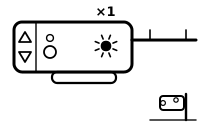
Motor drive board interrupt. Genie says an improperly balanced door, a damaged or worn counterbalance spring or binding door hardware can cause this signal.
Applies to: Excelerator series: H8000, H8000-07, H8000D, ISD990, ISD995, ISD1000, PRO99, PRO99-21C, PRO99FN, CMD9900. What you see: the status LED on the motor unit, green one flash, repeating.
What Genie says to do
- Genie says to reset the opener: unplug it for 5 seconds and plug it back in; the first run afterwards is at slow speed.
- If it persists, Genie says to check the door’s balance and condition.
Genie’s page also lists checks on the motor drive board’s fuse and its ribbon cable.
The same count on another maker’s opener means something else: LiftMaster, Learn button LED flashes once; Linear, Light flashes 1 time.
Source:
- The Genie Company: Genie Excelerator® Series Garage Door Opener Self-Diagnostic Troubleshooting — Excelerator series: H8000, H8000-07, H8000D, ISD990, ISD995, ISD1000, PRO99, PRO99-21C, PRO99FN, CMD9900. store.geniecompany.com Checked 2026-09-29.
Genie: Excelerator: green LED blinks 2 times, repeating
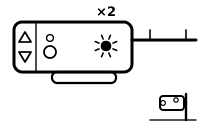
Controller board interrupt.
Applies to: Excelerator series: H8000, H8000-07, H8000D, ISD990, ISD995, ISD1000, PRO99, PRO99-21C, PRO99FN, CMD9900. What you see: the status LED on the motor unit, green 2 flashes, repeating.
What Genie says to do
- Genie says to reset the opener: unplug it for 5 seconds and plug it back in.
Genie’s page also says to check the ribbon cable between the motor board and the controller board.
The same count on another maker’s opener means something else: LiftMaster, Learn button LED flashes 2 times; LiftMaster, Opener lights flash 2 times; Linear, Light flashes 2 times.
Source:
- The Genie Company: Genie Excelerator® Series Garage Door Opener Self-Diagnostic Troubleshooting — Excelerator series: H8000, H8000-07, H8000D, ISD990, ISD995, ISD1000, PRO99, PRO99-21C, PRO99FN, CMD9900. store.geniecompany.com Checked 2026-09-29.
Genie: Excelerator: green LED blinks 3 times, repeating
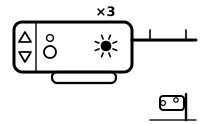
The opener has overheated or has been run too many times in a row.
Applies to: Excelerator series: H8000, H8000-07, H8000D, ISD990, ISD995, ISD1000, PRO99, PRO99-21C, PRO99FN, CMD9900. What you see: the status LED on the motor unit, green 3 flashes, repeating.
What Genie says to do
- Genie says not to unplug the opener or disconnect its power: wait 10 minutes; it gets back 5 runs for each 10 minutes of rest.
The same count on another maker’s opener means something else: LiftMaster, Learn button LED flashes 3 times; Linear, Light flashes 3 times.
Source:
- The Genie Company: Genie Excelerator® Series Garage Door Opener Self-Diagnostic Troubleshooting — Excelerator series: H8000, H8000-07, H8000D, ISD990, ISD995, ISD1000, PRO99, PRO99-21C, PRO99FN, CMD9900. store.geniecompany.com Checked 2026-09-29.
Genie: Excelerator: green LED blinks 4 times, repeating
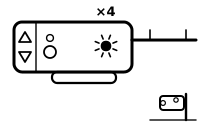
The force settings are incorrect.
Applies to: Excelerator series: H8000, H8000-07, H8000D, ISD990, ISD995, ISD1000, PRO99, PRO99-21C, PRO99FN, CMD9900. What you see: the status LED on the motor unit, green 4 flashes, repeating.
What Genie says to do
- Genie says to check and adjust the force settings as the owner’s manual describes, and to check the condition of the door.
The same count on another maker’s opener means something else: LiftMaster, Learn button LED flashes 4 times; Linear, Light flashes 4 times.
Source:
- The Genie Company: Genie Excelerator® Series Garage Door Opener Self-Diagnostic Troubleshooting — Excelerator series: H8000, H8000-07, H8000D, ISD990, ISD995, ISD1000, PRO99, PRO99-21C, PRO99FN, CMD9900. store.geniecompany.com Checked 2026-09-29.
Genie: Excelerator: green LED blinks 5 times, repeating
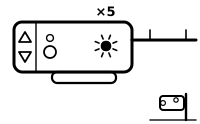
Safe-T-Beam malfunction. The safety sensors must be working for the door to close.
Applies to: Excelerator series: H8000, H8000-07, H8000D, ISD990, ISD995, ISD1000, PRO99, PRO99-21C, PRO99FN, CMD9900. What you see: the status LED on the motor unit, green 5 flashes, repeating.
What Genie says to do
This is a safety-sensor code. The sensors stop the door closing on a person, a pet or a car. semiatic repeats only Genie’s own alignment and cleaning steps; nothing here tells you to work around the sensors, and Genie’s wiring checks are in its own page.
- Genie says to make sure the Safe-T-Beam lenses are clean and that nothing is blocking the beam.
- Genie says the lenses should be mounted 5 to 6 inches from the floor on either side of the door opening, aligned facing one another.
Genie’s pages also point to loose wires and to the owner’s manual for further causes.
The same count on another maker’s opener means something else: LiftMaster, Learn button LED flashes 5 times; Linear, Light flashes 5 times.
Source:
- The Genie Company: Genie Excelerator® Series Garage Door Opener Self-Diagnostic Troubleshooting — Excelerator series: H8000, H8000-07, H8000D, ISD990, ISD995, ISD1000, PRO99, PRO99-21C, PRO99FN, CMD9900. store.geniecompany.com Checked 2026-09-29.
- The Genie Company: Why is the red Safe-T-Beam® light blinking? — Genie openers with Safe-T-Beam sensors (the page names no model). support.geniecompany.com Checked 2026-09-29.
Genie: Excelerator: green LED blinks 6 times, repeating
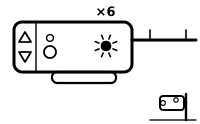
The wall console does not work.
Applies to: Excelerator series: H8000, H8000-07, H8000D, ISD990, ISD995, ISD1000, PRO99, PRO99-21C, PRO99FN, CMD9900. What you see: the status LED on the motor unit, green 6 flashes, repeating.
What Genie says to do
- Genie says to check the console wiring for shorts, tight staples or pinched wires, and the connections at both the powerhead and the console.
The same count on another maker’s opener means something else: LiftMaster, Learn button LED flashes 6 times; Linear, Light flashes 6 times.
Source:
- The Genie Company: Genie Excelerator® Series Garage Door Opener Self-Diagnostic Troubleshooting — Excelerator series: H8000, H8000-07, H8000D, ISD990, ISD995, ISD1000, PRO99, PRO99-21C, PRO99FN, CMD9900. store.geniecompany.com Checked 2026-09-29.
Genie: Excelerator: green LED blinks 7 times, repeating
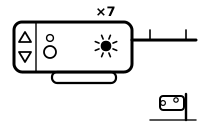
The limit switches are not working.
Applies to: Excelerator series: H8000, H8000-07, H8000D, ISD990, ISD995, ISD1000, PRO99, PRO99-21C, PRO99FN, CMD9900. What you see: the status LED on the motor unit, green 7 flashes, repeating.
What Genie says to do
- Genie says to check the wire connections at the powerhead terminals and look for shorted or pinched wires under the limit switch brackets.
The same count on another maker’s opener means something else: Linear, Light flashes 7 times.
Source:
- The Genie Company: Genie Excelerator® Series Garage Door Opener Self-Diagnostic Troubleshooting — Excelerator series: H8000, H8000-07, H8000D, ISD990, ISD995, ISD1000, PRO99, PRO99-21C, PRO99FN, CMD9900. store.geniecompany.com Checked 2026-09-29.
Genie: Excelerator: green LED blinks 8 times, repeating
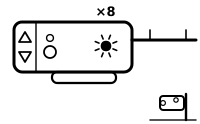
The wall console is locked (the vacation lock is on).
Applies to: Excelerator series: H8000, H8000-07, H8000D, ISD990, ISD995, ISD1000, PRO99, PRO99-21C, PRO99FN, CMD9900. What you see: the status LED on the motor unit, green 8 flashes, repeating.
What Genie says to do
- Genie says to move the vacation locking switch on the wall console from Lock to the unlocked position.
Source:
- The Genie Company: Genie Excelerator® Series Garage Door Opener Self-Diagnostic Troubleshooting — Excelerator series: H8000, H8000-07, H8000D, ISD990, ISD995, ISD1000, PRO99, PRO99-21C, PRO99FN, CMD9900. store.geniecompany.com Checked 2026-09-29.
Genie: 600/700/800 series: red LED on steady
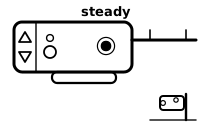
Setup is not complete.
Applies to: ChainLift 600 (1022), ReliaG 600 (1024), BeltLift 600 (1042), ChainLift 800 (2022), ReliaG 800 (2024), ChainLift 700 (2027), QuietLift 800 (2042). What you see: the status LED on the motor unit, red on steady, not flashing.
What Genie says to do
- Genie says to complete the programming shown in the owner’s manual: the travel limits and registering the remotes and other wireless devices.
Source:
- The Genie Company: Genie Garage Door Opener Troubleshooting Guide- for models 1022, 1024, 1042, 2022, 2024, 2042, 2027 — ChainLift 600 (1022), ReliaG 600 (1024), BeltLift 600 (1042), ChainLift 800 (2022), ReliaG 800 (2024), ChainLift 700 (2027), QuietLift 800 (2042). store.geniecompany.com Checked 2026-09-29.
Genie: 600/700/800 series: red LED blinks once, pause, repeat
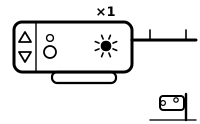
A remote is not programmed to the opener.
Applies to: ChainLift 600 (1022), ReliaG 600 (1024), BeltLift 600 (1042), ChainLift 800 (2022), ReliaG 800 (2024), ChainLift 700 (2027), QuietLift 800 (2042). What you see: the status LED on the motor unit, red one flash, repeating.
What Genie says to do
- Genie says to program the garage door opener remote.
The same count on another maker’s opener means something else: LiftMaster, Learn button LED flashes once; Linear, Light flashes 1 time.
Source:
- The Genie Company: Genie Garage Door Opener Troubleshooting Guide- for models 1022, 1024, 1042, 2022, 2024, 2042, 2027 — ChainLift 600 (1022), ReliaG 600 (1024), BeltLift 600 (1042), ChainLift 800 (2022), ReliaG 800 (2024), ChainLift 700 (2027), QuietLift 800 (2042). store.geniecompany.com Checked 2026-09-29.
Genie: 600/700/800 series: green LED blinks once, pause, repeat
The limits are not fully programmed, or the Safe-T-Beam was blocked or the door met an obstruction on the way down.
Applies to: ChainLift 600 (1022), ReliaG 600 (1024), BeltLift 600 (1042), ChainLift 800 (2022), ReliaG 800 (2024), ChainLift 700 (2027), QuietLift 800 (2042). What you see: the status LED on the motor unit, green one flash, repeating.
What Genie says to do
- Genie says to program the limits and to remove anything in the doorway.
Genie’s page also lists inspecting the garage door springs; its safety line below says who should deal with them.
The same count on another maker’s opener means something else: LiftMaster, Learn button LED flashes once; Linear, Light flashes 1 time.
Source:
- The Genie Company: Genie Garage Door Opener Troubleshooting Guide- for models 1022, 1024, 1042, 2022, 2024, 2042, 2027 — ChainLift 600 (1022), ReliaG 600 (1024), BeltLift 600 (1042), ChainLift 800 (2022), ReliaG 800 (2024), ChainLift 700 (2027), QuietLift 800 (2042). store.geniecompany.com Checked 2026-09-29.
Genie: 600/700/800 series: green LED blinks 2 times, pause, repeat
The UP limit is not set, the powerhead wiring has failed, or the Safe-T-Beams are out of line or continuously blocked.
Applies to: ChainLift 600 (1022), ReliaG 600 (1024), BeltLift 600 (1042), ChainLift 800 (2022), ReliaG 800 (2024), ChainLift 700 (2027), QuietLift 800 (2042). What you see: the status LED on the motor unit, green 2 flashes, repeating.
What Genie says to do
- Genie says to set the UP limit, inspect the wiring and connections, realign the Safe-T-Beam lenses and clear anything from the beam’s path.
The same count on another maker’s opener means something else: LiftMaster, Learn button LED flashes 2 times; LiftMaster, Opener lights flash 2 times; Linear, Light flashes 2 times.
Source:
- The Genie Company: Genie Garage Door Opener Troubleshooting Guide- for models 1022, 1024, 1042, 2022, 2024, 2042, 2027 — ChainLift 600 (1022), ReliaG 600 (1024), BeltLift 600 (1042), ChainLift 800 (2022), ReliaG 800 (2024), ChainLift 700 (2027), QuietLift 800 (2042). store.geniecompany.com Checked 2026-09-29.
Genie: 600/700/800 series: green LED blinks 3 times, pause, repeat
The limits were programmed in the wrong order.
Applies to: ChainLift 600 (1022), ReliaG 600 (1024), BeltLift 600 (1042), ChainLift 800 (2022), ReliaG 800 (2024), ChainLift 700 (2027), QuietLift 800 (2042). What you see: the status LED on the motor unit, green 3 flashes, repeating.
What Genie says to do
- Genie says to clear the limits and program them again as section 6 of the owner’s manual shows.
The same count on another maker’s opener means something else: LiftMaster, Learn button LED flashes 3 times; Linear, Light flashes 3 times.
Source:
- The Genie Company: Genie Garage Door Opener Troubleshooting Guide- for models 1022, 1024, 1042, 2022, 2024, 2042, 2027 — ChainLift 600 (1022), ReliaG 600 (1024), BeltLift 600 (1042), ChainLift 800 (2022), ReliaG 800 (2024), ChainLift 700 (2027), QuietLift 800 (2042). store.geniecompany.com Checked 2026-09-29.
Genie: 600/700/800 series: green LED blinks 4 times, pause, repeat
The wall button’s wire is shorted or its connections are reversed.
Applies to: ChainLift 600 (1022), ReliaG 600 (1024), BeltLift 600 (1042), ChainLift 800 (2022), ReliaG 800 (2024), ChainLift 700 (2027), QuietLift 800 (2042). What you see: the status LED on the motor unit, green 4 flashes, repeating.
What Genie says to do
- Genie says to inspect the wall button and its wire (staples can cut the insulation), replace the wall control if it is damaged, and reverse the wires at the powerhead terminals as section 3 of the owner’s manual shows.
The same count on another maker’s opener means something else: LiftMaster, Learn button LED flashes 4 times; Linear, Light flashes 4 times.
Source:
- The Genie Company: Genie Garage Door Opener Troubleshooting Guide- for models 1022, 1024, 1042, 2022, 2024, 2042, 2027 — ChainLift 600 (1022), ReliaG 600 (1024), BeltLift 600 (1042), ChainLift 800 (2022), ReliaG 800 (2024), ChainLift 700 (2027), QuietLift 800 (2042). store.geniecompany.com Checked 2026-09-29.
Genie: 600/700/800 series: green LED blinks 5 times, pause, repeat
The chain or belt is too tight, or the control system has a fault.
Applies to: ChainLift 600 (1022), ReliaG 600 (1024), BeltLift 600 (1042), ChainLift 800 (2022), ReliaG 800 (2024), ChainLift 700 (2027), QuietLift 800 (2042). What you see: the status LED on the motor unit, green 5 flashes, repeating.
What Genie says to do
- Genie says to adjust the chain or belt tension as section 1 of the owner’s manual shows, and otherwise to contact Genie customer service for technical support.
The same count on another maker’s opener means something else: LiftMaster, Learn button LED flashes 5 times; Linear, Light flashes 5 times.
Source:
- The Genie Company: Genie Garage Door Opener Troubleshooting Guide- for models 1022, 1024, 1042, 2022, 2024, 2042, 2027 — ChainLift 600 (1022), ReliaG 600 (1024), BeltLift 600 (1042), ChainLift 800 (2022), ReliaG 800 (2024), ChainLift 700 (2027), QuietLift 800 (2042). store.geniecompany.com Checked 2026-09-29.
The light on a safety sensor (photo eye)
Genie: Safe-T-Beam sensor: red light blinking
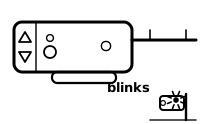
A Safe-T-Beam malfunction has occurred. Genie calls the Safe-T-Beam a government-required safety feature that must be installed for a Genie opener to work.
Applies to: Genie openers with Safe-T-Beam sensors (the page names no model). What you see: the safety sensor’s light, red blinking (the maker gives no count).
What Genie says to do
This is a safety-sensor code. The sensors stop the door closing on a person, a pet or a car. semiatic repeats only Genie’s own alignment and cleaning steps; nothing here tells you to work around the sensors, and Genie’s wiring checks are in its own page.
- Genie says to make sure the lenses are clean and that nothing is obstructing the beam.
- Genie says the lenses should be mounted 5 to 6 inches from the floor on either side of the door opening, aligned facing one another.
Genie’s page also says to check for loose wires, and if the light keeps blinking, to see the owner’s manual for more causes.
Source:
- The Genie Company: Why is the red Safe-T-Beam® light blinking? — Genie openers with Safe-T-Beam sensors (the page names no model). support.geniecompany.com Checked 2026-09-29.
Sources
Genie’s own help pages only, read on the date shown. Nothing here comes from forums or third-party “codes explained” sites.
- The Genie Company: Genie Excelerator® Series Garage Door Opener Self-Diagnostic Troubleshooting — Excelerator series: H8000, H8000-07, H8000D, ISD990, ISD995, ISD1000, PRO99, PRO99-21C, PRO99FN, CMD9900. store.geniecompany.com Checked 2026-09-29.
- The Genie Company: Genie Garage Door Opener Troubleshooting Guide- for models 1022, 1024, 1042, 2022, 2024, 2042, 2027 — ChainLift 600 (1022), ReliaG 600 (1024), BeltLift 600 (1042), ChainLift 800 (2022), ReliaG 800 (2024), ChainLift 700 (2027), QuietLift 800 (2042). store.geniecompany.com Checked 2026-09-29.
- The Genie Company: Why is the red Safe-T-Beam® light blinking? — Genie openers with Safe-T-Beam sensors (the page names no model). support.geniecompany.com Checked 2026-09-29.
Find a code by which light flashes and how many times, on any maker’s opener →