Tassimo Happy: what the lights mean
T DISC pod machine with a status display on the control panel and separate Fill water tank and Descale LEDs
The Happy’s control panel has a Start / Stop button, a status display and two LEDs: Fill water tank and Descale. It signals more than the Vivy or Suny do: the status display can turn red, and its manual separates a lit Descale LED (descale soon) from a flashing one (descale at once). It is also the one Tassimo manual here that names a power-supply fault, every LED flashing. The Happy goes to sleep with every LED dark, so an unlit machine is usually just idle.
Every Tassimo Happy light we could source, 9 in all, each with Tassimo’s meaning and steps. This is the Happy’s pattern; another Tassimo machine may use the same light for something else — check the manual for your model.
No LED lit
Off or no power
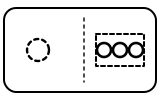
Usually the Happy is only asleep. If pressing Start / Stop wakes nothing, the manual’s next row applies: “The appliance has no power supply. Check to see whether the appliance is connected to the mains.”
“No LED is lit. The appliance is in idle mode. Press Start / Stop button.”
- Which light
- Several lights or symbols at once
- Colour
- No light
- Steady or flashing
- Off
What Tassimo says to do
- Press the Start / Stop button.
- If nothing lights, check the plug and the socket.
Source:
- Tassimo: TASSIMO HAPPY instruction manual, part 2: At a glance and Troubleshooting — Tassimo Happy (extended manual, English section). www.tassimo.com Checked 2026-10-16.
Status display red, and it will not brew
Fault or blockage

The machine cannot start a drink. The manual lists four causes in this row: no T DISC, a bar code it cannot read, a brewing unit not closed properly, or a T DISC put in while the machine was unplugged.
“The brewing will not start and/or the status display LED lights up red. No T DISC inserted. Check that a T DISC has been inserted.”
- Which light
- Main button or power light
- Colour
- Red
- Steady or flashing
- Steady
What Tassimo says to do
- Check a T DISC is in, printed side down.
- Clean the T DISC reading window with a soft, damp cloth and smooth the foil so the bar code can be read, or try a new T DISC.
- Clean around the lid and press it down until it clicks.
- If it still will not read the disc, contact the TASSIMO careline.
Source:
- Tassimo: TASSIMO HAPPY instruction manual, part 2: At a glance and Troubleshooting — Tassimo Happy (extended manual, English section). www.tassimo.com Checked 2026-10-16.
Status display flashing and the lid will not open
Mode running

The Happy is still working and keeps the brewing unit locked. Steady again means it is safe to open.
“The brewing unit cannot be opened. The brewing unit is still locked. Only open the brewing unit when the status display has stopped flashing and remains lit continuously.”
- Which light
- Main button or power light
- Colour
- Colour not named by the maker
- Steady or flashing
- Flashing or blinking
What Tassimo says to do
- Wait until the status display stops flashing and stays lit.
- If the lid still will not open, unplug the machine; if it stays locked, contact the TASSIMO careline.
If that does not fix it: how to contact Tassimo.
Source:
- Tassimo: TASSIMO HAPPY instruction manual, part 2: At a glance and Troubleshooting — Tassimo Happy (extended manual, English section). www.tassimo.com Checked 2026-10-16.
Fill water tank LED on
Water

The tank is too low. With a full tank the manual blames a stuck float or a tank that is not seated. If the water runs out part-way through a drink, fill the tank and press Start / Stop: “Your drink will then be brewed ready for you.”
“LED (Fill water tank) lights up. There is not enough water in the water tank. Fill the tank with cold, fresh water as far as the max mark. Reinsert the water tank.”
- Which light
- Water tank symbol
- Colour
- Colour not named by the maker
- Steady or flashing
- Steady
What Tassimo says to do
- Fill to the max mark with cold, fresh water and reinsert the tank.
- If the LED stays on with a full tank, clean the tank, free the float and push the tank fully home.
Source:
- Tassimo: TASSIMO HAPPY instruction manual, part 2: At a glance and Troubleshooting — Tassimo Happy (extended manual, English section). www.tassimo.com Checked 2026-10-16.
Descale LED on (steady)
Descale needed
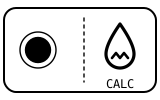
Descaling is due. Filtered or softened water does not prevent it: “Even decalcified water contains low amounts of calcium carbonate.”
“LED (Descale) lights up. The appliance needs to be descaled. Descale the appliance.”
- Which light
- Descale light or symbol
- Colour
- Colour not named by the maker
- Steady or flashing
- Steady
What Tassimo says to do
- Run the descaling programme in the Descaling section of the manual, with Tassimo descaling tabs (TCZ6004 / 00311530).
Source:
- Tassimo: TASSIMO HAPPY instruction manual, part 2: At a glance and Troubleshooting — Tassimo Happy (extended manual, English section). www.tassimo.com Checked 2026-10-16.
Descale LED flashing
Descale needed

The steady warning has been ignored for long enough that the descale is now urgent. Unlike the Vivy and Suny manuals, the Happy’s gives a flashing Descale LED its own, stronger row.
“LED (Descale) flashes. Appliance must be descaled urgently. Descale the appliance at once.”
- Which light
- Descale light or symbol
- Colour
- Colour not named by the maker
- Steady or flashing
- Flashing or blinking
What Tassimo says to do
- Descale now, following the Descaling section of the manual.
Source:
- Tassimo: TASSIMO HAPPY instruction manual, part 2: At a glance and Troubleshooting — Tassimo Happy (extended manual, English section). www.tassimo.com Checked 2026-10-16.
Descale LED and status display flashing together
Mode running

Nothing is wrong: this is what the Happy shows while its descaling programme runs.
“LED (Descale) and the status display flash simultaneously. The descaling process is running. Wait until the descaling process is complete.”
- Which light
- Several lights or symbols at once
- Colour
- Colour not named by the maker
- Steady or flashing
- Flashing or blinking
What Tassimo says to do
- Leave it to finish; do not open the brewing unit or remove the tank.
Source:
- Tassimo: TASSIMO HAPPY instruction manual, part 2: At a glance and Troubleshooting — Tassimo Happy (extended manual, English section). www.tassimo.com Checked 2026-10-16.
Descale and Fill water tank LEDs both on, and it will not brew
Fault or blockage
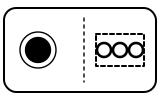
A fault on the machine, not two reminders at once. Note the difference from the Vivy and Suny, where the same pair flashes.
“LED (Descale) and LED (Fill water tank) light up simultaneously and brewing is not possible. There is a fault on the machine. Unplug the mains plug. Please contact the TASSIMO careline.”
- Which light
- Several lights or symbols at once
- Colour
- Colour not named by the maker
- Steady or flashing
- Steady
What Tassimo says to do
- Unplug the machine.
- Contact the TASSIMO careline.
If that does not fix it: how to contact Tassimo.
Source:
- Tassimo: TASSIMO HAPPY instruction manual, part 2: At a glance and Troubleshooting — Tassimo Happy (extended manual, English section). www.tassimo.com Checked 2026-10-16.
All LEDs flashing
Fault or blockage
The machine is not getting the mains voltage it expects. The manual points at your supply rather than the machine.
“All LEDs flashing. There is a problem with the voltage of the power supply. Unplug the appliance and then plug back in again. If the problem persists for a lengthy period, have the voltage of your power supply checked by an electrician.”
- Which light
- Several lights or symbols at once
- Colour
- Colour not named by the maker
- Steady or flashing
- Flashing or blinking
What Tassimo says to do
- Unplug the machine, then plug it back in.
- If it keeps happening, have an electrician check the voltage of your supply.
Source:
- Tassimo: TASSIMO HAPPY instruction manual, part 2: At a glance and Troubleshooting — Tassimo Happy (extended manual, English section). www.tassimo.com Checked 2026-10-16.
Near relatives
Machines from the same maker whose lights are close to these, each on its own page from its own manual. A light that looks the same can still mean something else, so check each one.
When Tassimo says to get help
The manual says to contact the TASSIMO careline; the UK manual names BSH Home Appliances (www.bosch-home.co.uk) for engineer visits and spare parts, including the orange Service T DISC (item no. 00576837) and descaling tabs (TCZ6004 / 00311530).
Sources
Every line on this page comes from Tassimo’s own documents, read on the date shown. Nothing is taken from third-party manual sites.
- Tassimo: TASSIMO HAPPY instruction manual, part 2: At a glance and Troubleshooting — Tassimo Happy (extended manual, English section). www.tassimo.com Checked 2026-10-16.