Nespresso Vertuo Creatista: what the lights mean
Vertuo line with a steam wand and milk jug (SVE850)
The Vertuo Creatista brews Vertuo capsules like the Vertuo Next, but adds a steam wand with a stainless-steel milk jug, and its panel is busier: a Coffee button that is also the on/off button, a Steam button, a Milk Texture button, a Milk Temperature button, and two small alerts marked Descaling and Cleaning. The coffee side blinks for the same reasons as on other Vertuo machines, but the Creatista is the one that names a colour for trouble: red. A red blink on the coffee or steam button means it ran out of water; two red blinks and a pause means it stopped on an error. Every light below is quoted from the troubleshooting table of the Sage-branded manual Nespresso hosts (pp. 24–26). Its ‘Blinking summary’ (pp. 27–29) is printed as pictures of the lights, so only the text rows are used here.
Every Nespresso Vertuo Creatista light we could source, 9 in all, each with Nespresso’s meaning and steps. This is the Vertuo Creatista’s pattern; another Nespresso machine may use the same light for something else — check the manual for your model.
Coffee or Steam button blinking red, machine stopped
Water

The machine ran out of water part-way through a coffee or a milk cycle. Nespresso’s first check is the water tank; it stops rather than pumping air.
“The machine has stopped and the coffee or steam button blinks red continuously.”
- Which light
- Main button or power light
- Colour
- Red
- Steady or flashing
- Flashing or blinking
What Nespresso says to do
- Check that the water tank is full.
- Fill the water tank and press the coffee or steam button to restart the process.
- Descale if necessary.
Source:
- Nespresso: Vertuo Creatista user manual: Cleaning the steam wand (pp. 17–18), Descaling (pp. 19–20) and Troubleshooting (pp. 24–26) — Vertuo Creatista SVE850 (Sage-branded English manual, SVE850 EN SAGE IB 240V A23). www.nespresso.com Checked 2026-10-12.
Coffee button: 2 red blinks, a pause, over and over
Fault or blockage
The machine has stopped on an error. What to check depends on what you were doing: brewing, cleaning or descaling, or programming a cup volume.
“Machine is not running and Coffee Button light continuously displays 2 blinks Red and 1 pause.”
- Which light
- Main button or power light
- Colour
- Red
- Steady or flashing
- Flashing or blinking
What Nespresso says to do
- If you were making a coffee: unlock the handle and open the machine head to check that a fresh, undamaged capsule is in the correct position; check that the handle is in the ‘locked’ position; check that the water tank is full.
- If you were descaling, emptying or cleaning: check that the capsule has been ejected and that the handle is locked.
- If you were programming a volume: check and insert a capsule.
- If it persists: unlock the handle and open the head, replace the capsule if needed, unplug the machine for 10 seconds, plug it back in, close the head and press the button to turn it on, then again to brew.
- If the problem persists, call Nespresso.
If that does not fix it: how to contact Nespresso.
Source:
- Nespresso: Vertuo Creatista user manual: Cleaning the steam wand (pp. 17–18), Descaling (pp. 19–20) and Troubleshooting (pp. 24–26) — Vertuo Creatista SVE850 (Sage-branded English manual, SVE850 EN SAGE IB 240V A23). www.nespresso.com Checked 2026-10-12.
Coffee light on, but no light on the milk side
Fault or blockage
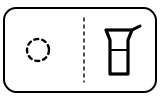
A machine communication error: the coffee side and the milk side are not talking to each other. Nespresso’s fix is a power cycle, not a repair.
“Coffee light on, but no light on milk side.”
- Which light
- Milk temperature and froth lights
- Colour
- No light
- Steady or flashing
- Off
What Nespresso says to do
- Unplug the machine, wait 10 seconds, plug the machine in, wait 10 seconds, then press the Steam button.
Source:
- Nespresso: Vertuo Creatista user manual: Cleaning the steam wand (pp. 17–18), Descaling (pp. 19–20) and Troubleshooting (pp. 24–26) — Vertuo Creatista SVE850 (Sage-branded English manual, SVE850 EN SAGE IB 240V A23). www.nespresso.com Checked 2026-10-12.
Descaling alert blinking
Descale needed

The machine needs descaling to keep working at its best. You can still make drinks while it blinks.
“Descale alert LED is blinking.”
- Which light
- Descale light or symbol
- Colour
- Colour not named by the maker
- Steady or flashing
- Flashing or blinking
What Nespresso says to do
- Descale the machine. Nespresso suggests cleaning the steam wand tip first.
- Fill the water tank with potable water to the descale line and add 2 units of Nespresso descaling liquid; empty the drip tray and capsule container; put a container of at least 2 L under the coffee outlet.
- Turn the machine on, open, close and lock the lever, then press the Steam button and the Milk Temperature button together for more than 5 seconds, and press the Steam button to begin the steam and coffee descale cycle.
- When it finishes, rinse and refill the tank to MAX with fresh water and press the Steam button to run the rinse cycle.
Source:
- Nespresso: Vertuo Creatista user manual: Cleaning the steam wand (pp. 17–18), Descaling (pp. 19–20) and Troubleshooting (pp. 24–26) — Vertuo Creatista SVE850 (Sage-branded English manual, SVE850 EN SAGE IB 240V A23). www.nespresso.com Checked 2026-10-12.
Descaling alert lit and the steam does not work
Descale needed
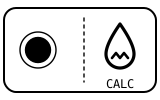
Descaling is overdue and the machine has locked the steam wand until it is done. (The blinking summary calls this state ‘Descale Lockout’.) It is not a broken wand.
“Descale alert LED is on and Steam does not work.”
- Which light
- Descale light or symbol
- Colour
- Colour not named by the maker
- Steady or flashing
- Steady
What Nespresso says to do
- Complete a descale cycle; the steps are the same as for the blinking descaling alert above.
- If the milk cycle still does not start, check that the water tank is in place, that the steam tip is not blocked and the wand is lowered, and that no coffee is brewing: steam only starts after the coffee has finished.
Source:
- Nespresso: Vertuo Creatista user manual: Cleaning the steam wand (pp. 17–18), Descaling (pp. 19–20) and Troubleshooting (pp. 24–26) — Vertuo Creatista SVE850 (Sage-branded English manual, SVE850 EN SAGE IB 240V A23). www.nespresso.com Checked 2026-10-12.
Clean Steam Wand alert lit
Cleaning due

The steam wand needs its cleaning cycle to keep frothing milk well. Nespresso also lists this alert as one reason the milk steam cycle will not start.
“Clean Steam Wand alert LED is on.”
- Which light
- Cleaning symbol
- Colour
- Colour not named by the maker
- Steady or flashing
- Steady
What Nespresso says to do
- Fill the milk jug to the max line with fresh potable water and lift the steam wand into it.
- With the machine on, press and hold the Steam button for 3 seconds to start the clean cycle.
- When it is complete, lift the wand, remove the jug, then empty and rinse the jug.
- If the tip is blocked, unscrew it and clear each hole with the steam wand cleaning tool kept under the water tank.
Source:
- Nespresso: Vertuo Creatista user manual: Cleaning the steam wand (pp. 17–18), Descaling (pp. 19–20) and Troubleshooting (pp. 24–26) — Vertuo Creatista SVE850 (Sage-branded English manual, SVE850 EN SAGE IB 240V A23). www.nespresso.com Checked 2026-10-12.
Coffee light blinking while the machine is running
Mode running

Normal if coffee is flowing. If only water is flowing, the machine is doing something you asked for: a cleaning, a descaling or an emptying of the system.
“Coffee light blinks while machine is running.”
- Which light
- Main button or power light
- Colour
- Colour not named by the maker
- Steady or flashing
- Flashing or blinking
What Nespresso says to do
- If coffee is flowing normally, nothing is wrong.
- If you did not mean to clean, descale or empty it, push the button to stop it.
- If it is still blinking, leave descaling mode by pushing and holding the button for at least 7 seconds.
- If the problem persists, call Nespresso.
If that does not fix it: how to contact Nespresso.
Source:
- Nespresso: Vertuo Creatista user manual: Cleaning the steam wand (pp. 17–18), Descaling (pp. 19–20) and Troubleshooting (pp. 24–26) — Vertuo Creatista SVE850 (Sage-branded English manual, SVE850 EN SAGE IB 240V A23). www.nespresso.com Checked 2026-10-12.
Coffee light blinking, but nothing is coming out
Heating up
Usually a short wait: the machine reads the capsule’s barcode and adjusts its settings before coffee flows. It can also mean an empty tank, or a machine cooling down after a lot of use.
“Coffee light blinks and machine is not running.”
- Which light
- Main button or power light
- Colour
- Colour not named by the maker
- Steady or flashing
- Flashing or blinking
What Nespresso says to do
- Give it a few seconds; the coffee flow takes time to start while the barcode is read.
- Check that a fresh capsule is in the correct position and the handle is locked, then push the button.
- Fill the water tank and push the button to start.
- If it still blinks, turn the machine off by pushing the Coffee button for 3 seconds, push it again to turn it on, and wait about 20 minutes for it to cool down after extensive use.
- If it will not turn off, leave descaling mode by pushing the Coffee button for at least 7 seconds.
Source:
- Nespresso: Vertuo Creatista user manual: Cleaning the steam wand (pp. 17–18), Descaling (pp. 19–20) and Troubleshooting (pp. 24–26) — Vertuo Creatista SVE850 (Sage-branded English manual, SVE850 EN SAGE IB 240V A23). www.nespresso.com Checked 2026-10-12.
Coffee button lit steadily, but the machine will not start
Normal operation
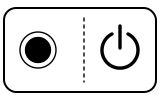
The machine is on and ready; it is waiting for the lever. A lever that is not fully turned to the lock position is the first thing Nespresso checks.
“The machine doesn’t start and the Coffee Button light is on and steady.”
- Which light
- Main button or power light
- Colour
- Colour not named by the maker
- Steady or flashing
- Steady
What Nespresso says to do
- Check that the Coffee lever is properly locked.
- To brew, check that a fresh capsule is in the correct position, lock the handle and push the button.
- To clean, descale or empty the machine, make sure there is no capsule inside, close and lock it, then push the button.
Source:
- Nespresso: Vertuo Creatista user manual: Cleaning the steam wand (pp. 17–18), Descaling (pp. 19–20) and Troubleshooting (pp. 24–26) — Vertuo Creatista SVE850 (Sage-branded English manual, SVE850 EN SAGE IB 240V A23). www.nespresso.com Checked 2026-10-12.
Near relatives
Machines from the same maker whose lights are close to these, each on its own page from its own manual. A light that looks the same can still mean something else, so check each one.
When Nespresso says to get help
Call Nespresso (the manual’s wording: ‘If problem persists, call Nespresso’).
Sources
Every line on this page comes from Nespresso’s own documents, read on the date shown. Nothing is taken from third-party manual sites.
- Nespresso: Vertuo Creatista user manual: Cleaning the steam wand (pp. 17–18), Descaling (pp. 19–20) and Troubleshooting (pp. 24–26) — Vertuo Creatista SVE850 (Sage-branded English manual, SVE850 EN SAGE IB 240V A23). www.nespresso.com Checked 2026-10-12.