Nespresso Vertuo Next and Vertuo Pop: what the lights mean
Vertuo line (big and small barcode capsules)
The Vertuo Next and the Vertuo Pop each have a single button, and its light is the whole display: white or orange, steady, blinking at a set speed, or fading in and out. Nespresso prints the same ‘Blinking summary’ for both machines, word for word — the Vertuo Next manual and the Vertuo Next, Vertuo Pop and Vertuo Plus manual list the identical 12 patterns — so one page covers both. The Vertuo Plus is different: its button lights green, not white, and it has its own page.
Every Nespresso Vertuo Next and Vertuo Pop light we could source, 12 in all, each with Nespresso’s meaning and steps. This is the Vertuo Next and Vertuo Pop’s pattern; another Nespresso machine may use the same light for something else — check the manual for your model.
Orange and white light blink in turn 3 times, then the light stays on
Descale needed
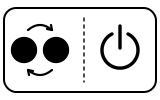
Descaling alert: the machine needs descaling. You can still make coffee — Nespresso says the alert appears only a few times before descaling becomes necessary.
- Which light
- Main button or power light
- Colour
- Orange and white in turn
- Steady or flashing
- Lights taking turns
What Nespresso says to do
- Plan a descaling soon; the alert is a warning, not a lock-out.
- To descale: eject the capsule, leave the lever unlocked, and hold the button for at least 7 seconds; the button blinks rapidly and you have 45 seconds to enter descaling mode by locking and unlocking the lever and holding the button again for 7 seconds.
- Follow the manual’s descaling steps with Nespresso descaling solution; when the button stops blinking rapidly and turns steady, descaling is complete. Let the machine dry for 10 minutes before use.
Source:
- Nespresso: Vertuo Next — My Machine (user manual): ‘Blinking summary’ (p. 29) and ‘Troubleshooting’ (p. 30) — Vertuo Next, US and Canada manual (UM_VERTUO NEXT_Z1, 2019). www.nespresso.com Checked 2026-09-29.
- Nespresso: User manual of Vertuo Next, Vertuo Pop and Vertuo Plus: ‘Blinking summary’ (Vertuo Next / Vertuo Pop) and ‘Troubleshooting’ — Vertuo Pop and Vertuo Next (multi-language manual covering Vertuo Next, Pop and Plus). www.nespresso.com Checked 2026-09-29.
Orange light on for 1.5 seconds, off for 0.5 seconds, over and over
Water
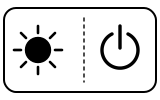
The water tank is empty. The troubleshooting list describes the same thing as a machine that does not start while the light blinks one blink, one pause.
- Which light
- Main button or power light
- Colour
- Orange
- Steady or flashing
- Flashing or blinking
What Nespresso says to do
- Fill the water tank and push the button to start.
- Check that the handle is properly locked.
Source:
- Nespresso: Vertuo Next — My Machine (user manual): ‘Blinking summary’ (p. 29) and ‘Troubleshooting’ (p. 30) — Vertuo Next, US and Canada manual (UM_VERTUO NEXT_Z1, 2019). www.nespresso.com Checked 2026-09-29.
- Nespresso: User manual of Vertuo Next, Vertuo Pop and Vertuo Plus: ‘Blinking summary’ (Vertuo Next / Vertuo Pop) and ‘Troubleshooting’ — Vertuo Pop and Vertuo Next (multi-language manual covering Vertuo Next, Pop and Plus). www.nespresso.com Checked 2026-09-29.
Orange light blinks twice quickly, then stays off for a long moment
Fault or blockage
Error. The troubleshooting list describes it as the light blinking two blinks and one pause continuously while the machine is not running.
- Which light
- Main button or power light
- Colour
- Orange
- Steady or flashing
- Flashing or blinking
What Nespresso says to do
- When making coffee: unlock the handle, open the head and check that a fresh, undamaged capsule is in the right position; check the handle is in the LOCKED position; check the water tank is filled.
- When descaling, emptying or cleaning: check that the capsule has been ejected and the handle is LOCKED.
- If it keeps happening: unlock and open the head, replace the capsule if needed, unplug the machine and plug it back in after 10 seconds, close the head, press the button to turn it on and again to brew.
- If the problem persists, call Nespresso.
If that does not fix it: how to contact Nespresso.
Source:
- Nespresso: Vertuo Next — My Machine (user manual): ‘Blinking summary’ (p. 29) and ‘Troubleshooting’ (p. 30) — Vertuo Next, US and Canada manual (UM_VERTUO NEXT_Z1, 2019). www.nespresso.com Checked 2026-09-29.
- Nespresso: User manual of Vertuo Next, Vertuo Pop and Vertuo Plus: ‘Blinking summary’ (Vertuo Next / Vertuo Pop) and ‘Troubleshooting’ — Vertuo Pop and Vertuo Next (multi-language manual covering Vertuo Next, Pop and Plus). www.nespresso.com Checked 2026-09-29.
Orange light fades to off, then comes back on, over and over
Too hot, cooling
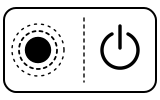
The machine is cooling down after overheating.
- Which light
- Main button or power light
- Colour
- Orange
- Steady or flashing
- Fading in and out
What Nespresso says to do
- Turn the machine off by pushing the button for 3 seconds, then push it again to turn it on.
- Wait about 20 minutes to let the machine cool down after extensive use.
Source:
- Nespresso: Vertuo Next — My Machine (user manual): ‘Blinking summary’ (p. 29) and ‘Troubleshooting’ (p. 30) — Vertuo Next, US and Canada manual (UM_VERTUO NEXT_Z1, 2019). www.nespresso.com Checked 2026-09-29.
- Nespresso: User manual of Vertuo Next, Vertuo Pop and Vertuo Plus: ‘Blinking summary’ (Vertuo Next / Vertuo Pop) and ‘Troubleshooting’ — Vertuo Pop and Vertuo Next (multi-language manual covering Vertuo Next, Pop and Plus). www.nespresso.com Checked 2026-09-29.
Orange light blinking quickly, twice a second
Mode running
Cleaning mode: water, not coffee, runs through the machine on purpose.
- Which light
- Main button or power light
- Colour
- Orange
- Steady or flashing
- Flashing or blinking
What Nespresso says to do
- A cleaning is started on purpose: water tank filled, no capsule, head opened, closed and locked, then the button pressed 3 times within 2 seconds. If you did that, let it finish.
- If you did not mean to clean, push the button to stop the machine. If it is still blinking, exit descaling mode by holding the button for at least 7 seconds.
- If the problem persists, call Nespresso.
If that does not fix it: how to contact Nespresso.
Source:
- Nespresso: Vertuo Next — My Machine (user manual): ‘Blinking summary’ (p. 29) and ‘Troubleshooting’ (p. 30) — Vertuo Next, US and Canada manual (UM_VERTUO NEXT_Z1, 2019). www.nespresso.com Checked 2026-09-29.
- Nespresso: User manual of Vertuo Next, Vertuo Pop and Vertuo Plus: ‘Blinking summary’ (Vertuo Next / Vertuo Pop) and ‘Troubleshooting’ — Vertuo Pop and Vertuo Next (multi-language manual covering Vertuo Next, Pop and Plus). www.nespresso.com Checked 2026-09-29.
Orange light blinking rapidly, three times a second
Mode running
Descaling or emptying the system is running.
- Which light
- Main button or power light
- Colour
- Orange
- Steady or flashing
- Flashing or blinking
What Nespresso says to do
- Emptying is started on purpose: tank emptied, capsule ejected, container in place, machine unplugged, head closed and locked, then the button held while plugging back in. Descaling is started by holding the button for 7 seconds. If you did either, let it run; the machine stops by itself at the end of each phase.
- If you did not mean to, push the button to stop the machine. If it is still blinking, exit descaling mode by holding the button for at least 7 seconds.
- If the problem persists, call Nespresso.
If that does not fix it: how to contact Nespresso.
Source:
- Nespresso: Vertuo Next — My Machine (user manual): ‘Blinking summary’ (p. 29) and ‘Troubleshooting’ (p. 30) — Vertuo Next, US and Canada manual (UM_VERTUO NEXT_Z1, 2019). www.nespresso.com Checked 2026-09-29.
- Nespresso: User manual of Vertuo Next, Vertuo Pop and Vertuo Plus: ‘Blinking summary’ (Vertuo Next / Vertuo Pop) and ‘Troubleshooting’ — Vertuo Pop and Vertuo Next (multi-language manual covering Vertuo Next, Pop and Plus). www.nespresso.com Checked 2026-09-29.
Orange light blinks 5 times in 10 seconds
Setting confirmed
The machine has been reset to its factory settings.
- Which light
- Main button or power light
- Colour
- Orange
- Steady or flashing
- Flashing or blinking
What Nespresso says to do
- Nothing to fix: this confirms a reset. Any cup sizes you programmed are back to the factory volumes.
Source:
- Nespresso: Vertuo Next — My Machine (user manual): ‘Blinking summary’ (p. 29) and ‘Troubleshooting’ (p. 30) — Vertuo Next, US and Canada manual (UM_VERTUO NEXT_Z1, 2019). www.nespresso.com Checked 2026-09-29.
- Nespresso: User manual of Vertuo Next, Vertuo Pop and Vertuo Plus: ‘Blinking summary’ (Vertuo Next / Vertuo Pop) and ‘Troubleshooting’ — Vertuo Pop and Vertuo Next (multi-language manual covering Vertuo Next, Pop and Plus). www.nespresso.com Checked 2026-09-29.
White light slowly brightens to fully on, goes off, and repeats
Heating up
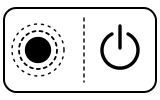
The machine is heating up.
- Which light
- Main button or power light
- Colour
- White
- Steady or flashing
- Fading in and out
What Nespresso says to do
- Wait: the light turns steady white when the machine is ready.
- If it keeps going and the machine does not run, check that a fresh capsule is in the right position, the handle is locked and the water tank is filled.
Source:
- Nespresso: Vertuo Next — My Machine (user manual): ‘Blinking summary’ (p. 29) and ‘Troubleshooting’ (p. 30) — Vertuo Next, US and Canada manual (UM_VERTUO NEXT_Z1, 2019). www.nespresso.com Checked 2026-09-29.
- Nespresso: User manual of Vertuo Next, Vertuo Pop and Vertuo Plus: ‘Blinking summary’ (Vertuo Next / Vertuo Pop) and ‘Troubleshooting’ — Vertuo Pop and Vertuo Next (multi-language manual covering Vertuo Next, Pop and Plus). www.nespresso.com Checked 2026-09-29.
White light blinking regularly, once a second
Normal operation
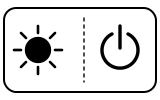
Coffee is being prepared. Nespresso notes it takes some time before coffee comes out, because the machine reads the capsule’s barcode and pre-wets the coffee.
- Which light
- Main button or power light
- Colour
- White
- Steady or flashing
- Flashing or blinking
What Nespresso says to do
- If coffee is flowing normally, the machine is working properly.
- If only water is flowing and you did not ask for cleaning, descaling or emptying, push the button to stop the machine.
Source:
- Nespresso: Vertuo Next — My Machine (user manual): ‘Blinking summary’ (p. 29) and ‘Troubleshooting’ (p. 30) — Vertuo Next, US and Canada manual (UM_VERTUO NEXT_Z1, 2019). www.nespresso.com Checked 2026-09-29.
- Nespresso: User manual of Vertuo Next, Vertuo Pop and Vertuo Plus: ‘Blinking summary’ (Vertuo Next / Vertuo Pop) and ‘Troubleshooting’ — Vertuo Pop and Vertuo Next (multi-language manual covering Vertuo Next, Pop and Plus). www.nespresso.com Checked 2026-09-29.
White light blinking twice a second
Update or connection
Software update in progress.
- Which light
- Main button or power light
- Colour
- White
- Steady or flashing
- Flashing or blinking
What Nespresso says to do
- Leave the machine alone until the update finishes.
Source:
- Nespresso: Vertuo Next — My Machine (user manual): ‘Blinking summary’ (p. 29) and ‘Troubleshooting’ (p. 30) — Vertuo Next, US and Canada manual (UM_VERTUO NEXT_Z1, 2019). www.nespresso.com Checked 2026-09-29.
- Nespresso: User manual of Vertuo Next, Vertuo Pop and Vertuo Plus: ‘Blinking summary’ (Vertuo Next / Vertuo Pop) and ‘Troubleshooting’ — Vertuo Pop and Vertuo Next (multi-language manual covering Vertuo Next, Pop and Plus). www.nespresso.com Checked 2026-09-29.
Steady white light
Normal operation
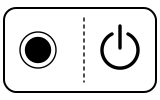
Ready mode: the machine is ready to brew.
- Which light
- Main button or power light
- Colour
- White
- Steady or flashing
- Steady
What Nespresso says to do
- If the machine does not start with the light steady: check that the handle is properly locked, that a fresh capsule is in the right position, and push the button.
- For cleaning, descaling or emptying, check that no capsule is inside, then close and lock the machine and push the button.
Source:
- Nespresso: Vertuo Next — My Machine (user manual): ‘Blinking summary’ (p. 29) and ‘Troubleshooting’ (p. 30) — Vertuo Next, US and Canada manual (UM_VERTUO NEXT_Z1, 2019). www.nespresso.com Checked 2026-09-29.
- Nespresso: User manual of Vertuo Next, Vertuo Pop and Vertuo Plus: ‘Blinking summary’ (Vertuo Next / Vertuo Pop) and ‘Troubleshooting’ — Vertuo Pop and Vertuo Next (multi-language manual covering Vertuo Next, Pop and Plus). www.nespresso.com Checked 2026-09-29.
No light on the button
Off or no power
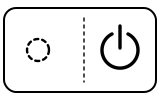
The machine is off. To save energy it turns itself off after 2 minutes without use.
- Which light
- Main button or power light
- Colour
- No light
- Steady or flashing
- Off
What Nespresso says to do
- Push the button, or unlock the machine.
- If nothing happens, check the mains, plug, voltage and fuse.
Source:
- Nespresso: Vertuo Next — My Machine (user manual): ‘Blinking summary’ (p. 29) and ‘Troubleshooting’ (p. 30) — Vertuo Next, US and Canada manual (UM_VERTUO NEXT_Z1, 2019). www.nespresso.com Checked 2026-09-29.
- Nespresso: User manual of Vertuo Next, Vertuo Pop and Vertuo Plus: ‘Blinking summary’ (Vertuo Next / Vertuo Pop) and ‘Troubleshooting’ — Vertuo Pop and Vertuo Next (multi-language manual covering Vertuo Next, Pop and Plus). www.nespresso.com Checked 2026-09-29.
When Nespresso says to get help
Call Nespresso (the manual’s wording: ‘If problem persists, call Nespresso’).
Sources
Every line on this page comes from Nespresso’s own documents, read on the date shown. Nothing is taken from third-party manual sites.
- Nespresso: Vertuo Next — My Machine (user manual): ‘Blinking summary’ (p. 29) and ‘Troubleshooting’ (p. 30) — Vertuo Next, US and Canada manual (UM_VERTUO NEXT_Z1, 2019). www.nespresso.com Checked 2026-09-29.
- Nespresso: User manual of Vertuo Next, Vertuo Pop and Vertuo Plus: ‘Blinking summary’ (Vertuo Next / Vertuo Pop) and ‘Troubleshooting’ — Vertuo Pop and Vertuo Next (multi-language manual covering Vertuo Next, Pop and Plus). www.nespresso.com Checked 2026-09-29.