Nespresso Gran Lattissima: what the lights mean
Original line with the Rapid Cappuccino System milk jug (F531)
The Gran Lattissima takes the small Original capsules and has a full row of drink buttons: coffee buttons, milk recipe buttons (including Flat white and Hot milk), an on/standby button, and two alerts, Descaling and Clean, that shine orange. Almost everything else is said by the buttons blinking: slowly while heating, fast three times when the tank is empty, all together before it switches itself off on an error. One pattern is easy to misread: all buttons blinking in turn is either the machine overheating or the emptying mode you started. Every light below is quoted from the English section of Nespresso’s F531 manual, mostly its Troubleshooting table (p. 30).
Every Nespresso Gran Lattissima light we could source, 12 in all, each with Nespresso’s meaning and steps. This is the Gran Lattissima’s pattern; another Nespresso machine may use the same light for something else — check the manual for your model.
Coffee buttons blinking after you switch it on
Heating up
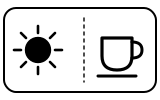
The machine is heating up, which takes about 25 seconds. When you connect the Rapid Cappuccino System for a milk drink, it heats again for about 15 seconds with the lights blinking.
“Blinking lights (coffee buttons): heating-up (25 s)”
- Which light
- Cup, drink or strength buttons
- Colour
- Colour not named by the maker
- Steady or flashing
- Flashing or blinking
What Nespresso says to do
- Wait until the coffee buttons stop blinking and stay lit.
Source:
- Nespresso: Gran Lattissima user manual: first use, preparing milk-based beverages, programming, descaling, emptying the system and Troubleshooting (p. 30) — Gran Lattissima, type F531 (English and Traditional Chinese manual, English section). www.nespresso.com Checked 2026-10-12.
Coffee buttons lit steadily
Normal operation
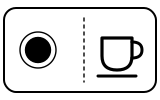
Ready: the machine is at temperature.
“Steady lights: ready”
- Which light
- Cup, drink or strength buttons
- Colour
- Colour not named by the maker
- Steady or flashing
- Steady
What Nespresso says to do
- Insert a capsule, close the lever and press the button for the drink you want.
Source:
- Nespresso: Gran Lattissima user manual: first use, preparing milk-based beverages, programming, descaling, emptying the system and Troubleshooting (p. 30) — Gran Lattissima, type F531 (English and Traditional Chinese manual, English section). www.nespresso.com Checked 2026-10-12.
All coffee buttons blink fast 3 times, then back to ready
Water
The water tank is empty. The machine refuses the drink and returns to ready instead of brewing.
“All coffee buttons blinking fast 3 times and then machine goes back in ready mode.”
- Which light
- Cup, drink or strength buttons
- Colour
- Colour not named by the maker
- Steady or flashing
- Flashing or blinking
What Nespresso says to do
- Fill the water tank with fresh potable water and press the drink button again.
Source:
- Nespresso: Gran Lattissima user manual: first use, preparing milk-based beverages, programming, descaling, emptying the system and Troubleshooting (p. 30) — Gran Lattissima, type F531 (English and Traditional Chinese manual, English section). www.nespresso.com Checked 2026-10-12.
Descaling alert lit orange
Descale needed
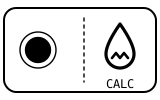
Time to descale. The machine sets the alert from how many drinks you have made; descaling takes about 20 minutes.
“Descaling alert shines orange.”
- Which light
- Descale light or symbol
- Colour
- Orange
- Steady or flashing
- Steady
What Nespresso says to do
- Lift and close the lever to eject any capsule; empty the drip tray, used capsule container, cup support and drop collector.
- Fill the water tank with 100 ml of Nespresso descaling agent and add water up to the Descaling mark (about 500 ml).
- Plug the descaling pipe from the back of the machine into the steam connector; the machine enters descaling mode.
- Follow the manual’s ‘Descaling’ section to the end, including the rinse with the tank filled to MAX (about 1.3 L).
Source:
- Nespresso: Gran Lattissima user manual: first use, preparing milk-based beverages, programming, descaling, emptying the system and Troubleshooting (p. 30) — Gran Lattissima, type F531 (English and Traditional Chinese manual, English section). www.nespresso.com Checked 2026-10-12.
Descaling alert blinking orange, Flat white button lit steadily
Mode running
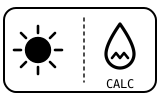
The machine is in descaling mode and waiting for you to start, or to start the rinse. The descaling alert keeps blinking orange for the whole cycle.
“Descaling alert blinks orange and flat white button steady light.”
- Which light
- Descale light or symbol
- Colour
- Orange
- Steady or flashing
- Flashing or blinking
What Nespresso says to do
- Press the Flat white button to start the descaling process.
- If you did not fill the water tank to the MAX level (about 1.3 L) for the rinse, restart the descaling process: fill to MAX and press the Flat white button.
- If the machine does not switch off at the end of the process, repeat the action.
Source:
- Nespresso: Gran Lattissima user manual: first use, preparing milk-based beverages, programming, descaling, emptying the system and Troubleshooting (p. 30) — Gran Lattissima, type F531 (English and Traditional Chinese manual, English section). www.nespresso.com Checked 2026-10-12.
Descaling and Clean alerts both blinking
Mode running
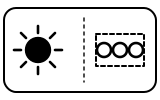
Usually menu mode, where you set the water hardness, the automatic power-off or the emptying. If you have just descaled, it means the descaling did not complete properly.
“Descaling and clean alerts blink.”
- Which light
- Several lights or symbols at once
- Colour
- Orange
- Steady or flashing
- Flashing or blinking
What Nespresso says to do
- To leave menu mode, press the Hot milk and Flat white buttons together for 3 seconds, or wait 30 seconds for it to exit by itself.
- If this follows a descaling, repeat the descaling cycle.
Source:
- Nespresso: Gran Lattissima user manual: first use, preparing milk-based beverages, programming, descaling, emptying the system and Troubleshooting (p. 30) — Gran Lattissima, type F531 (English and Traditional Chinese manual, English section). www.nespresso.com Checked 2026-10-12.
Clean alert lit orange
Cleaning due
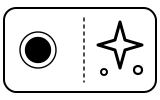
The Rapid Cappuccino System (the milk jug and its parts) needs cleaning. It lights at the end of a milk drink.
“Clean alert shines orange.”
- Which light
- Cleaning symbol
- Colour
- Orange
- Steady or flashing
- Steady
What Nespresso says to do
- Take the Rapid Cappuccino System apart and clean all its parts in the upper rack of your dishwasher.
- If there is no dishwasher, follow the manual’s ‘Hand washing of Rapid Cappuccino System’ section.
Source:
- Nespresso: Gran Lattissima user manual: first use, preparing milk-based beverages, programming, descaling, emptying the system and Troubleshooting (p. 30) — Gran Lattissima, type F531 (English and Traditional Chinese manual, English section). www.nespresso.com Checked 2026-10-12.
All coffee and milk buttons flashing in turn
Too hot, cooling
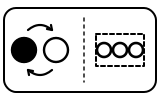
The machine has overheated. The same pattern follows an emptying of the system: the machine is then blocked for about 10 minutes.
“All coffee buttons and all milk recipe buttons flash alternatively.”
- Which light
- Several lights or symbols at once
- Colour
- Colour not named by the maker
- Steady or flashing
- Lights taking turns
What Nespresso says to do
- Wait until the machine cools down.
- If you have just emptied the system, wait about 10 minutes before using it.
Source:
- Nespresso: Gran Lattissima user manual: first use, preparing milk-based beverages, programming, descaling, emptying the system and Troubleshooting (p. 30) — Gran Lattissima, type F531 (English and Traditional Chinese manual, English section). www.nespresso.com Checked 2026-10-12.
All buttons blinking in turn after you start emptying
Mode running
The machine is emptying its water circuit, which you started from menu mode before storage, frost or a repair. It switches off by itself when finished.
“All buttons blink alternately: emptying mode in progress.”
- Which light
- Several lights or symbols at once
- Colour
- Colour not named by the maker
- Steady or flashing
- Lights taking turns
What Nespresso says to do
- Let it finish; the machine switches off automatically.
- It stays blocked for about 10 minutes after emptying.
Source:
- Nespresso: Gran Lattissima user manual: first use, preparing milk-based beverages, programming, descaling, emptying the system and Troubleshooting (p. 30) — Gran Lattissima, type F531 (English and Traditional Chinese manual, English section). www.nespresso.com Checked 2026-10-12.
All buttons blink together for 10 seconds, then it switches off
Fault or blockage
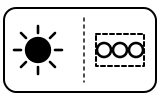
An error alarm: Nespresso says the machine needs repair.
“All buttons blink simultaneously for 10 seconds and then machine switches off automatically.”
- Which light
- Several lights or symbols at once
- Colour
- Colour not named by the maker
- Steady or flashing
- Flashing or blinking
What Nespresso says to do
- Send the appliance for repair or call Nespresso.
If that does not fix it: how to contact Nespresso.
Source:
- Nespresso: Gran Lattissima user manual: first use, preparing milk-based beverages, programming, descaling, emptying the system and Troubleshooting (p. 30) — Gran Lattissima, type F531 (English and Traditional Chinese manual, English section). www.nespresso.com Checked 2026-10-12.
Lights blinking irregularly
Fault or blockage
A fault the manual does not let you fix yourself.
“Irregular blinking.”
- Which light
- Several lights or symbols at once
- Colour
- Colour not named by the maker
- Steady or flashing
- Flashing or blinking
What Nespresso says to do
- Send the appliance for repair or call Nespresso.
If that does not fix it: how to contact Nespresso.
Source:
- Nespresso: Gran Lattissima user manual: first use, preparing milk-based beverages, programming, descaling, emptying the system and Troubleshooting (p. 30) — Gran Lattissima, type F531 (English and Traditional Chinese manual, English section). www.nespresso.com Checked 2026-10-12.
Buttons blink 3 times rapidly after a setting
Setting confirmed
The new value you set in menu mode (such as the water hardness) has been saved; the menu then exits and the machine returns to ready.
“They blink 3 times rapidly to confirm new value.”
- Which light
- Several lights or symbols at once
- Colour
- Colour not named by the maker
- Steady or flashing
- Flashing or blinking
What Nespresso says to do
- Nothing to do.
Source:
- Nespresso: Gran Lattissima user manual: first use, preparing milk-based beverages, programming, descaling, emptying the system and Troubleshooting (p. 30) — Gran Lattissima, type F531 (English and Traditional Chinese manual, English section). www.nespresso.com Checked 2026-10-12.
Near relatives
Machines from the same maker whose lights are close to these, each on its own page from its own manual. A light that looks the same can still mean something else, so check each one.
When Nespresso says to get help
Call Nespresso, or send the appliance for repair (the manual’s wording).
Sources
Every line on this page comes from Nespresso’s own documents, read on the date shown. Nothing is taken from third-party manual sites.
- Nespresso: Gran Lattissima user manual: first use, preparing milk-based beverages, programming, descaling, emptying the system and Troubleshooting (p. 30) — Gran Lattissima, type F531 (English and Traditional Chinese manual, English section). www.nespresso.com Checked 2026-10-12.