Keurig K-Mini: what the lights mean
Single-serve K-Cup pod brewer you fill with one cup of water at a time
The K-Mini has only two lights: the power button and the brew button’s indicator light. It has no ADD WATER or DESCALE light — you pour in exactly one cup’s worth of water (6 to 12 oz) each time — so everything it tells you comes from that one brew light flashing, pulsing, staying solid or going out. The order matters: flashing means ready, pulsing means heating, solid means pouring. Keurig says to descale every 3 to 6 months; no light reminds you.
Every Keurig K-Mini light we could source, 6 in all, each with Keurig’s meaning and steps. This is the K-Mini’s pattern; another Keurig machine may use the same light for something else — check the manual for your model.
Power button lit
Normal operation
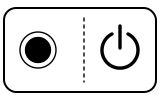
The brewer is on. On its own this light does not mean it is ready to brew; that is the brew light’s job.
“Press the power button. The power button will illuminate.”
- Which light
- Main button or power light
- Colour
- Colour not named by the maker
- Steady or flashing
- Steady
What Keurig says to do
- Pour 6 to 12 oz of water into the reservoir (between the MIN and MAX lines), insert a pod and lift and lower the handle.
Source:
- Keurig: K-Mini Use & Care Guide: Brew Your First Cup, Brewer Features and Troubleshooting — K-Mini single-serve coffee maker (US guide, DC0000001485 REV A). dam.keurig.com Checked 2026-10-09.
Brew indicator light flashing
Normal operation

Ready to brew: the handle has been lowered and the brewer is waiting for you to press brew.
“Lower the handle completely to close the lid. The brew indicator light will flash to indicate that the brewer is ready.”
- Which light
- Cup, drink or strength buttons
- Colour
- Colour not named by the maker
- Steady or flashing
- Flashing or blinking
What Keurig says to do
- Put your mug on the drip tray and press the brew button.
Source:
- Keurig: K-Mini Use & Care Guide: Brew Your First Cup, Brewer Features and Troubleshooting — K-Mini single-serve coffee maker (US guide, DC0000001485 REV A). dam.keurig.com Checked 2026-10-09.
Brew indicator light pulsing after you press brew
Heating up
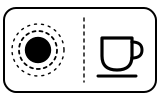
The brewer is heating the water you poured in. Keurig gives about 2 minutes for this.
“Press the brew button. The brew indicator light will illuminate solid, then begin to pulse while the brewer is heating.”
- Which light
- Cup, drink or strength buttons
- Colour
- Colour not named by the maker
- Steady or flashing
- Fading in and out
What Keurig says to do
- Wait. Do not lift the handle: Keurig warns there is extremely hot water in the pod holder while brewing.
Source:
- Keurig: K-Mini Use & Care Guide: Brew Your First Cup, Brewer Features and Troubleshooting — K-Mini single-serve coffee maker (US guide, DC0000001485 REV A). dam.keurig.com Checked 2026-10-09.
Brew indicator light solid again, coffee pouring
Mode running
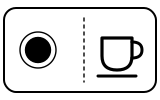
Heating is done and the brewer is pouring your drink.
“After about 2 minutes, the brew indicator light will illuminate solid again and the beverage will begin to dispense.”
- Which light
- Cup, drink or strength buttons
- Colour
- Colour not named by the maker
- Steady or flashing
- Steady
What Keurig says to do
- Leave the mug in place until the light goes out. If the brewer stops part-way, the troubleshooting steps for a partial cup apply.
Source:
- Keurig: K-Mini Use & Care Guide: Brew Your First Cup, Brewer Features and Troubleshooting — K-Mini single-serve coffee maker (US guide, DC0000001485 REV A). dam.keurig.com Checked 2026-10-09.
Brew indicator light goes out
Normal operation
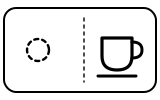
The cup is finished.
“Brewing is complete when the brew indicator light is no longer illuminated. When complete, lift the handle and dispose of the used K-Cup® pod.”
- Which light
- Cup, drink or strength buttons
- Colour
- No light
- Steady or flashing
- Off
What Keurig says to do
- Lift the handle and throw away the used pod.
Source:
- Keurig: K-Mini Use & Care Guide: Brew Your First Cup, Brewer Features and Troubleshooting — K-Mini single-serve coffee maker (US guide, DC0000001485 REV A). dam.keurig.com Checked 2026-10-09.
No light at all, or the brewer shuts off
Off or no power
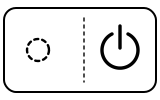
Usually the brewer has switched itself off: the K-Mini turns off 90 seconds after the last brew. If the power button will not light, it is getting no power.
“For energy savings, the brewer automatically turns off 90 seconds after the last brew. Press the power button to restart.”
- Which light
- Main button or power light
- Colour
- No light
- Steady or flashing
- Off
What Keurig says to do
- Press the power button to restart.
- Plug the brewer into its own grounded outlet; Keurig says an overloaded circuit can stop it working properly.
- If the brewer still doesn’t have power, contact Customer Service.
If that does not fix it: how to contact Keurig.
Source:
- Keurig: K-Mini Use & Care Guide: Brew Your First Cup, Brewer Features and Troubleshooting — K-Mini single-serve coffee maker (US guide, DC0000001485 REV A). dam.keurig.com Checked 2026-10-09.
Near relatives
Machines from the same maker whose lights are close to these, each on its own page from its own manual. A light that looks the same can still mean something else, so check each one.
When Keurig says to get help
Contact Keurig Customer Service at 1-866-901-BREW (2739), the number in the guide.
Sources
Every line on this page comes from Keurig’s own documents, read on the date shown. Nothing is taken from third-party manual sites.
- Keurig: K-Mini Use & Care Guide: Brew Your First Cup, Brewer Features and Troubleshooting — K-Mini single-serve coffee maker (US guide, DC0000001485 REV A). dam.keurig.com Checked 2026-10-09.