De’Longhi Dinamica ECAM35020: what the lights mean
Bean-to-cup with a touch panel of symbol lights (Dinamica ECAM35020B, US manual)
The Dinamica (ECAM35020B in the US) is a step up from the Magnifica S: instead of a row of buttons it has a flat touch panel, but its warnings work the same way — a symbol for the grounds container, one for the water tank, one for descaling and a heating light, each meaning one thing when steady and another when flashing. The manual draws each symbol as a picture, so this page names each one by the job the manual gives it in ‘2.2 Description of the touch screen’; in the quotes, [symbol] marks where the manual shows the picture. The ‘Explanation of lights’ table also lists alarms shown by combinations of symbols (beans run out, grinding too fine, too much coffee) without naming the symbols in words; those are left out here rather than guessed at.
Every De’Longhi Dinamica ECAM35020 light we could source, 9 in all, each with De’Longhi’s meaning and steps. This is the Dinamica ECAM35020’s pattern; another De’Longhi machine may use the same light for something else — check the manual for your model.
Heating light flashing on the touch panel
Heating up
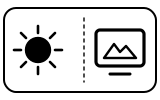
The machine is heating up and running its rinse: hot water circulates and a little comes out of the coffee spouts. The same light flashes while it rinses before switching off. If it flashes when you ask for a coffee, De’Longhi says the machine has detected impurities in its internal circuits.
“To turn the machine on, press the [symbol] button (A23) (fig. 7). The [symbol] light (B1) flashes on the touch screen (B) to indicate the machine is heating up.”
- Which light
- Icon on the display screen
- Colour
- Colour not named by the maker
- Steady or flashing
- Flashing or blinking
What De’Longhi says to do
- Wait: the machine is ready when this light goes off and the coffee icons come on.
- If it flashes when you choose a drink, wait for the machine to be ready again and choose the drink again. Contact Customer Services if the problem persists.
If that does not fix it: how to contact De’Longhi.
Source:
- De’Longhi: Dinamica Instructions for use: 2.2 Description of the touch screen, 4 Turning the machine on, 17.3 Cleaning the coffee grounds container, 18 Descaling, 22 Explanation of lights, 23 Troubleshooting — Dinamica ECAM35020B (US and Canada manual, ECAM35020). library.delonghigroup.com Checked 2026-10-09.
- De’Longhi: Dinamica Espresso Machine — Support (links the Instructions for use above) — Dinamica ECAM35020B. www.delonghi.com Checked 2026-10-09.
Heating light off, coffee icons lit
Normal operation
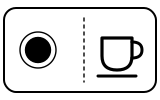
Ready: the machine is at temperature and the drinks it can make are lit.
“The machine is at temperature when the [symbol] light on the touch screen goes off and the coffee icons come on.”
- Which light
- Cup, drink or strength buttons
- Colour
- Colour not named by the maker
- Steady or flashing
- Steady
What De’Longhi says to do
- Touch the drink you want; the 2X icon makes two cups.
Source:
- De’Longhi: Dinamica Instructions for use: 2.2 Description of the touch screen, 4 Turning the machine on, 17.3 Cleaning the coffee grounds container, 18 Descaling, 22 Explanation of lights, 23 Troubleshooting — Dinamica ECAM35020B (US and Canada manual, ECAM35020). library.delonghigroup.com Checked 2026-10-09.
Grounds container light flashing
Container or tray
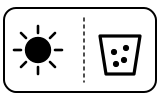
The grounds container is full and must be emptied and cleaned. The machine makes no coffee until you do. It also asks 72 hours after the first coffee, even if the container is not full.
“B2. [symbol] light: - on steadily: put the grounds container (A11) back - flashing: the grounds container needs to be emptied”
- Which light
- Coffee grounds container symbol
- Colour
- Colour not named by the maker
- Steady or flashing
- Flashing or blinking
What De’Longhi says to do
- Empty the grounds container and the drip tray, clean them and put them back.
- Always empty the grounds container when you take out the drip tray, even if it holds only a few grounds; otherwise it can overfill and clog the machine.
Source:
- De’Longhi: Dinamica Instructions for use: 2.2 Description of the touch screen, 4 Turning the machine on, 17.3 Cleaning the coffee grounds container, 18 Descaling, 22 Explanation of lights, 23 Troubleshooting — Dinamica ECAM35020B (US and Canada manual, ECAM35020). library.delonghigroup.com Checked 2026-10-09.
Grounds container light on steadily
Container or tray
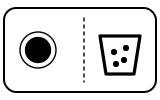
The grounds container is not in place, usually because it was not put back after cleaning.
“After cleaning, the grounds container (A11) has not been replaced”
- Which light
- Coffee grounds container symbol
- Colour
- Colour not named by the maker
- Steady or flashing
- Steady
What De’Longhi says to do
- Remove the drip tray and insert the grounds container, then refit the tray.
Source:
- De’Longhi: Dinamica Instructions for use: 2.2 Description of the touch screen, 4 Turning the machine on, 17.3 Cleaning the coffee grounds container, 18 Descaling, 22 Explanation of lights, 23 Troubleshooting — Dinamica ECAM35020B (US and Canada manual, ECAM35020). library.delonghigroup.com Checked 2026-10-09.
Water tank light flashing
Water
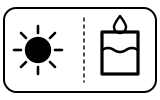
There is not enough water in the tank. During descaling the same light flashes when a cycle has used up the tank and it is time to rinse.
“Insufficient water in the tank (A17)”
- Which light
- Water tank symbol
- Colour
- Colour not named by the maker
- Steady or flashing
- Flashing or blinking
What De’Longhi says to do
- Fill the tank with water and/or insert it correctly, pushing it as far as it will go until it clicks into place.
Source:
- De’Longhi: Dinamica Instructions for use: 2.2 Description of the touch screen, 4 Turning the machine on, 17.3 Cleaning the coffee grounds container, 18 Descaling, 22 Explanation of lights, 23 Troubleshooting — Dinamica ECAM35020B (US and Canada manual, ECAM35020). library.delonghigroup.com Checked 2026-10-09.
Water tank light on steadily
Water
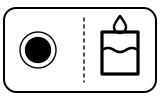
The water tank is missing or not seated properly. This is the opposite of the Magnifica Evo, where a steady tank light means ‘fill it’.
“The tank (A17) is missing or not correctly in place”
- Which light
- Water tank symbol
- Colour
- Colour not named by the maker
- Steady or flashing
- Steady
What De’Longhi says to do
- Insert the tank correctly, pushing it as far as it will go until it clicks into place.
Source:
- De’Longhi: Dinamica Instructions for use: 2.2 Description of the touch screen, 4 Turning the machine on, 17.3 Cleaning the coffee grounds container, 18 Descaling, 22 Explanation of lights, 23 Troubleshooting — Dinamica ECAM35020B (US and Canada manual, ECAM35020). library.delonghigroup.com Checked 2026-10-09.
Descale light flashing, with only OK and ESC lit
Descale needed
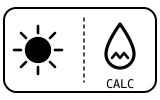
The machine needs descaling. How soon it asks depends on the water hardness setting (level 4 out of the box). If you press ESC, the light keeps flashing as a reminder.
“Descale the machine when the [symbol] light (B5) on the touch screen (B) flashes and only the OK (B15) and ESC icons (B14) remain on. To descale immediately, press OK and follow the instructions from point 4. To descale the machine later, press ESC.”
- Which light
- Descale light or symbol
- Colour
- Colour not named by the maker
- Steady or flashing
- Flashing or blinking
What De’Longhi says to do
- Press OK to descale now, or ESC to do it later.
- Empty the drip tray and grounds container; empty the water tank and take out the water softener filter if fitted. Pour De’Longhi descaler to level A (a 100 ml pack), add a litre of water to level B and refit the tank.
- Put a container of at least 1.8 litres under the frother and the coffee spouts and press OK. When ESC flashes, turn the steam/hot water dial to I. After about 35 minutes the water tank light flashes: rinse twice with a full tank of fresh water as the manual’s section 18 describes, then turn the dial back to 0.
- Use De’Longhi descaler only; De’Longhi says unsuitable descaler or incorrect descaling may cause faults not covered by the guarantee.
Source:
- De’Longhi: Dinamica Instructions for use: 2.2 Description of the touch screen, 4 Turning the machine on, 17.3 Cleaning the coffee grounds container, 18 Descaling, 22 Explanation of lights, 23 Troubleshooting — Dinamica ECAM35020B (US and Canada manual, ECAM35020). library.delonghigroup.com Checked 2026-10-09.
Descale light on steadily
Mode running
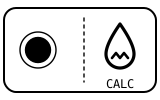
The descaling programme is running. It is not a fault.
“B5. [symbol] light: - on steadily: descaling programme underway - flashing: the machine needs descaling”
- Which light
- Descale light or symbol
- Colour
- Colour not named by the maker
- Steady or flashing
- Steady
What De’Longhi says to do
- Let the programme finish and follow the prompts: turn the dial when ESC flashes and refill the tank for the rinses when the water tank light asks.
- If the cycle stops part-way (for example a power cut), De’Longhi recommends repeating it.
Source:
- De’Longhi: Dinamica Instructions for use: 2.2 Description of the touch screen, 4 Turning the machine on, 17.3 Cleaning the coffee grounds container, 18 Descaling, 22 Explanation of lights, 23 Troubleshooting — Dinamica ECAM35020B (US and Canada manual, ECAM35020). library.delonghigroup.com Checked 2026-10-09.
ESC flashing
Mode running
The machine wants you to turn the steam/hot water dial. It happens during descaling, and when steam or hot water is still turned on.
“Indicates the steam/hot water dial (A22) must be turned on or off”
- Which light
- Steam or hot-water light
- Colour
- Colour not named by the maker
- Steady or flashing
- Flashing or blinking
What De’Longhi says to do
- If the steam/hot water dial is on, turn it off to the 0 position.
- If the steam/hot water dial is off, turn it on to the I position to deliver steam.
Source:
- De’Longhi: Dinamica Instructions for use: 2.2 Description of the touch screen, 4 Turning the machine on, 17.3 Cleaning the coffee grounds container, 18 Descaling, 22 Explanation of lights, 23 Troubleshooting — Dinamica ECAM35020B (US and Canada manual, ECAM35020). library.delonghigroup.com Checked 2026-10-09.
Near relatives
Machines from the same maker whose lights are close to these, each on its own page from its own manual. A light that looks the same can still mean something else, so check each one.
When De’Longhi says to get help
Contact De’Longhi Customer Services (the manual’s wording) if a problem cannot be solved as the manual describes.
Sources
Every line on this page comes from De’Longhi’s own documents, read on the date shown. Nothing is taken from third-party manual sites.
- De’Longhi: Dinamica Instructions for use: 2.2 Description of the touch screen, 4 Turning the machine on, 17.3 Cleaning the coffee grounds container, 18 Descaling, 22 Explanation of lights, 23 Troubleshooting — Dinamica ECAM35020B (US and Canada manual, ECAM35020). library.delonghigroup.com Checked 2026-10-09.
- De’Longhi: Dinamica Espresso Machine — Support (links the Instructions for use above) — Dinamica ECAM35020B. www.delonghi.com Checked 2026-10-09.