Sage / Breville Barista Express: what the lights mean
Portafilter espresso with built-in grinder (Sage SES875 in the UK and Europe, Breville BES870 in the US and Canada)
The Barista Express has no screen: the POWER button, the 1 CUP, 2 CUP and PROGRAM buttons, the FILTER SIZE lights, the STEAM/HOT WATER light and one maintenance light do all the signalling. The maintenance light differs by country. Breville’s US and Canada machine calls it CLEAN / DESCALE: flashing means clean, steady means descale. Sage’s UK guide calls it CLEAN ME and uses it for the cleaning cycle only; descaling there goes by the calendar (every 90 days at water hardness 4, every 60 days at hardness 6). Auto-off also differs: the US book gives a slow-flashing sleep mode after 1 hour and auto off after 3 hours, the UK guide auto off after 30 minutes.
Every Sage / Breville Barista Express light we could source, 8 in all, each with Sage / Breville’s meaning and steps. This is the Barista Express’s pattern; another Sage / Breville machine may use the same light for something else — check the manual for your model.
POWER button light flashing after you switch on
Heating up
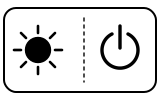
The machine is heating. A pumping sound while it heats is normal.
- Which light
- Main button or power light
- Colour
- Colour not named by the maker
- Steady or flashing
- Flashing or blinking
What Sage / Breville says to do
- Wait: when it reaches operating temperature the POWER light stops flashing and all the button lights come on.
- If instead the STEAM/HOT WATER light flashes at switch-on and the machine does not heat, the steam dial is not at STANDBY: turn it to STANDBY and heating starts.
Source:
- Breville: the Barista Express® — Instruction Book: Functions, Care & Cleaning (Cleaning cycle, Descaling) and Troubleshooting — Barista Express BES870, US and Canada instruction book (V23 edition). assets.breville.com Checked 2026-09-29.
- Sage: the Barista Express™ BES875 / SES875 — User Guide: Functions, Care & Cleaning and Troubleshooting — Barista Express SES875, UK user guide (UG2 A25 edition). assets.sageappliances.com Checked 2026-09-29.
All button lights on steadily
Normal operation
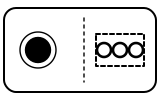
STANDBY mode: the machine is at temperature and ready. Breville suggests a water flush with no coffee the first time.
- Which light
- Several lights or symbols at once
- Colour
- Colour not named by the maker
- Steady or flashing
- Steady
What Sage / Breville says to do
- Nothing to do. If the machine is on but stops working, Sage’s guide says the safety thermal cut-out may have tripped because the pump or grinder overheated: switch off with POWER, unplug, let it cool for 30–60 minutes, and if the problem persists call Sage Customer Service (Breville Support in the US).
If that does not fix it: how to contact Sage / Breville.
Source:
- Breville: the Barista Express® — Instruction Book: Functions, Care & Cleaning (Cleaning cycle, Descaling) and Troubleshooting — Barista Express BES870, US and Canada instruction book (V23 edition). assets.breville.com Checked 2026-09-29.
- Sage: the Barista Express™ BES875 / SES875 — User Guide: Functions, Care & Cleaning and Troubleshooting — Barista Express SES875, UK user guide (UG2 A25 edition). assets.sageappliances.com Checked 2026-09-29.
POWER button light flashing slowly, machine idle
Mode running
Sleep mode (Breville US and Canada book): the machine switches to it after 1 hour unused, and to auto off after 3 hours. Sage’s UK guide describes no sleep mode; its machine goes to auto off after 30 minutes.
- Which light
- Main button or power light
- Colour
- Colour not named by the maker
- Steady or flashing
- Flashing or blinking
What Sage / Breville says to do
- To wake it, press any button except POWER. The POWER light flashes while it reheats, then all button lights come on.
Source:
- Breville: the Barista Express® — Instruction Book: Functions, Care & Cleaning (Cleaning cycle, Descaling) and Troubleshooting — Barista Express BES870, US and Canada instruction book (V23 edition). assets.breville.com Checked 2026-09-29.
- Sage: the Barista Express™ BES875 / SES875 — User Guide: Functions, Care & Cleaning and Troubleshooting — Barista Express SES875, UK user guide (UG2 A25 edition). assets.sageappliances.com Checked 2026-09-29.
FILTER SIZE lights flashing
Fault or blockage
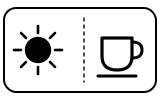
The bean hopper is not correctly locked into position.
- Which light
- Cup, drink or strength buttons
- Colour
- Colour not named by the maker
- Steady or flashing
- Flashing or blinking
What Sage / Breville says to do
- Remove the hopper, check for debris, then lock it back into position.
Source:
- Breville: the Barista Express® — Instruction Book: Functions, Care & Cleaning (Cleaning cycle, Descaling) and Troubleshooting — Barista Express BES870, US and Canada instruction book (V23 edition). assets.breville.com Checked 2026-09-29.
- Sage: the Barista Express™ BES875 / SES875 — User Guide: Functions, Care & Cleaning and Troubleshooting — Barista Express SES875, UK user guide (UG2 A25 edition). assets.sageappliances.com Checked 2026-09-29.
CLEAN / DESCALE light flashing (CLEAN ME light on a Sage)
Cleaning due
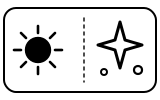
A cleaning cycle is due. This is a back-flush of the group head, separate from descaling.
- Which light
- Cleaning symbol
- Colour
- Colour not named by the maker
- Steady or flashing
- Flashing or blinking
What Sage / Breville says to do
- Put the 1 CUP filter basket in the portafilter, then the cleaning disc, then one cleaning tablet; lock it into the group head with a large container under the spouts.
- Fill the tank with cold water, empty the drip tray and switch the machine off with POWER.
- Press 1 CUP and 2 CUP together, then POWER as well, and hold all three — about 10 seconds in Breville’s US book, about 3 seconds in Sage’s UK guide. The cycle runs for about 5 minutes and ends with 2 beeps.
- Check the tablet has dissolved; if not, repeat. Sage adds a final rinse: remove the disc, refit the portafilter and press 2 CUP.
Source:
- Breville: the Barista Express® — Instruction Book: Functions, Care & Cleaning (Cleaning cycle, Descaling) and Troubleshooting — Barista Express BES870, US and Canada instruction book (V23 edition). assets.breville.com Checked 2026-09-29.
- Sage: the Barista Express™ BES875 / SES875 — User Guide: Functions, Care & Cleaning and Troubleshooting — Barista Express SES875, UK user guide (UG2 A25 edition). assets.sageappliances.com Checked 2026-09-29.
CLEAN / DESCALE light on steadily
Descale needed
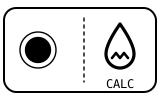
Descaling is required (Breville US and Canada machine). On a Sage machine the CLEAN ME light is for cleaning only; Sage says to descale every 90 days at water hardness 4 and every 60 days at hardness 6.
- Which light
- Descale light or symbol
- Colour
- Colour not named by the maker
- Steady or flashing
- Steady
What Sage / Breville says to do
- Dissolve one sachet of descaling powder in 1 litre of water and fill the tank; take the water filter out first.
- Hold 2 CUP, then hold POWER as well, to enter descale mode. POWER flashes while it heats; it is ready when POWER, 1 CUP, the CLEAN light and the STEAM/HOT WATER light are all steady.
- Press 1 CUP to descale the coffee side (about 25 seconds), then turn the dial to steam (about 13 seconds) and to hot water (about 8 seconds). Repeat until the tank is empty.
- Rinse the tank, fill it with fresh water to MAX, repeat the same steps to rinse, then press POWER to leave descale mode. The machine turns itself off after 5 minutes of no action in descale mode.
Source:
- Breville: the Barista Express® — Instruction Book: Functions, Care & Cleaning (Cleaning cycle, Descaling) and Troubleshooting — Barista Express BES870, US and Canada instruction book (V23 edition). assets.breville.com Checked 2026-09-29.
- Sage: the Barista Express™ BES875 / SES875 — User Guide: Functions, Care & Cleaning and Troubleshooting — Barista Express SES875, UK user guide (UG2 A25 edition). assets.sageappliances.com Checked 2026-09-29.
STEAM/HOT WATER light flashing
Heating up
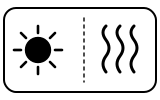
The machine is heating to make steam or hot water; condensed water may drip from the wand meanwhile. It also flashes after 5 minutes of continuous steaming, when the machine switches steam off, and at switch-on if the dial is not at STANDBY.
- Which light
- Steam or hot-water light
- Colour
- Colour not named by the maker
- Steady or flashing
- Flashing or blinking
What Sage / Breville says to do
- Wait for the light to stop flashing: the wand or hot water outlet is then ready.
- If it flashes after long steaming, or when you switch on, turn the dial back to STANDBY.
Source:
- Breville: the Barista Express® — Instruction Book: Functions, Care & Cleaning (Cleaning cycle, Descaling) and Troubleshooting — Barista Express BES870, US and Canada instruction book (V23 edition). assets.breville.com Checked 2026-09-29.
- Sage: the Barista Express™ BES875 / SES875 — User Guide: Functions, Care & Cleaning and Troubleshooting — Barista Express SES875, UK user guide (UG2 A25 edition). assets.sageappliances.com Checked 2026-09-29.
PROGRAM button flashing
Setting confirmed
The machine is in programming mode, ready to learn a new 1 CUP or 2 CUP shot volume.
- Which light
- Main button or power light
- Colour
- Colour not named by the maker
- Steady or flashing
- Flashing or blinking
What Sage / Breville says to do
- Press 1 CUP (or 2 CUP) to start the shot and press it again at the volume you want; two beeps confirm the new volume.
- To go back to the factory volumes, hold PROGRAM until the machine beeps three times (Sage’s guide).
Source:
- Breville: the Barista Express® — Instruction Book: Functions, Care & Cleaning (Cleaning cycle, Descaling) and Troubleshooting — Barista Express BES870, US and Canada instruction book (V23 edition). assets.breville.com Checked 2026-09-29.
- Sage: the Barista Express™ BES875 / SES875 — User Guide: Functions, Care & Cleaning and Troubleshooting — Barista Express SES875, UK user guide (UG2 A25 edition). assets.sageappliances.com Checked 2026-09-29.
When Sage / Breville says to get help
Call Breville Support in the US and Canada, or Sage Customer Service in the UK (0808 178 1650, the number in Sage’s guide).
Sources
Every line on this page comes from Sage / Breville’s own documents, read on the date shown. Nothing is taken from third-party manual sites.
- Breville: the Barista Express® — Instruction Book: Functions, Care & Cleaning (Cleaning cycle, Descaling) and Troubleshooting — Barista Express BES870, US and Canada instruction book (V23 edition). assets.breville.com Checked 2026-09-29.
- Sage: the Barista Express™ BES875 / SES875 — User Guide: Functions, Care & Cleaning and Troubleshooting — Barista Express SES875, UK user guide (UG2 A25 edition). assets.sageappliances.com Checked 2026-09-29.