Sage / Breville Bambino Plus: what the lights mean
Compact portafilter espresso (Sage SES500 in the UK and Europe, Breville BES500 elsewhere)
Sage is the name Breville sells under in the UK and Europe; the Bambino Plus is the same machine with either badge. It has no screen: the 1 CUP, 2 CUP and STEAM buttons and the milk temperature and milk foam lights make every alert, by which ones light up and whether they flash together or in turn.
Every Sage / Breville Bambino Plus light we could source, 7 in all, each with Sage / Breville’s meaning and steps. This is the Bambino Plus’s pattern; another Sage / Breville machine may use the same light for something else — check the manual for your model.
1 CUP and STEAM, then 2 CUP, flash alternately for 15 seconds
Descale needed
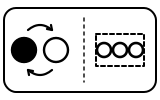
The machine needs descaling. Pressing any of these buttons cancels the alert and returns it to ready mode.
- Which light
- Several lights or symbols at once
- Colour
- Colour not named by the maker
- Steady or flashing
- Lights taking turns
What Sage / Breville says to do
- Empty the drip tray; fill the tank to the DESCALE line and add the descaling agent.
- Put a 2 L container under the portafilter and steam wand, turn the machine off with 1 CUP + STEAM and let it cool completely.
- With the machine off, hold 1 CUP and STEAM for 5 seconds to enter descale mode, then press 1 CUP or STEAM to start; the two buttons flash alternately throughout.
- When the solution is used up, refill to MAX, empty the container and press 1 CUP or STEAM to resume. When it finishes, 1 CUP and STEAM flash alternately and the machine goes to standby.
Source:
- Breville: the Bambino Plus — Instruction Book: Functions, Care & Cleaning, Descaling and Troubleshooting — Bambino Plus BES500, US and Canada instruction book (sold as Sage SES500 in the UK and Europe). assets.breville.com Checked 2026-09-29.
1 CUP and 2 CUP buttons flashing alternately
Cleaning due
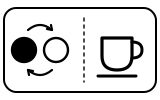
200 extractions have been made since the last cleaning cycle: the group head needs cleaning. This is a flushing cycle, separate from descaling.
- Which light
- Cup, drink or strength buttons
- Colour
- Colour not named by the maker
- Steady or flashing
- Lights taking turns
What Sage / Breville says to do
- Put the cleaning disc in the filter basket, a cleaning tablet on top, and lock the portafilter in.
- Empty the drip tray, put a 2 L container under the portafilter and steam wand, and fill the tank to MAX.
- Hold 1 CUP and 2 CUP for 5 seconds, then press either to start; the lights flash in turn while it runs and the machine returns to ready mode at the end.
Source:
- Breville: the Bambino Plus — Instruction Book: Functions, Care & Cleaning, Descaling and Troubleshooting — Bambino Plus BES500, US and Canada instruction book (sold as Sage SES500 in the UK and Europe). assets.breville.com Checked 2026-09-29.
1 CUP, 2 CUP and STEAM buttons not lit
Water
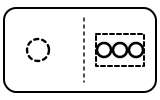
The machine has detected a low water level (or the tank is not attached properly).
- Which light
- Several lights or symbols at once
- Colour
- No light
- Steady or flashing
- Off
What Sage / Breville says to do
- Add water to the tank and make sure it sits flush against the back of the machine.
- When there is enough water, all buttons light up and the machine can be used.
Source:
- Breville: the Bambino Plus — Instruction Book: Functions, Care & Cleaning, Descaling and Troubleshooting — Bambino Plus BES500, US and Canada instruction book (sold as Sage SES500 in the UK and Europe). assets.breville.com Checked 2026-09-29.
MILK TEMP and MILK FOAM lights fully lit and flashing, STEAM light off
Fault or blockage

The machine has detected a blocked steam wand and stopped. The troubleshooting table adds that the water tank may be empty.
- Which light
- Milk temperature and froth lights
- Colour
- Colour not named by the maker
- Steady or flashing
- Flashing or blinking
What Sage / Breville says to do
- Clean the steam wand tip as the manual’s ‘Cleaning the Steam Wand’ section describes.
- Press and hold the STEAM button for 3 seconds to purge the system, and fill the tank if it is low. The lights flash until the purge is done.
Source:
- Breville: the Bambino Plus — Instruction Book: Functions, Care & Cleaning, Descaling and Troubleshooting — Bambino Plus BES500, US and Canada instruction book (sold as Sage SES500 in the UK and Europe). assets.breville.com Checked 2026-09-29.
MILK TEMP and MILK FOAM lights running downwards
Mode running
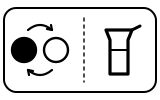
Lower-the-steam-wand alert: the wand has been left raised after texturing milk.
- Which light
- Milk temperature and froth lights
- Colour
- Colour not named by the maker
- Steady or flashing
- Lights taking turns
What Sage / Breville says to do
- Lower the steam wand so it can purge itself automatically.
- To purge by hand, with the wand lowered, hold STEAM for 5 seconds.
Source:
- Breville: the Bambino Plus — Instruction Book: Functions, Care & Cleaning, Descaling and Troubleshooting — Bambino Plus BES500, US and Canada instruction book (sold as Sage SES500 in the UK and Europe). assets.breville.com Checked 2026-09-29.
Light flashes 3 times after pressing 1 CUP or 2 CUP in reset mode
Setting confirmed

All shot volumes have been reset to the factory settings.
- Which light
- Cup, drink or strength buttons
- Colour
- Colour not named by the maker
- Steady or flashing
- Flashing or blinking
What Sage / Breville says to do
- Nothing to fix: the machine returns to ready mode.
Source:
- Breville: the Bambino Plus — Instruction Book: Functions, Care & Cleaning, Descaling and Troubleshooting — Bambino Plus BES500, US and Canada instruction book (sold as Sage SES500 in the UK and Europe). assets.breville.com Checked 2026-09-29.
All lights on steadily
Normal operation
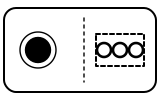
Ready mode: the water tank is attached correctly and the machine can be used.
- Which light
- Several lights or symbols at once
- Colour
- Colour not named by the maker
- Steady or flashing
- Steady
What Sage / Breville says to do
- Nothing to do. If the machine is on but stops working, the manual says its thermal cut-out may have tripped: switch off with 1 CUP + STEAM, unplug, let it cool 30–60 minutes, and if the problem persists call Breville Support.
If that does not fix it: how to contact Sage / Breville.
Source:
- Breville: the Bambino Plus — Instruction Book: Functions, Care & Cleaning, Descaling and Troubleshooting — Bambino Plus BES500, US and Canada instruction book (sold as Sage SES500 in the UK and Europe). assets.breville.com Checked 2026-09-29.
When Sage / Breville says to get help
Call Breville Support (the manual’s wording; Sage support in the UK and Europe).
Sources
Every line on this page comes from Sage / Breville’s own documents, read on the date shown. Nothing is taken from third-party manual sites.
- Breville: the Bambino Plus — Instruction Book: Functions, Care & Cleaning, Descaling and Troubleshooting — Bambino Plus BES500, US and Canada instruction book (sold as Sage SES500 in the UK and Europe). assets.breville.com Checked 2026-09-29.