Philips Barista Brew: what the lights mean
Semi-automatic espresso with portafilter (PSA3218, PSA3228)
The Barista Brew is Philips’ portafilter machine. Its button lights double as status lights: the hot water/steam light turns red for a water or pressure problem, and a separate descale light is steady when descaling is due.
Every Philips Barista Brew light we could source, 7 in all, each with Philips’s meaning and steps. This is the Barista Brew’s pattern; another Philips machine may use the same light for something else — check the manual for your model.
Hot water/steam light blinking red
Water
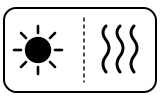
One of three things: the water tank is almost empty; the water tank is not in place; or the brewing pressure is over its limit, so no coffee or only drops come out.
- Which light
- Steam or hot-water light
- Colour
- Red
- Steady or flashing
- Flashing or blinking
What Philips says to do
- Fill the tank with fresh water to MAX and press the drink button.
- Insert the tank, push it in as far as it goes, and press the drink button again.
- For the pressure case: use a coarser grind, tamp with less force, and use the right amount — Philips recommends 12–14 g for a single cup and 18–20 g for a double.
- If none of this solves it, contact Philips.
If that does not fix it: how to contact Philips.
Source:
- Philips: A warning light is On or flashing on my Philips Barista Brew Espresso Machine — Barista Brew PSA3218/01, PSA3218/10, PSA3228/01 and others named in the article. www.usa.philips.com Checked 2026-09-29.
Hot water/steam light blinking white
Heating up
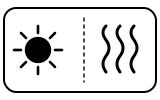
The machine is heating up for the hot water/steam function.
- Which light
- Steam or hot-water light
- Colour
- White
- Steady or flashing
- Flashing or blinking
What Philips says to do
- Wait for it to finish heating.
Source:
- Philips: A warning light is On or flashing on my Philips Barista Brew Espresso Machine — Barista Brew PSA3218/01, PSA3218/10, PSA3228/01 and others named in the article. www.usa.philips.com Checked 2026-09-29.
Descale light on, steady
Descale needed
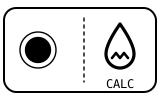
The machine needs descaling.
- Which light
- Descale light or symbol
- Colour
- Colour not named by the maker
- Steady or flashing
- Steady
What Philips says to do
- Descale the machine following the instructions in its user manual.
Source:
- Philips: A warning light is On or flashing on my Philips Barista Brew Espresso Machine — Barista Brew PSA3218/01, PSA3218/10, PSA3228/01 and others named in the article. www.usa.philips.com Checked 2026-09-29.
Descale light flashing slowly
Mode running
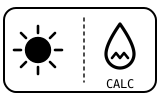
The machine is in descaling mode.
- Which light
- Descale light or symbol
- Colour
- Colour not named by the maker
- Steady or flashing
- Flashing or blinking
What Philips says to do
- Carry on with the descaling steps in the manual.
Source:
- Philips: A warning light is On or flashing on my Philips Barista Brew Espresso Machine — Barista Brew PSA3218/01, PSA3218/10, PSA3228/01 and others named in the article. www.usa.philips.com Checked 2026-09-29.
On/Off button flashing
Heating up
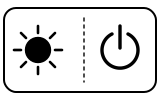
The machine is heating up.
- Which light
- Main button or power light
- Colour
- Colour not named by the maker
- Steady or flashing
- Flashing or blinking
What Philips says to do
- Wait until it is ready: all button lights except the descale light go steady.
Source:
- Philips: A warning light is On or flashing on my Philips Barista Brew Espresso Machine — Barista Brew PSA3218/01, PSA3218/10, PSA3228/01 and others named in the article. www.usa.philips.com Checked 2026-09-29.
On/Off and 1-cup Espresso buttons stay on, steady
Mode running
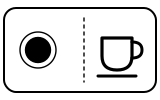
After first use, or after the first cycle of descaling, the machine needs to be flushed before you can use it.
- Which light
- Cup, drink or strength buttons
- Colour
- Colour not named by the maker
- Steady or flashing
- Steady
What Philips says to do
- Make sure the water tank is filled and put a bowl under the coffee spout.
- Press the 1-cup Espresso button to start flushing; the 1-cup, 2-cup and Americano lights light up one after the other.
- When flushing is complete the lights stay steady and the machine is ready.
Source:
- Philips: A warning light is On or flashing on my Philips Barista Brew Espresso Machine — Barista Brew PSA3218/01, PSA3218/10, PSA3228/01 and others named in the article. www.usa.philips.com Checked 2026-09-29.
All button lights on steadily (descale light off)
Normal operation
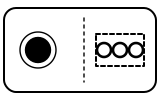
The machine is ready for use.
- Which light
- Several lights or symbols at once
- Colour
- Colour not named by the maker
- Steady or flashing
- Steady
What Philips says to do
- Nothing to do.
Source:
- Philips: A warning light is On or flashing on my Philips Barista Brew Espresso Machine — Barista Brew PSA3218/01, PSA3218/10, PSA3228/01 and others named in the article. www.usa.philips.com Checked 2026-09-29.
When Philips says to get help
Contact Philips for further assistance (the article’s wording).
Sources
Every line on this page comes from Philips’s own documents, read on the date shown. Nothing is taken from third-party manual sites.
- Philips: A warning light is On or flashing on my Philips Barista Brew Espresso Machine — Barista Brew PSA3218/01, PSA3218/10, PSA3228/01 and others named in the article. www.usa.philips.com Checked 2026-09-29.