Nespresso Essenza Plus and CitiZ Platinum: what the lights mean
Original line (small bullet capsules)
The Essenza Plus and the CitiZ Platinum share one Nespresso manual and one set of lights. Unlike the older Original machines they have a descaling alert with two levels — blinking first, steady when it is overdue — and a water hardness setting that decides when the alert comes on (after 1,000 to 4,000 cups of 40 ml). The CitiZ Platinum has more drink buttons (Americano, Americano XL, hot water) than the Essenza Plus, but the manual gives both the same light meanings.
Every Nespresso Essenza Plus and CitiZ Platinum light we could source, 6 in all, each with Nespresso’s meaning and steps. This is the Essenza Plus and CitiZ Platinum’s pattern; another Nespresso machine may use the same light for something else — check the manual for your model.
Descaling alert blinking
Descale needed
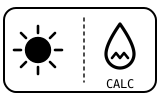
Descaling alert level 1: the machine counts the drinks you make and is telling you it is time to descale. It can blink in ready mode or while coffee is being made. Heavy use of Americano or hot water brings it on sooner.
- Which light
- Descale light or symbol
- Colour
- Colour not named by the maker
- Steady or flashing
- Flashing or blinking
What Nespresso says to do
- Descale soon: eject the capsule, empty the capsule container and drip tray, fill the tank to half with water plus Nespresso descaling agent, and place a 1 L container under the outlet.
- With the machine on, hold the three buttons the manual shows for your machine for more than 5 seconds to enter descaling mode, then start it; to back out at this point, press any coffee button.
- When the tank is empty, rinse it, fill it with fresh water to MAX, empty the container and press the hot water button; do this once more. The machine switches off by itself at the end.
Source:
- Nespresso: User manual of CitiZ Platinum and Essenza Plus: Descaling (alert levels), Water hardness setting and Troubleshooting — CitiZ Platinum and Essenza Plus (shared multi-language manual). www.nespresso.com Checked 2026-09-29.
Descaling alert lit steadily
Descale needed
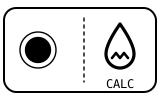
Descaling alert level 2: the descale is overdue. Nespresso says to descale immediately to avoid the machine’s performance and the coffee’s quality dropping.
- Which light
- Descale light or symbol
- Colour
- Colour not named by the maker
- Steady or flashing
- Steady
What Nespresso says to do
- Run the full descaling procedure now (see the blinking-alert page for the steps).
- If the alert comes on sooner than you expect, check the water hardness setting matches your water.
Source:
- Nespresso: User manual of CitiZ Platinum and Essenza Plus: Descaling (alert levels), Water hardness setting and Troubleshooting — CitiZ Platinum and Essenza Plus (shared multi-language manual). www.nespresso.com Checked 2026-09-29.
All drink buttons blinking fast
Fault or blockage
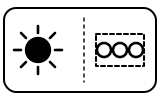
The machine is in error, overheating, or standing somewhere below 0 °C (32 °F).
- Which light
- Several lights or symbols at once
- Colour
- Colour not named by the maker
- Steady or flashing
- Flashing or blinking
What Nespresso says to do
- Wait for all the buttons to stop blinking; this can take a few minutes.
- If they still blink after a few minutes, unplug the machine and plug it back in.
- If the problem persists, call Nespresso.
If that does not fix it: how to contact Nespresso.
Source:
- Nespresso: User manual of CitiZ Platinum and Essenza Plus: Descaling (alert levels), Water hardness setting and Troubleshooting — CitiZ Platinum and Essenza Plus (shared multi-language manual). www.nespresso.com Checked 2026-09-29.
Buttons blinking after holding the hot water button for 5 seconds (machine off)
Setting confirmed
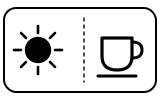
The machine is showing its water hardness setting, from level 0 to 4. The level decides when the descaling alert comes on: level 0 (under 50 mg/l calcium carbonate) after 4,000 cups of 40 ml, level 1 after 3,000, level 2 after 2,000, level 3 after 1,500 and level 4 (over 380 mg/l) after 1,000.
- Which light
- Cup, drink or strength buttons
- Colour
- Colour not named by the maker
- Steady or flashing
- Flashing or blinking
What Nespresso says to do
- Test your water with the strip supplied with the machine.
- Press the hot water button until the right level is shown.
- Press any coffee button to save and leave the setting.
Source:
- Nespresso: User manual of CitiZ Platinum and Essenza Plus: Descaling (alert levels), Water hardness setting and Troubleshooting — CitiZ Platinum and Essenza Plus (shared multi-language manual). www.nespresso.com Checked 2026-09-29.
Lights blinking irregularly
Fault or blockage
Nespresso lists irregular blinking — as opposed to the even, fast blinking of all the drink buttons — as a fault to be repaired.
- Which light
- Cup, drink or strength buttons
- Colour
- Colour not named by the maker
- Steady or flashing
- Flashing or blinking
What Nespresso says to do
- Send the appliance for repair or call Nespresso.
If that does not fix it: how to contact Nespresso.
Source:
- Nespresso: User manual of CitiZ Platinum and Essenza Plus: Descaling (alert levels), Water hardness setting and Troubleshooting — CitiZ Platinum and Essenza Plus (shared multi-language manual). www.nespresso.com Checked 2026-09-29.
No light
Off or no power
The machine turns itself off after 9 minutes without use; any button turns it back on. If no button does, it is getting no power.
- Which light
- Cup, drink or strength buttons
- Colour
- No light
- Steady or flashing
- Off
What Nespresso says to do
- Press any button to turn it on; it heats for about 30 seconds.
- If nothing lights, check the power outlet, the plug, the voltage and the fuse. In case of problems, call Nespresso.
If that does not fix it: how to contact Nespresso.
Source:
- Nespresso: User manual of CitiZ Platinum and Essenza Plus: Descaling (alert levels), Water hardness setting and Troubleshooting — CitiZ Platinum and Essenza Plus (shared multi-language manual). www.nespresso.com Checked 2026-09-29.
When Nespresso says to get help
Call Nespresso (the manual’s wording).
Sources
Every line on this page comes from Nespresso’s own documents, read on the date shown. Nothing is taken from third-party manual sites.
- Nespresso: User manual of CitiZ Platinum and Essenza Plus: Descaling (alert levels), Water hardness setting and Troubleshooting — CitiZ Platinum and Essenza Plus (shared multi-language manual). www.nespresso.com Checked 2026-09-29.