Nespresso Essenza Mini: what the lights mean
Original line (small bullet capsules)
The Essenza Mini has two buttons, Espresso and Lungo, each with a light. The manual uses them for heating up, ready, settings and the descaling and emptying modes — but it has no descaling alert: Nespresso gives a cup count instead (after 300 cups of 40 ml in hard water, 600 in medium, 1200 in soft). The Citiz, Inissia and Pixie speak the same two-light language, but their manuals use 3-second presses where the Essenza Mini’s uses 5 seconds, so they have their own page; the Essenza Plus and CitiZ Platinum add a descaling alert and have theirs.
Every Nespresso Essenza Mini light we could source, 7 in all, each with Nespresso’s meaning and steps. This is the Essenza Mini’s pattern; another Nespresso machine may use the same light for something else — check the manual for your model.
Both button lights blinking after you switch it on
Heating up
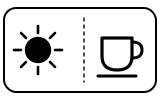
The machine is heating up, which takes about 25 seconds. Steady lights mean it is ready.
- Which light
- Cup, drink or strength buttons
- Colour
- Colour not named by the maker
- Steady or flashing
- Flashing or blinking
What Nespresso says to do
- Wait for the lights to go steady.
- You can press Espresso or Lungo while they blink: the coffee then flows by itself when the machine is ready.
Source:
- Nespresso: Essenza Mini — My Machine (user manual): Machine operation, Energy saving mode, Reset to factory settings, Descaling, Emptying the system and Troubleshooting — Essenza Mini, Original line (Breville-made edition, 2017 manual). www.nespresso.com Checked 2026-09-29.
Both lights blinking after holding Espresso and Lungo for 5 seconds
Mode running
The machine is in descaling mode.
- Which light
- Cup, drink or strength buttons
- Colour
- Colour not named by the maker
- Steady or flashing
- Flashing or blinking
What Nespresso says to do
- Carry on with the descaling steps in the manual: press Lungo and let the tank of descaling solution run through, repeat with the collected solution, then rinse twice with fresh water.
- To leave descaling mode, press Espresso and Lungo together for 5 seconds.
Source:
- Nespresso: Essenza Mini — My Machine (user manual): Machine operation, Energy saving mode, Reset to factory settings, Descaling, Emptying the system and Troubleshooting — Essenza Mini, Original line (Breville-made edition, 2017 manual). www.nespresso.com Checked 2026-09-29.
The two lights blinking alternately, with the tank removed and the lever open
Mode running
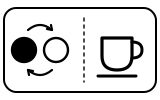
The machine is emptying its water system — the mode used before a long period without use, for frost protection, or before a repair.
- Which light
- Cup, drink or strength buttons
- Colour
- Colour not named by the maker
- Steady or flashing
- Lights taking turns
What Nespresso says to do
- Let it run: the machine switches itself off when emptying is finished.
- Close the lever, then empty and clean the capsule container, the drip tray and the drip base.
Source:
- Nespresso: Essenza Mini — My Machine (user manual): Machine operation, Energy saving mode, Reset to factory settings, Descaling, Emptying the system and Troubleshooting — Essenza Mini, Original line (Breville-made edition, 2017 manual). www.nespresso.com Checked 2026-09-29.
Light blinks fast 3 times
Setting confirmed
A setting has been saved: either a new cup volume you just programmed, or a reset to factory settings (Espresso 40 ml, Lungo 110 ml, Auto Off after 9 minutes).
- Which light
- Cup, drink or strength buttons
- Colour
- Colour not named by the maker
- Steady or flashing
- Flashing or blinking
What Nespresso says to do
- Nothing to fix. After a reset the lights go on blinking as the machine heats up, then turn steady when it is ready.
Source:
- Nespresso: Essenza Mini — My Machine (user manual): Machine operation, Energy saving mode, Reset to factory settings, Descaling, Emptying the system and Troubleshooting — Essenza Mini, Original line (Breville-made edition, 2017 manual). www.nespresso.com Checked 2026-09-29.
Espresso button blinks once or twice after holding it for 5 seconds with the machine off
Setting confirmed
The machine is showing its Auto Off setting: a single blink means it switches off after 9 minutes, a double blink after 30 minutes.
- Which light
- Cup, drink or strength buttons
- Colour
- Colour not named by the maker
- Steady or flashing
- Flashing or blinking
What Nespresso says to do
- Press Espresso once to change to 30 minutes, once more to go back to 9 minutes.
- Press Lungo for 5 seconds to leave the setting.
Source:
- Nespresso: Essenza Mini — My Machine (user manual): Machine operation, Energy saving mode, Reset to factory settings, Descaling, Emptying the system and Troubleshooting — Essenza Mini, Original line (Breville-made edition, 2017 manual). www.nespresso.com Checked 2026-09-29.
Irregular blinking
Fault or blockage
Nespresso lists irregular blinking as a fault the owner cannot fix.
- Which light
- Cup, drink or strength buttons
- Colour
- Colour not named by the maker
- Steady or flashing
- Flashing or blinking
What Nespresso says to do
- Send the appliance for repair or call the Nespresso Club.
If that does not fix it: how to contact Nespresso.
Source:
- Nespresso: Essenza Mini — My Machine (user manual): Machine operation, Energy saving mode, Reset to factory settings, Descaling, Emptying the system and Troubleshooting — Essenza Mini, Original line (Breville-made edition, 2017 manual). www.nespresso.com Checked 2026-09-29.
No light
Off or no power
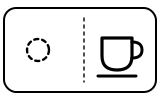
Either the machine has switched itself off (Auto Off after 9 minutes without use, or 30 minutes if you changed it), or it is getting no power.
- Which light
- Cup, drink or strength buttons
- Colour
- No light
- Steady or flashing
- Off
What Nespresso says to do
- Press Espresso or Lungo to turn it on.
- If nothing lights, check the mains, plug, voltage and fuse. In case of problems, call the Nespresso Club.
If that does not fix it: how to contact Nespresso.
Source:
- Nespresso: Essenza Mini — My Machine (user manual): Machine operation, Energy saving mode, Reset to factory settings, Descaling, Emptying the system and Troubleshooting — Essenza Mini, Original line (Breville-made edition, 2017 manual). www.nespresso.com Checked 2026-09-29.
When Nespresso says to get help
Call the Nespresso Club (the manual’s wording).
Sources
Every line on this page comes from Nespresso’s own documents, read on the date shown. Nothing is taken from third-party manual sites.
- Nespresso: Essenza Mini — My Machine (user manual): Machine operation, Energy saving mode, Reset to factory settings, Descaling, Emptying the system and Troubleshooting — Essenza Mini, Original line (Breville-made edition, 2017 manual). www.nespresso.com Checked 2026-09-29.