JURA A1: what the lights mean
One-cup bean-to-cup (A1, A100)
The JURA A1 has no text screen: a row of symbols lights up or flashes — a water tank, a coffee grounds container, a cleaning symbol, a descaling symbol, a filter symbol and the coffee-strength and cup-size symbols. JURA’s manual lists every message on that ‘symbol display’.
Every JURA A1 light we could source, 11 in all, each with JURA’s meaning and steps. This is the A1’s pattern; another JURA machine may use the same light for something else — check the manual for your model.
Descaling symbol lights up (machine otherwise ready)
Descale needed
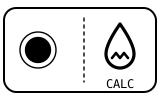
The machine is asking to be descaled.
- Which light
- Descale light or symbol
- Colour
- Colour not named by the maker
- Steady or flashing
- Steady
What JURA says to do
- Descale the machine as in the manual’s ‘Maintenance – Descaling the machine’ section.
Source:
- JURA: Instructions for use for A1 — 6 Messages on symbol display, 7 Troubleshooting — A1, North American edition. us.jura.com Checked 2026-09-29.
Cleaning symbol lights up (machine otherwise ready)
Cleaning due
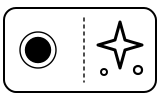
The machine is asking to be cleaned.
- Which light
- Cleaning symbol
- Colour
- Colour not named by the maker
- Steady or flashing
- Steady
What JURA says to do
- Run the cleaning as in the manual’s ‘Maintenance – Cleaning the machine’ section.
Source:
- JURA: Instructions for use for A1 — 6 Messages on symbol display, 7 Troubleshooting — A1, North American edition. us.jura.com Checked 2026-09-29.
Filter symbol lights up (machine otherwise ready)
Water filter
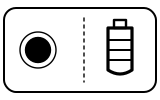
The CLEARYL Blue filter cartridge is used up: it stops working after 60 litres (2000 oz) of water.
- Which light
- Water filter light
- Colour
- Colour not named by the maker
- Steady or flashing
- Steady
What JURA says to do
- Replace the CLEARYL Blue filter cartridge (‘Maintenance – Changing the filter’).
Source:
- JURA: Instructions for use for A1 — 6 Messages on symbol display, 7 Troubleshooting — A1, North American edition. us.jura.com Checked 2026-09-29.
Water tank symbol lights up
Water
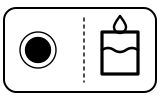
The water tank is empty or not inserted correctly; you cannot make anything. If it lights up while the tank is full, the tank’s float is stuck.
- Which light
- Water tank symbol
- Colour
- Colour not named by the maker
- Steady or flashing
- Steady
What JURA says to do
- Fill the water tank and insert it properly.
- If the tank is full and the symbol stays on, descale the water tank (‘Maintenance – Descaling the water tank’).
Source:
- JURA: Instructions for use for A1 — 6 Messages on symbol display, 7 Troubleshooting — A1, North American edition. us.jura.com Checked 2026-09-29.
Coffee grounds container symbol lights up
Container or tray
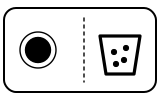
The coffee grounds container is full; no coffee can be made.
- Which light
- Coffee grounds container symbol
- Colour
- Colour not named by the maker
- Steady or flashing
- Steady
What JURA says to do
- Empty the coffee grounds container and the drip tray.
Source:
- JURA: Instructions for use for A1 — 6 Messages on symbol display, 7 Troubleshooting — A1, North American edition. us.jura.com Checked 2026-09-29.
Coffee grounds container symbol flashes
Container or tray
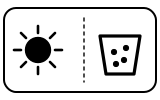
The drip tray is not inserted, or not inserted correctly; you cannot make anything.
- Which light
- Coffee grounds container symbol
- Colour
- Colour not named by the maker
- Steady or flashing
- Flashing or blinking
What JURA says to do
- Insert the drip tray.
Source:
- JURA: Instructions for use for A1 — 6 Messages on symbol display, 7 Troubleshooting — A1, North American edition. us.jura.com Checked 2026-09-29.
The Ristretto, Espresso, Coffee and both coffee-strength symbols flash
Fault or blockage
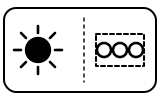
The aroma preservation cover on the bean container is missing or not fitted correctly.
- Which light
- Several lights or symbols at once
- Colour
- Colour not named by the maker
- Steady or flashing
- Flashing or blinking
What JURA says to do
- Fit the aroma preservation cover correctly.
Source:
- JURA: Instructions for use for A1 — 6 Messages on symbol display, 7 Troubleshooting — A1, North American edition. us.jura.com Checked 2026-09-29.
Ristretto, Espresso, Coffee and Ground Coffee symbols flash briefly after you add ground coffee
Fault or blockage
There was not enough ground coffee, so the machine stopped.
- Which light
- Several lights or symbols at once
- Colour
- Colour not named by the maker
- Steady or flashing
- Flashing or blinking
What JURA says to do
- Next time, add more ground coffee (‘Preparation – Ground coffee’).
Source:
- JURA: Instructions for use for A1 — 6 Messages on symbol display, 7 Troubleshooting — A1, North American edition. us.jura.com Checked 2026-09-29.
The two coffee-strength symbols (‘normal’ and ‘strong’) flash alternately
Water
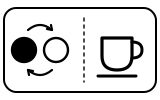
The system must be filled with water.
- Which light
- Cup, drink or strength buttons
- Colour
- Colour not named by the maker
- Steady or flashing
- Lights taking turns
What JURA says to do
- Fill the water tank.
- Touch the ‘normal’ or ‘strong’ symbol; the system fills with water.
Source:
- JURA: Instructions for use for A1 — 6 Messages on symbol display, 7 Troubleshooting — A1, North American edition. us.jura.com Checked 2026-09-29.
The two strength symbols, the Cleaning symbol and the Descaling or Filter symbol light up brightly
Setting confirmed
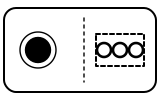
You are in programming mode.
- Which light
- Several lights or symbols at once
- Colour
- Colour not named by the maker
- Steady or flashing
- Steady
What JURA says to do
- Touch the ‘normal’ or ‘strong’ strength symbol to leave programming mode; the machine is ready again.
Source:
- JURA: Instructions for use for A1 — 6 Messages on symbol display, 7 Troubleshooting — A1, North American edition. us.jura.com Checked 2026-09-29.
Cleaning symbol flashes for 5 seconds at switch-on, then the machine switches off
Fault or blockage
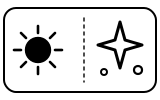
The machine has been in the cold for a long time, so heating is disabled for safety.
- Which light
- Cleaning symbol
- Colour
- Colour not named by the maker
- Steady or flashing
- Flashing or blinking
What JURA says to do
- Let the machine warm up to room temperature.
- If you cannot solve the problem, contact JURA customer support in your country.
If that does not fix it: how to contact JURA.
Source:
- JURA: Instructions for use for A1 — 6 Messages on symbol display, 7 Troubleshooting — A1, North American edition. us.jura.com Checked 2026-09-29.
When JURA says to get help
Contact JURA customer support in your country (the manual’s wording).
Sources
Every line on this page comes from JURA’s own documents, read on the date shown. Nothing is taken from third-party manual sites.
- JURA: Instructions for use for A1 — 6 Messages on symbol display, 7 Troubleshooting — A1, North American edition. us.jura.com Checked 2026-09-29.