De’Longhi Magnifica Evo: what the lights mean
Bean-to-cup with drink buttons and indicator row (ECAM29X.2Y, 29X.3Y, 29X.4Y and FEB292X–294X)
Unlike the Magnifica S, the Magnifica Evo’s manual names every indicator in words and gives each a steady meaning and a blinking one: descale, grounds container, water, water filter, plus a general alarm, and the drink buttons blink while it warms up. The steady and blinking meanings are often the opposite way round from the Magnifica S — on the Evo a steady water light means ‘fill the tank’ and a blinking one means ‘the tank is not in place’ — so check which machine you have.
Every De’Longhi Magnifica Evo light we could source, 11 in all, each with De’Longhi’s meaning and steps. This is the Magnifica Evo’s pattern; another De’Longhi machine may use the same light for something else — check the manual for your model.
Drink buttons blinking
Heating up

The machine is warming up.
- Which light
- Cup, drink or strength buttons
- Colour
- Colour not named by the maker
- Steady or flashing
- Flashing or blinking
What De’Longhi says to do
- Wait: when it is ready the drink and settings indicators stay lit.
Source:
- De’Longhi: Bean to cup espresso and cappuccino machine — Instructions for use ECAM29X.2Y - 29X.3Y - 29X.4Y - FEB292X - 293X - 294X: 2.2 Description of control panel, 10 Water softener filter, 15 Descaling, 16 Explanation of lights — Magnifica Evo ECAM290.22.B and the other ECAM29X.2Y/3Y/4Y models. library.delonghigroup.com Checked 2026-09-29.
Drink and settings indicators lit steadily
Normal operation
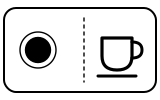
The machine is ready for use.
- Which light
- Cup, drink or strength buttons
- Colour
- Colour not named by the maker
- Steady or flashing
- Steady
What De’Longhi says to do
- Select the drink you want and its options (intensity, pre-ground coffee).
Source:
- De’Longhi: Bean to cup espresso and cappuccino machine — Instructions for use ECAM29X.2Y - 29X.3Y - 29X.4Y - FEB292X - 293X - 294X: 2.2 Description of control panel, 10 Water softener filter, 15 Descaling, 16 Explanation of lights — Magnifica Evo ECAM290.22.B and the other ECAM29X.2Y/3Y/4Y models. library.delonghigroup.com Checked 2026-09-29.
Descale indicator lit steadily
Descale needed
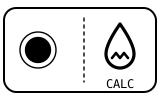
The machine must be descaled.
- Which light
- Descale light or symbol
- Colour
- Colour not named by the maker
- Steady or flashing
- Steady
What De’Longhi says to do
- Hold the descale button for at least 5 seconds, until its light blinks rapidly.
- Empty the drip tray and grounds container and refit them; empty the water tank completely and remove the softener filter if fitted.
- Pour descaler to level A (a 100 ml pack), add one litre of water to level B and refit the tank. Put a container of at least 2 litres under the coffee spout and the cappuccino maker, then press the descale button to start.
- When the descale button blinks rapidly, turn the steam/hot water dial to I. The cycle then alternates between pausing and delivering for about 30 minutes; when the water indicator lights up, empty the container, rinse and fill the tank to MAX, and press the descale button to rinse, turning the dial each time the steam button blinks.
Source:
- De’Longhi: Bean to cup espresso and cappuccino machine — Instructions for use ECAM29X.2Y - 29X.3Y - 29X.4Y - FEB292X - 293X - 294X: 2.2 Description of control panel, 10 Water softener filter, 15 Descaling, 16 Explanation of lights — Magnifica Evo ECAM290.22.B and the other ECAM29X.2Y/3Y/4Y models. library.delonghigroup.com Checked 2026-09-29.
Descale indicator blinking
Mode running
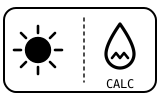
Descaling is in progress.
- Which light
- Descale light or symbol
- Colour
- Colour not named by the maker
- Steady or flashing
- Flashing or blinking
What De’Longhi says to do
- Let it run and follow the prompts. If descaling was interrupted, press the descale button, and if the steam dial is at O turn it to I: the cycle resumes from the rinse step.
Source:
- De’Longhi: Bean to cup espresso and cappuccino machine — Instructions for use ECAM29X.2Y - 29X.3Y - 29X.4Y - FEB292X - 293X - 294X: 2.2 Description of control panel, 10 Water softener filter, 15 Descaling, 16 Explanation of lights — Magnifica Evo ECAM290.22.B and the other ECAM29X.2Y/3Y/4Y models. library.delonghigroup.com Checked 2026-09-29.
Grounds container indicator lit steadily
Container or tray
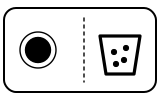
The grounds container needs emptying.
- Which light
- Coffee grounds container symbol
- Colour
- Colour not named by the maker
- Steady or flashing
- Steady
What De’Longhi says to do
- Take out the drip tray, empty the grounds container and the tray, and push them fully home.
Source:
- De’Longhi: Bean to cup espresso and cappuccino machine — Instructions for use ECAM29X.2Y - 29X.3Y - 29X.4Y - FEB292X - 293X - 294X: 2.2 Description of control panel, 10 Water softener filter, 15 Descaling, 16 Explanation of lights — Magnifica Evo ECAM290.22.B and the other ECAM29X.2Y/3Y/4Y models. library.delonghigroup.com Checked 2026-09-29.
Grounds container indicator blinking
Container or tray
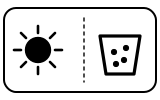
The grounds container is missing or not inserted correctly.
- Which light
- Coffee grounds container symbol
- Colour
- Colour not named by the maker
- Steady or flashing
- Flashing or blinking
What De’Longhi says to do
- Position the drip tray complete with the grounds container and press it fully home.
Source:
- De’Longhi: Bean to cup espresso and cappuccino machine — Instructions for use ECAM29X.2Y - 29X.3Y - 29X.4Y - FEB292X - 293X - 294X: 2.2 Description of control panel, 10 Water softener filter, 15 Descaling, 16 Explanation of lights — Magnifica Evo ECAM290.22.B and the other ECAM29X.2Y/3Y/4Y models. library.delonghigroup.com Checked 2026-09-29.
Water indicator lit steadily
Water
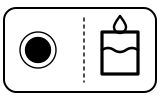
There is not enough water in the tank. During descaling, this light also marks the end of the first step.
- Which light
- Water tank symbol
- Colour
- Colour not named by the maker
- Steady or flashing
- Steady
What De’Longhi says to do
- Fill the tank. If it came on during descaling, empty the container, rinse the tank, fill it with fresh water to MAX and carry on with the rinse.
Source:
- De’Longhi: Bean to cup espresso and cappuccino machine — Instructions for use ECAM29X.2Y - 29X.3Y - 29X.4Y - FEB292X - 293X - 294X: 2.2 Description of control panel, 10 Water softener filter, 15 Descaling, 16 Explanation of lights — Magnifica Evo ECAM290.22.B and the other ECAM29X.2Y/3Y/4Y models. library.delonghigroup.com Checked 2026-09-29.
Water indicator blinking
Water

The water tank is missing or not positioned correctly.
- Which light
- Water tank symbol
- Colour
- Colour not named by the maker
- Steady or flashing
- Flashing or blinking
What De’Longhi says to do
- Make sure the tank is correctly in place, pushed fully home.
Source:
- De’Longhi: Bean to cup espresso and cappuccino machine — Instructions for use ECAM29X.2Y - 29X.3Y - 29X.4Y - FEB292X - 293X - 294X: 2.2 Description of control panel, 10 Water softener filter, 15 Descaling, 16 Explanation of lights — Magnifica Evo ECAM290.22.B and the other ECAM29X.2Y/3Y/4Y models. library.delonghigroup.com Checked 2026-09-29.
Water filter indicator lit steadily
Water filter
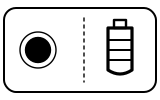
The water softener filter must be replaced.
- Which light
- Water filter light
- Colour
- Colour not named by the maker
- Steady or flashing
- Steady
What De’Longhi says to do
- Remove the water tank and the spent filter, activate a new filter as section 10 describes and set the machine for it in the settings menu.
- De’Longhi adds: replace the filter after two months (see its date indicator), or after 3 weeks if the machine has not been used, even if the light has not come on.
Source:
- De’Longhi: Bean to cup espresso and cappuccino machine — Instructions for use ECAM29X.2Y - 29X.3Y - 29X.4Y - FEB292X - 293X - 294X: 2.2 Description of control panel, 10 Water softener filter, 15 Descaling, 16 Explanation of lights — Magnifica Evo ECAM290.22.B and the other ECAM29X.2Y/3Y/4Y models. library.delonghigroup.com Checked 2026-09-29.
Water filter indicator blinking
Water filter
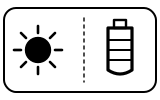
Filter installation is in progress.
- Which light
- Water filter light
- Colour
- Colour not named by the maker
- Steady or flashing
- Flashing or blinking
What De’Longhi says to do
- Carry on with the steps in section 10 of the manual until the filter is installed.
Source:
- De’Longhi: Bean to cup espresso and cappuccino machine — Instructions for use ECAM29X.2Y - 29X.3Y - 29X.4Y - FEB292X - 293X - 294X: 2.2 Description of control panel, 10 Water softener filter, 15 Descaling, 16 Explanation of lights — Magnifica Evo ECAM290.22.B and the other ECAM29X.2Y/3Y/4Y models. library.delonghigroup.com Checked 2026-09-29.
General alarm indicator on
Fault or blockage
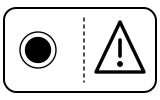
General alarm: the inside of the machine is very dirty.
- Which light
- Warning or alarm light
- Colour
- Colour not named by the maker
- Steady or flashing
- Steady
What De’Longhi says to do
- Clean the machine thoroughly, as the manual’s cleaning section (13) describes.
- If the message is still displayed after cleaning, contact De’Longhi Customer Services and/or an approved Service Centre.
If that does not fix it: how to contact De’Longhi.
Source:
- De’Longhi: Bean to cup espresso and cappuccino machine — Instructions for use ECAM29X.2Y - 29X.3Y - 29X.4Y - FEB292X - 293X - 294X: 2.2 Description of control panel, 10 Water softener filter, 15 Descaling, 16 Explanation of lights — Magnifica Evo ECAM290.22.B and the other ECAM29X.2Y/3Y/4Y models. library.delonghigroup.com Checked 2026-09-29.
When De’Longhi says to get help
Contact De’Longhi Customer Services and/or an approved Service Centre (the manual’s wording).
Sources
Every line on this page comes from De’Longhi’s own documents, read on the date shown. Nothing is taken from third-party manual sites.
- De’Longhi: Bean to cup espresso and cappuccino machine — Instructions for use ECAM29X.2Y - 29X.3Y - 29X.4Y - FEB292X - 293X - 294X: 2.2 Description of control panel, 10 Water softener filter, 15 Descaling, 16 Explanation of lights — Magnifica Evo ECAM290.22.B and the other ECAM29X.2Y/3Y/4Y models. library.delonghigroup.com Checked 2026-09-29.
- De’Longhi: Magnifica Evo, Black — Support Center (links the Instructions for use above) — Magnifica Evo ECAM290.22.B. www.delonghi.com Checked 2026-09-29.