De’Longhi Dedica EC685: what the lights mean
Dedica pump espresso (EC685, EC695, EC785)
The Dedica has three lit buttons — 1 cup, 2 cups and steam — and an orange descale light. The manual’s ‘Explanation of indicator lights’ table draws the buttons as pictures, so several patterns are told apart by when they happen: at switch-on, after steaming, or when you ask for coffee. Other Dedica models (EC680, Dedica Arte, Dedica Maestro) have their own manuals.
Every De’Longhi Dedica EC685 light we could source, 8 in all, each with De’Longhi’s meaning and steps. This is the Dedica EC685’s pattern; another De’Longhi machine may use the same light for something else — check the manual for your model.
Orange descale light flashing
Descale needed
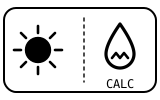
The appliance needs descaling.
- Which light
- Descale light or symbol
- Colour
- Orange
- Steady or flashing
- Flashing or blinking
What De’Longhi says to do
- Run a descaling cycle as in section 12 of the manual, with a descaler diluted as its pack says.
- Descaling is complete when the orange light goes off.
Source:
- De’Longhi: Coffee maker EC685 / EC695 / EC785 — Instructions for use: 7.3 Cooling cycle, 12 Descaling, 13 Explanation of indicator lights, 14 Troubleshooting — Dedica EC685, EC695, EC785 (EC685EX:4 edition). library.delonghigroup.com Checked 2026-09-29.
The three button lights flash one after another when you switch on
Normal operation
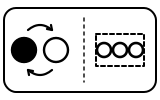
The appliance is running its self-diagnosis cycle.
- Which light
- Several lights or symbols at once
- Colour
- Colour not named by the maker
- Steady or flashing
- Lights taking turns
What De’Longhi says to do
- Nothing to do: the cup lights then flash while it heats up and go steady when it is ready.
Source:
- De’Longhi: Coffee maker EC685 / EC695 / EC785 — Instructions for use: 7.3 Cooling cycle, 12 Descaling, 13 Explanation of indicator lights, 14 Troubleshooting — Dedica EC685, EC695, EC785 (EC685EX:4 edition). library.delonghigroup.com Checked 2026-09-29.
Coffee button lights flashing after switch-on
Heating up
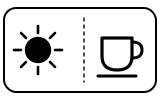
The appliance is heating up to make coffee. When the lights are on steadily it is ready.
- Which light
- Cup, drink or strength buttons
- Colour
- Colour not named by the maker
- Steady or flashing
- Flashing or blinking
What De’Longhi says to do
- Wait for the lights to go steady before making coffee.
Source:
- De’Longhi: Coffee maker EC685 / EC695 / EC785 — Instructions for use: 7.3 Cooling cycle, 12 Descaling, 13 Explanation of indicator lights, 14 Troubleshooting — Dedica EC685, EC695, EC785 (EC685EX:4 edition). library.delonghigroup.com Checked 2026-09-29.
The lights flash rapidly and no coffee comes out
Water
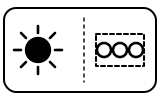
The water tank is empty or the machine is not making coffee. The troubleshooting table lists the causes: no water in the tank, a tank not pushed down far enough to open its valves, a blocked boiler outlet or filter, or limescale.
- Which light
- Several lights or symbols at once
- Colour
- Colour not named by the maker
- Steady or flashing
- Flashing or blinking
What De’Longhi says to do
- Fill the tank with water.
- Press the tank down lightly to open the valves on its bottom.
- Clean the coffee spouts and filters (sections 11.2 and 11.3 of the manual).
- If limescale is the cause, descale (section 12).
Source:
- De’Longhi: Coffee maker EC685 / EC695 / EC785 — Instructions for use: 7.3 Cooling cycle, 12 Descaling, 13 Explanation of indicator lights, 14 Troubleshooting — Dedica EC685, EC695, EC785 (EC685EX:4 edition). library.delonghigroup.com Checked 2026-09-29.
Two button lights flash when you leave the steam function
Mode running
The steam dial is still open.
- Which light
- Several lights or symbols at once
- Colour
- Colour not named by the maker
- Steady or flashing
- Flashing or blinking
What De’Longhi says to do
- Close the steam dial (turn it to ○).
Source:
- De’Longhi: Coffee maker EC685 / EC695 / EC785 — Instructions for use: 7.3 Cooling cycle, 12 Descaling, 13 Explanation of indicator lights, 14 Troubleshooting — Dedica EC685, EC695, EC785 (EC685EX:4 edition). library.delonghigroup.com Checked 2026-09-29.
Two lights flash at the same time after you have used steam
Too hot, cooling
The boiler is too hot to make espresso and needs to cool down to the right temperature (EC685, EC695 and EC785).
- Which light
- Several lights or symbols at once
- Colour
- Colour not named by the maker
- Steady or flashing
- Flashing or blinking
What De’Longhi says to do
- Put a container under the frother.
- Open the steam dial to let out steam and hot water; the steam light flashes.
- Dispensing stops by itself when the boiler has cooled: then close the steam dial. The machine is ready for use.
Source:
- De’Longhi: Coffee maker EC685 / EC695 / EC785 — Instructions for use: 7.3 Cooling cycle, 12 Descaling, 13 Explanation of indicator lights, 14 Troubleshooting — Dedica EC685, EC695, EC785 (EC685EX:4 edition). library.delonghigroup.com Checked 2026-09-29.
Steam button light flashing
Heating up
The manual: the appliance is heating up to deliver steam; a steady light means it is ready to steam. De’Longhi’s help centre, asked about a flashing steam light on the EC685, answers: the appliance needs descaling.
- Which light
- Steam or hot-water light
- Colour
- Colour not named by the maker
- Steady or flashing
- Flashing or blinking
What De’Longhi says to do
- Wait: when the steam light is steady, open the steam dial.
- If the help centre’s answer fits your case, descale as in section 12 of the manual.
Source:
- De’Longhi: Coffee maker EC685 / EC695 / EC785 — Instructions for use: 7.3 Cooling cycle, 12 Descaling, 13 Explanation of indicator lights, 14 Troubleshooting — Dedica EC685, EC695, EC785 (EC685EX:4 edition). library.delonghigroup.com Checked 2026-09-29.
- De’Longhi: Steam light flashing | Dedica EC685 — De’Longhi Coffee Machines Help Center — Dedica EC685. support.delonghi.com Checked 2026-09-29.
All the lights flash and the appliance does not work
Fault or blockage
A fault the manual does not let you fix yourself.
- Which light
- Several lights or symbols at once
- Colour
- Colour not named by the maker
- Steady or flashing
- Flashing or blinking
What De’Longhi says to do
- Disconnect the appliance immediately and contact authorised Customer Services.
If that does not fix it: how to contact De’Longhi.
Source:
- De’Longhi: Coffee maker EC685 / EC695 / EC785 — Instructions for use: 7.3 Cooling cycle, 12 Descaling, 13 Explanation of indicator lights, 14 Troubleshooting — Dedica EC685, EC695, EC785 (EC685EX:4 edition). library.delonghigroup.com Checked 2026-09-29.
When De’Longhi says to get help
Contact De’Longhi’s authorised Customer Services (the manual’s wording).
Sources
Every line on this page comes from De’Longhi’s own documents, read on the date shown. Nothing is taken from third-party manual sites.
- De’Longhi: Coffee maker EC685 / EC695 / EC785 — Instructions for use: 7.3 Cooling cycle, 12 Descaling, 13 Explanation of indicator lights, 14 Troubleshooting — Dedica EC685, EC695, EC785 (EC685EX:4 edition). library.delonghigroup.com Checked 2026-09-29.
- De’Longhi: EC685.R Dedica manual espresso maker — manuals page (links the instructions above) — Dedica EC685.R. www.delonghi.com Checked 2026-09-29.
- De’Longhi: Steam light flashing | Dedica EC685 — De’Longhi Coffee Machines Help Center — Dedica EC685. support.delonghi.com Checked 2026-09-29.